JSON Validator Online: Check JSON Syntax Clearly
JSON is a text format for exchanging structured values such as objects, arrays, strings, numbers, booleans, and null. One missing quotation mark or bracket can make an otherwise readable document impossible for an application to parse. A json validator checks whether text follows JSON syntax and gives a useful first answer when debugging data. Paste your input into the editor above and choose Validate JSON to see whether the browser can parse it.
This json validator online is a browser-based syntax checker. You can paste text, upload a JSON file, or ask the browser to load text from a URL that permits cross-origin access. The result reports whether the input is valid; for a top-level object it also shows the number of immediate keys, and for a top-level array it shows the item count. It does not evaluate a JSON Schema or test application-specific rules, so syntactic validity should not be confused with data correctness.
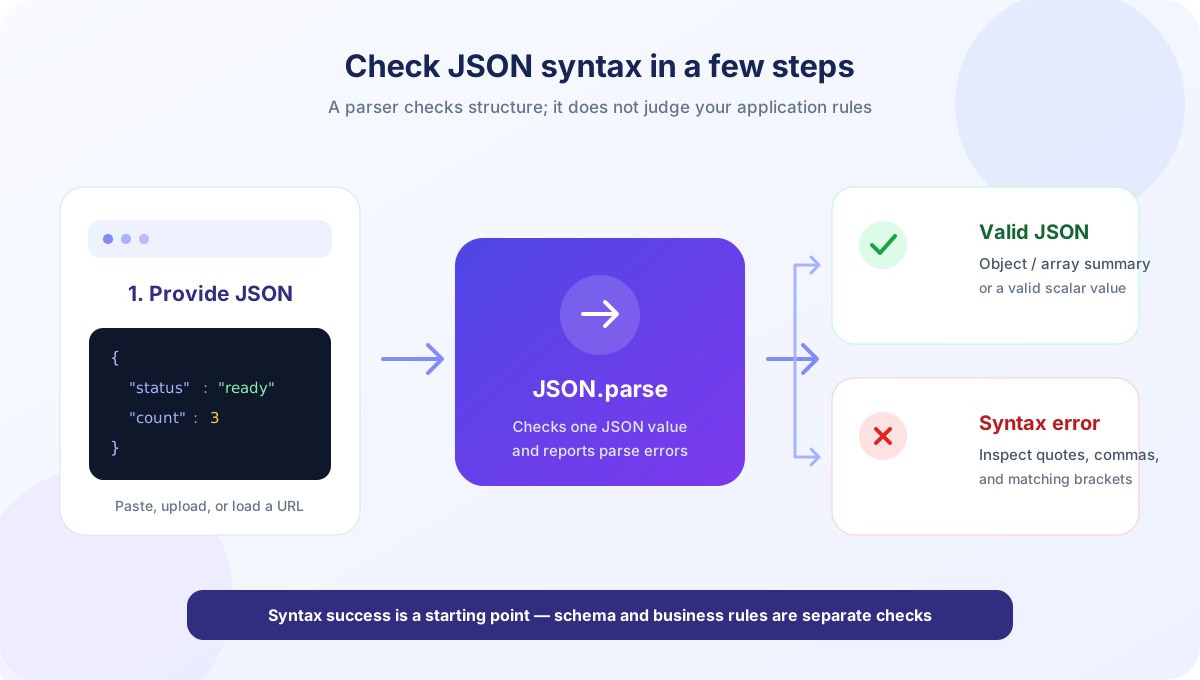
How to Validate JSON with This Tool
The controls are designed for a quick check without leaving the page. Loading the input and validating it are separate actions: choose a source, review the editor contents, and then run validation.
- Paste or enter the JSON. The editor accepts a single JSON value. It may be an object, array, string, number, boolean, or null.
- Or load a local file. Select Upload File and choose a .json or text file. The browser reads the file into the editor; it does not validate merely because a file was selected.
- Or load from a URL. Enter an address and select Load URL. The page adds HTTPS when no HTTP or HTTPS scheme was provided. The remote server must allow the browser request under its CORS policy.
- Select Validate JSON. The tool passes the editor text to the browser’s JSON.parse function. It trims surrounding whitespace first and displays a success or error message beneath the editor.
- Review the result. A valid top-level object reports its immediate key count; an array reports its top-level item count. A valid scalar value displays a general validity message.
- Fix and recheck when needed. Correct any reported syntax issue in the editor, then validate again. The tool reports errors; it does not automatically repair the text.
The editor also has Format and Sort toolbar actions. Format rewrites valid JSON with two-space indentation, while Sort recursively sorts object properties and also writes the changed text back to the editor. These actions parse JSON too, so invalid input produces a formatting or sorting error rather than a successful transformation. Validate JSON is the dedicated action for checking syntax and showing the summary message.
Other controls include Undo, Redo, and Clear. Uploaded or URL-loaded content and formatting/sorting operations create saved history states, up to 50. Regular typing is not stored as a separate history snapshot in this implementation. Clear empties the editor, resets that saved history, updates the line-number display, and hides the result. The editor displays line numbers and the current cursor line and column, but validation errors use the browser’s native message and do not receive a separate line/column annotation from this tool.
What the Validation Result Tells You
When parsing succeeds, the tool displays “Valid JSON” followed by a small top-level summary. For example, an object containing a name and a status has two immediate keys even if one of those values contains another nested object. The count is not a recursive total of every property throughout the document. Similarly, an array summary counts entries in the outer array and does not total elements in nested arrays.
{
  "name": "Mira",
  "profile": {
    "active": true,
    "region": "Lahore"
  }
}
This example is valid JSON. The success message counts two top-level object keys: name and profile. It does not report four keys by adding the two properties inside profile. The validator checks whether a value can be parsed; it does not inspect whether the name is present in a database or whether the region belongs to a permitted list.
For invalid text, the result starts with “Invalid JSON” and includes the browser parser’s error text when available. Error phrasing differs among browsers. Look near the indicated character or location for a missing comma, quote, colon, bracket, or brace. The tool does not present a custom diagnostic list, point to a highlighted token, or try to guess what you meant.
| Top-level JSON value | Example | Result summary |
|---|---|---|
| Object | {"id": 8, "ready": true} | Valid JSON. Object with 2 keys. |
| Array | ["red", "green"] | Valid JSON. Array with 2 items. |
| String | "hello" | Valid JSON. |
| Number | 42 | Valid JSON. |
| Boolean or null | false or null | Valid JSON. |
Validation checks the entire trimmed editor value as one JSON document. Two objects placed next to each other without a container are not one valid JSON value. If your application uses newline-delimited JSON, validate each line separately or use a tool designed for JSON Lines. Likewise, a JSON file with a byte-order mark or an encoding issue may need to be normalized before it can parse in the browser.
JSON Syntax Rules and Frequent Errors
JSON syntax is intentionally stricter than many programming-language object literals. A browser JSON parser requires quoted property names, double-quoted strings, commas between items, and matching delimiters. It does not permit comments, trailing commas, or unquoted identifiers. These rules make data interchange more predictable across programming environments, but can surprise someone copying a JavaScript example into a JSON file.
| Problem | Invalid JSON | Corrected JSON |
|---|---|---|
| Unquoted property | {name: "Mira"} | {"name": "Mira"} |
| Single quotes | {'name': 'Mira'} | {"name": "Mira"} |
| Trailing comma | {"ready": true,} | {"ready": true} |
| Missing comma | {"x": 1 "y": 2} | {"x": 1, "y": 2} |
| Comment syntax | {"id": 8 // comment} | {"id": 8} |
| Capitalized literal | {"active": True} | {"active": true} |
Strings must escape characters that have structural meaning. A quotation mark inside a string is written as \", a backslash is escaped as \\, and a line break is represented with an escape such as \n. A colon separates a property name from its value; a comma separates neighboring properties or array values. The last entry does not receive a trailing comma.
For an unclosed structure, count the opening and closing braces and brackets and check their order. A closing bracket cannot substitute for a closing brace, and nested structures must close from the inside outward. If a string contains a URL, remember that the slash is allowed, but quotation marks and backslashes inside its text still follow JSON string escaping rules. The parser message can narrow down the area to inspect, but careful balancing remains useful for deeply nested data.
When a copied snippet includes comments or trailing commas, first determine whether it is JSONC, a JavaScript object literal, or a configuration dialect rather than standard JSON. Those formats may intentionally support syntax extensions. Removing the extension-specific parts can make the content valid JSON, but can also alter meaning; use the corresponding parser if those comments or features must be retained.
A systematic way to find the parse error
Start at the beginning of the document and check the outermost value. An object must start with an opening brace and end with its matching closing brace; an array must use square brackets. Next, inspect each object entry for a quoted property name, a colon, and a value. Then check that neighboring entries are separated by one comma and that the final entry has no extra comma. This top-down pass catches many syntax problems without requiring guesswork.
If the parser mentions a position, remember that browser messages can use different character-counting conventions and may point near, rather than directly at, the mistake. Inspect the reported area and the character immediately before it. A missing comma is often discovered where the next key begins; a missing quote can make an otherwise harmless colon appear invalid. For a deeply nested document, reduce the input to the smallest failing fragment. Once that fragment validates, add the surrounding properties and arrays back in stages.
Do not remove punctuation at random just to obtain a success result. A syntactically valid edit can still change the meaning of the data. Compare the corrected value with the source, especially around optional fields, null values, and strings that contain escaped characters. If the file uses a dialect with comments or trailing commas, choose the parser for that dialect rather than stripping syntax without checking how those comments or values are intended to work.
A successful parse answers “Does this text follow JSON syntax?” It does not answer “Will my application accept this data?”
JSON Validation Versus JSON Schema Validation
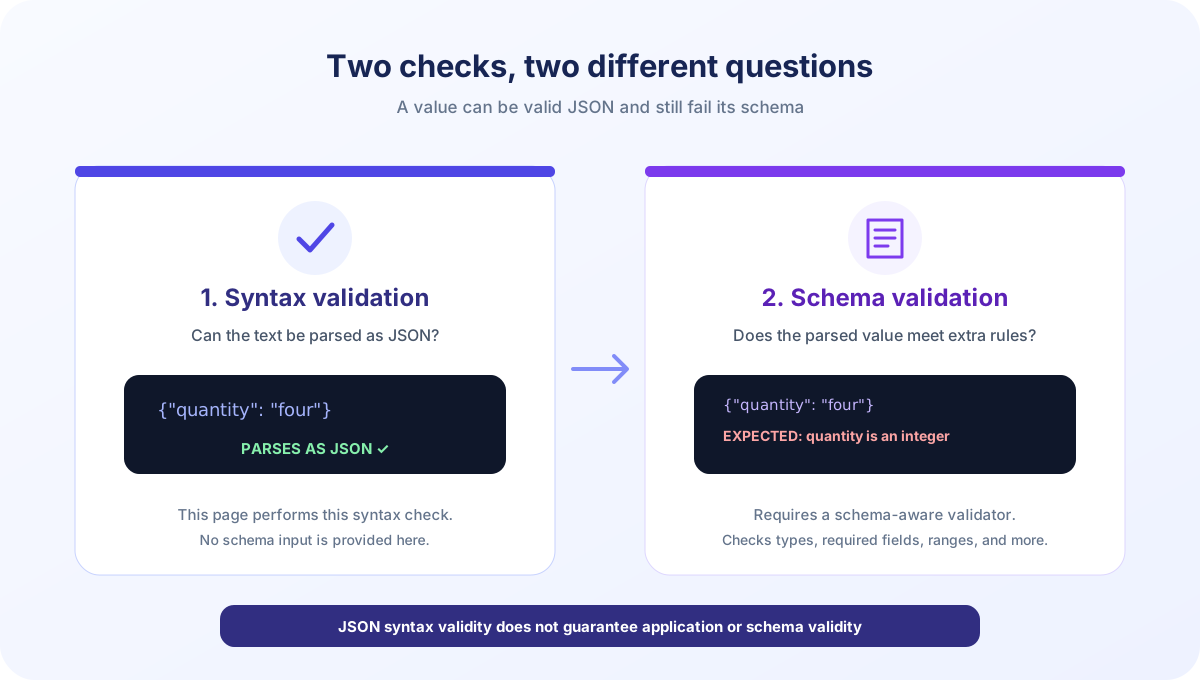
Syntax validation and schema validation solve different problems. A syntax parser checks whether the characters form a valid JSON value. A JSON Schema describes constraints for values, such as required properties, allowed types, numeric ranges, string patterns, and nested object structure. A data object can parse successfully and still violate every important requirement of its intended schema.
For example, both objects below are syntactically valid JSON:
{"quantity": 4}
{"quantity": "four"}
If an application expects quantity to be an integer, a schema-aware checker may accept the first value and reject the second. This page would parse either document and report one key. It has no schema editor, schema URL field, draft selector, required-property rule, or type-checking interface.
People searching for a json validator schema, a schema json validator, or an online json validator with schema need a separate schema-aware workflow. Provide both the JSON instance and its JSON Schema to a validator that supports the appropriate JSON Schema draft. Review whether the validator treats format keywords as annotations or assertions, and check its documentation for supported vocabularies and references.
A schema check can also report more than one problem, depending on the library and configuration. It might tell you that a required property is missing, a value has the wrong type, a number is outside a permitted range, or an array has too many items. Those rules come from the schema, not from JSON grammar. A JSON validator that only calls a parser should not claim to enforce them.
For the same reason, this page cannot confirm that a response matches an API specification, that a database record is complete, or that a date string uses the expected format. If those guarantees matter, validate against the schema or application contract after syntax parsing. Keep validation errors actionable by checking both the input value and the exact schema version being used.
When to Use a JSON Validator Tool
A json validator tool is a useful first step when an API request fails with a parsing error, a configuration file will not load, or a pasted response looks malformed. It can quickly distinguish syntax mistakes from other classes of errors. It is also useful while preparing a small reproducible example: verify that the example parses before investigating the code that consumes it.
Some people search with the short phrase “json validate” when they want this same syntax check. The wording varies, but the useful first action is consistent: give the parser one complete JSON value and review the result. A set of json validators may offer different levels of checking, from simple syntax parsing to schemas, style rules, or API contracts. Compare the actual feature set rather than assuming every tool covers all of those layers.
Validation is not a substitute for inspecting the source or understanding the data model. If the result is valid but a program still rejects the document, check the program’s schema, required fields, type conversions, API version, encoding, and business rules. If the input contains multiple records in a line-oriented format, split it into individual JSON values or use a JSON Lines-aware tool. If the requirement is to compare or style the document, format it separately rather than treating a syntax pass as a complete review.
The browser parser is suitable for common JSON documents, but it does not expose a maximum-size setting in this interface. Very large input consumes browser memory and can make a tab less responsive. For exceptionally large logs or streams, use a streaming parser or command-line process that handles records incrementally. For ordinary snippets, local config files, and typical API payloads, a browser check is convenient and quick.
Consider the effect of JavaScript number handling for very large integer values. JSON syntax allows numeric literals that exceed JavaScript’s exact integer range, but parsing them into a JavaScript Number can round the numeric value. This validator only asks whether parsing succeeds; it does not compare every number’s original digits with a lossless representation. If a large integer is an identifier or exact measurement, represent it as a quoted string when the data contract allows, or use a parser designed for lossless numbers.
Duplicate property names are another edge case. The JSON grammar is commonly interpreted with unique names in objects, but browser JSON.parse does not report repeated names; the later value overwrites the earlier one in the parsed object. This tool consequently reports the input as valid according to the browser parser and does not flag duplicates. If uniqueness is a requirement, add a duplicate-key-aware parser or lint check to the validation workflow.
Validation can also be one stage in continuous integration. A project may parse fixtures first, validate them against a schema second, and run application tests afterward. Keeping those checks distinct makes failures easier to investigate: syntax feedback belongs to the parser, contract feedback belongs to schema validation, and behavior feedback belongs to the program. This page is for interactive inspection, not an automated build runner or a replacement for tests committed with your project.
Using Files, URLs, and the Browser
Upload File reads the selected file as text with the browser’s FileReader. Selecting a file does not run validation automatically; the content is placed in the editor and you choose Validate JSON. This makes it possible to review the text or use Format and Sort before checking it. The page does not offer a dedicated report download or a separate save function, so copy any diagnostics or corrected content you need to keep.
Load URL sends a fetch request from the browser to the address supplied. If you enter a hostname without a protocol, the tool prepends HTTPS. Cross-origin requests are controlled by browser security and the remote site’s CORS headers. A web page being accessible in a normal tab does not mean another site can read its response with fetch. If the request fails, paste the response manually or upload a local file rather than assuming the JSON itself is invalid.
A successful load only means the browser received response text. The response could still be an HTML login page, an error message, or plain text. Run Validate JSON to check its syntax. If the server requires authentication, the request may not use the same credentials as a normal browser navigation. Check the URL, access requirements, response body, and CORS policy independently.
Validation, formatting, and sorting use client-side JavaScript in the page; file contents are read in the browser. Loading a URL makes a network request to that URL. Your browser extensions, network setup, or shared-device environment may also affect data handling. Follow your organization’s data rules and avoid placing confidential material into a browser environment you do not trust.
JSON Validator in Java and Application Code
A search for json validator schema java typically refers to validating JSON in a Java application rather than using a browser page. A Java workflow commonly has two stages: parse the text into a JSON representation, then validate that instance against a schema if the project needs structural rules. Choose libraries based on the JSON Schema draft, supported keywords, reference resolution, and how validation errors are presented. This SnapZain page does not execute Java or accept Java source code.
In any language, keep parsing separate from schema checks. A parser can reject malformed JSON before a schema is even considered. A schema validator then checks a successfully parsed value against declared constraints. The distinction makes error reporting clearer: syntax errors point to malformed text, while schema errors identify values that fail a contract. Build systems often run both checks automatically so invalid fixtures are caught before deployment.
When integrating validation into a service, consider untrusted input, document size, parser depth, external schema references, and error detail. Set resource limits appropriate for the application, avoid fetching arbitrary references unless intended, and avoid returning sensitive internal details to public clients. These are engineering considerations for an application validator; this browser tool’s purpose is a quick syntax check, not an API security scanner or schema execution environment.
Use a representative fixture set for a schema: include valid examples and invalid cases for each important constraint. Check boundary values, absent optional properties, nulls, empty arrays, and nested objects. Confirm that the validator’s selected draft and format handling match the schema author’s expectations. A single “valid” example is not enough to prove that a schema enforces every rule your application relies upon.
Related JSON and Web Tools
Validation is often one step in a data workflow. If the input parses but is difficult to read, use JSON Formatter to add indentation, sort object keys, or minify the text. If you want to explore nested values visually, open JSON Viewer. These tools complement this validator, but none of them turns syntax validation into JSON Schema validation unless the feature is explicitly provided.
For markup rather than structured data, HTML Viewer is the relevant tool. HTML and JSON have different grammars and purposes; a document accepted by one parser is not thereby valid under the other format. Select the tool that matches the actual input, then use the appropriate schema or application checks for any deeper requirements.
A reliable checklist is simple: confirm the document is standard JSON, run the syntax check, inspect the parsed structure, and then validate any contract your application requires. When modifying the source, retain a copy if exact whitespace, duplicate property spellings, or large numeric literals matter. This prevents a successful parse from being mistaken for a guarantee about every downstream interpretation.
A “json validator and formatter” can be a convenient combination for iterative editing, but validation and formatting still have separate outcomes. A formatter can make a valid structure easier to inspect; a syntax validator can reject malformed input. Neither action alone proves that the object conforms to your service’s contract. Make the intended acceptance rules explicit so a green syntax result is not mistaken for a complete quality check.
Conclusion: Validate Syntax, Then Check the Contract
This online JSON validator uses the browser parser to tell you whether the editor contains one syntactically valid JSON value. Paste text, upload a file, or load a CORS-accessible URL, then select Validate JSON. Use the result as a practical first check, not as proof that data matches a schema or application requirement. For formatting, structural browsing, or markup preview, continue with JSON Formatter, JSON Viewer, or HTML Viewer; for schema rules, use a dedicated schema-aware validator.


