HEX to Text: Decode Hexadecimal Byte Pairs
Hexadecimal is a compact way to write byte values; text is made from characters represented by numeric codes. The SnapZain hex to text converter reads each pair of hexadecimal digits as one byte and maps that byte to a character code. For example, 48 69 becomes Hi, because hexadecimal 48 and 69 correspond to the character codes H and i.
This is byte-to-character decoding, not a general file decoder or a conversion of one large hexadecimal number. A hex to text conversion requires complete byte pairs. The tool accepts an optional initial 0x prefix followed by hex digits, ignores whitespace, and allows up to 500 input characters.
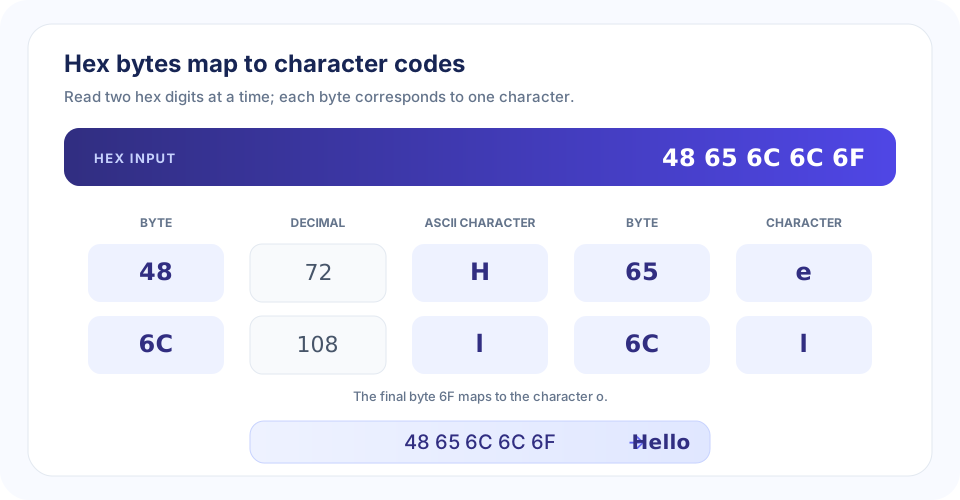
How Hexadecimal Bytes Become Text
Each byte contains eight bits and can be written with two hexadecimal digits. A byte value can also represent a character code. When the bytes correspond to familiar ASCII characters, converting from hex to text produces readable letters, digits, punctuation, spaces, or control characters.
For example, the hex byte 41 is decimal 65, the ASCII code for uppercase A. The pair 20 is decimal 32, the ASCII space. A string of bytes such as 48 69 is read as two characters, not as the single large number 0x4869.
- Remove formatting whitespace. Spaces or line breaks may be used to separate bytes for readability.
- Check the optional prefix. An initial 0x or 0X is a hexadecimal marker and is not decoded as a byte.
- Split into pairs. Every two hex digits form one byte.
- Map each byte to a character code. The tool applies direct byte-to-character mapping.
- Join the characters in order. Their sequence forms the output string.
“A hex-to-text decoder reads byte pairs as character codes; it does not infer a file format or decrypt data.”
Hex to Text Examples and Byte Table
These examples show common ASCII byte values and their character results. Some byte values represent control characters rather than visible glyphs, so not every valid byte produces an obvious symbol on screen.
| Hex byte | Decimal | Character | Example use |
|---|---|---|---|
20 | 32 | Space | Separates words |
30 | 48 | 0 | Digit zero |
41 | 65 | A | Uppercase A |
48 | 72 | H | Uppercase H |
61 | 97 | a | Lowercase a |
6C | 108 | l | Lowercase l |
6F | 111 | o | Lowercase o |
21 | 33 | ! | Exclamation mark |
Convert 48656C6C6F from hex to text
Split the input into bytes: 48 65 6C 6C 6F. Their ASCII characters are H, e, l, l, and o, so the output is Hello.
Convert 4869 to text
The pairs are 48 and 69. They map to H and i, giving Hi. You can enter the same value as 48 69; whitespace is ignored.
Convert 48656C6C6F20576F726C6421
Pairing the bytes gives 48 65 6C 6C 6F 20 57 6F 72 6C 64 21. The byte 20 is a space and 21 is an exclamation mark, so the decoded result is Hello World!.
Using the Online HEX to Text Converter
This online hex to text converter accepts a hexadecimal byte string or pairs separated by whitespace. To convert hex to text online, paste the bytes into the input and choose Convert. The output preserves byte order. You can copy the decoded result or clear both fields to start again.
- Use hexadecimal digits 0–9 and A–F.
- Enter an even number of digits so every byte has two hex digits.
- Whitespace between bytes is optional and ignored.
- An initial 0x or 0X prefix is optional.
- The complete input is limited to 500 characters.
- Control and non-ASCII byte values may not display as expected text.
The phrase “convert hex to text file” can mean different things. This tool converts pasted hex text; it does not upload, read, or transform a file. If you have a file represented as hex, first obtain its hexadecimal byte string. If you have raw file bytes, use software designed for that file type and encoding instead.
ASCII, UTF-8, and Encoding Limits
Character decoding depends on an encoding. ASCII assigns characters to byte values 0–127. This calculator uses JavaScript’s String.fromCharCode for each byte, which directly maps a byte value to a code unit; it does not run a UTF-8 decoder or combine multiple bytes into one Unicode character.
As a result, common ASCII hex works as expected, but UTF-8 bytes for characters such as accented letters or emoji may display as mojibake. For UTF-8, bytes must be decoded as a sequence according to UTF-8 rules. Use a UTF-8-aware hex decoder when you know the original data uses that encoding. Also note that a valid byte may be a control code and therefore invisible or non-printing.
Hex is also different from encryption. Converting a byte such as 41 to A only interprets a number as a character code; it does not reveal a secret or bypass protection. If bytes contain compressed, encrypted, or structured binary data, a plain text conversion will not reconstruct the original file contents.
HEX to Text Compared with Number-Base Conversion
HEX to Text interprets each byte as a character code. Number-base converters instead keep a numeric value and change its written base. Use Decimal to Binary to represent base-10 values in base 2, Decimal to HEX for base 10 to base 16, HEX to Binary for hexadecimal digits to bits, and Binary to HEX for bits to hexadecimal.
Choose according to what your input means: if two-digit hex pairs represent encoded characters, use this page; if the full string is one number, use a number-base converter. The same hex characters can be interpreted differently depending on that intent.
Conclusion: Decode Hex in Complete Byte Pairs
To convert hex to text, group the digits into two-character bytes and map each byte to a character code in order. This tool ignores whitespace, accepts an optional initial 0x prefix, and requires an even number of valid hex digits within its 500-character limit. It directly maps bytes to character codes rather than decoding UTF-8, so use an encoding-aware tool for non-ASCII text or file data.


