Binary to HEX: Convert Base 2 into Base 16
Binary and hexadecimal are two ways to write the same whole-number value. Binary is base 2 and uses only 0 and 1; hexadecimal, often called HEX, is base 16 and uses 0–9 and A–F. The SnapZain binary to hex converter groups binary digits into four-bit units and replaces each unit with its corresponding hexadecimal digit.
For example, binary 0111 is hexadecimal 7. The leading zero is only padding and does not change the value. Binary 1010 1111 maps to hexadecimal AF. Enter one value or multiple space-separated values in the converter above; each input is converted separately.
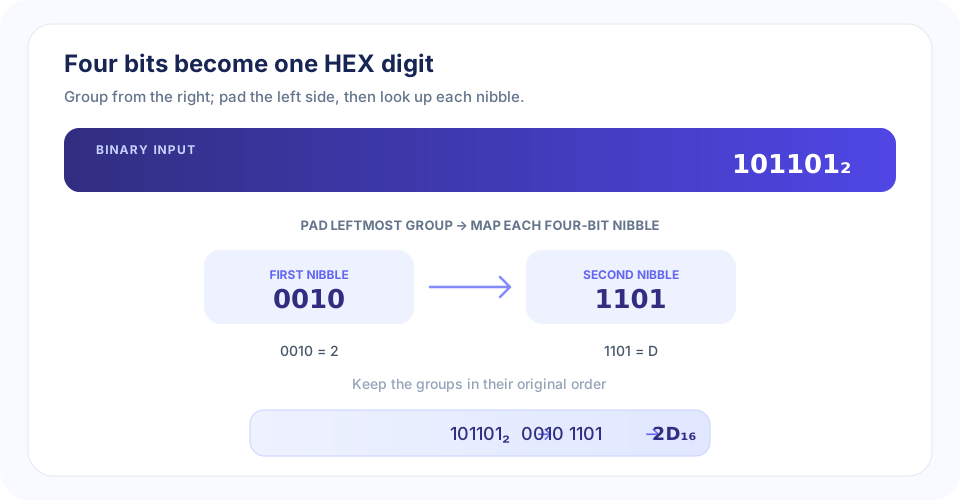
How to Convert Binary to Hex by Grouping Four Bits
The direct binary-to-hex method uses a simple relationship: four binary bits have 16 possible patterns, exactly the 16 values represented by one hexadecimal digit. These four-bit groups are called nibbles. Start from the right edge of the binary number so every group corresponds to the correct place value.
- Start at the right. Split the binary digits into groups of four, moving toward the left.
- Pad the first group if needed. Add zeros to the far left until that group contains four bits. Padding does not change the number.
- Look up each group. Match each nibble to its hexadecimal digit from 0 through F.
- Write the digits in order. Keep the groups in their original left-to-right order to get the HEX value.
For 101101, split from the right to get 10 1101. Pad the first group to make 0010 1101. The nibble 0010 maps to 2, and 1101 maps to D. Therefore, 101101₂ = 2D₁₆. This is how to go from binary to hex without first converting through decimal.
“Four bits make one HEX digit; group from the right, pad only on the left, and keep the digits in order.”
Binary to Hex Formula and Lookup Chart
For a binary string, group the bits into nibbles and evaluate each nibble as a base-2 value. The value 8b₃ + 4b₂ + 2b₁ + b₀ ranges from 0 to 15 and maps to the hexadecimal symbols 0–F. Here, each b is one binary bit. This is the binary to hex formula behind the lookup chart.
| Binary nibble | Decimal value | HEX | Binary nibble | Decimal value | HEX |
|---|---|---|---|---|---|
0000 | 0 | 0 | 1000 | 8 | 8 |
0001 | 1 | 1 | 1001 | 9 | 9 |
0010 | 2 | 2 | 1010 | 10 | A |
0011 | 3 | 3 | 1011 | 11 | B |
0100 | 4 | 4 | 1100 | 12 | C |
0101 | 5 | 5 | 1101 | 13 | D |
0110 | 6 | 6 | 1110 | 14 | E |
0111 | 7 | 7 | 1111 | 15 | F |
Values 10–15 use letters because a single hex digit must represent all 16 possible nibble values. Thus 1010 is A, 1100 is C, and 1111 is F. Keeping this chart nearby makes converting binary to hex a quick grouping and lookup task rather than a long decimal calculation.
Worked Binary to HEX Examples
0111 binary to hex
The four-bit group 0111 has decimal value 7, so it maps to hexadecimal 7. The leftmost zero is part of the nibble representation but is not needed in the final single-digit HEX value.
Convert 1111 from binary to hex
Binary 1111 is the largest four-bit value: 8 + 4 + 2 + 1 = 15. Decimal 15 corresponds to hexadecimal F.
Convert 1010 1111 from binary to hex
The groups are already four bits each. 1010 maps to A, and 1111 maps to F. The complete result is AF.
Convert 10000000 from binary to hex
Split it as 1000 0000. The groups map to 8 and 0, so 10000000₂ = 80₁₆. The zero is important because it marks the lower hexadecimal place.
Convert 110101101 from binary to hex
Group from the right: 1 1010 1101. Pad the first group to 0001 1010 1101. These groups map to 1, A, and D, giving 1AD.
| Binary input | Four-bit groups | HEX output | Decimal check |
|---|---|---|---|
| 0111 | 0111 | 7 | 7 |
| 1010 | 1010 | A | 10 |
| 1111 | 1111 | F | 15 |
| 101101 | 0010 1101 | 2D | 45 |
| 10000000 | 1000 0000 | 80 | 128 |
| 110101101 | 0001 1010 1101 | 1AD | 429 |
Using the Online Binary to HEX Converter
This binary to hex calculator automates the nibble lookup and returns uppercase letters. Enter only 0s and 1s for each value. To convert a batch, place a space between complete binary numbers—for example, 1010 1111 10000000. The results are A F 80, in the same order.
- Each binary value must contain only 0 and 1.
- Separate multiple values with spaces; spaces split entries rather than group one value visually.
- Do not include a 0b prefix, comma, sign, or binary point.
- Keep each value at or below 53 bits.
- The complete input is limited to 500 characters.
- Results use uppercase A–F and omit leading zeros.
- Use Copy to clipboard, Clear, or Ctrl+Enter to work with the result.
The 53-bit maximum is deliberate: the largest accepted value is 2⁵³ − 1, JavaScript’s largest exactly represented integer. That maximum is 1FFFFFFFFFFFFF in hexadecimal. Keeping conversions within the safe range avoids silently rounding the numeric value.
Binary, HEX, and Text Conversion
Binary to HEX changes the base of a number; it does not decode text. If your bits encode characters, a text converter uses byte grouping and a character encoding to interpret them. For example, binary 01000001 can be represented numerically as hex 41, and byte 0x41 represents ASCII letter A. Those are related steps, but they answer different questions.
Use HEX to Binary for the reverse base conversion. Binary to Text interprets binary groups as characters, HEX to Decimal converts base 16 to base 10, and Binary to Decimal converts base 2 to base 10. Pick the tool that matches both your input and the result you need.
“A HEX digit is a compact label for four bits; choosing a text converter adds character interpretation that a number-base conversion does not.”
Conclusion: Group Binary Digits into Nibbles
To convert binary to hex, group bits into fours from the right, pad the leftmost group with zeros when necessary, and map each nibble to a HEX digit. Keep the digit order and preserve internal zero groups; only unnecessary padding at the far left can be dropped. SnapZain’s converter handles one value or space-separated batches up to 53 bits per value and 500 characters total.


