URL Shortener: Create A Short Link Online
A URL shortener turns a long web address into a compact link that is easier to copy, share, or include in a message. Paste an HTTP or HTTPS URL into the tool above, choose Shorten URL, and copy the result. The short link uses SnapZain’s domain and redirects visitors to the destination that was submitted.
This free URL shortener is designed for a straightforward task: shorten a link and copy it. If you need a free URL link shortener for a simple share, this page returns a SnapZain link without offering a separate account dashboard. It also does not show campaign analytics, an expiration selector, or custom alias controls. Always confirm the original destination before you share the result, because the shortened text makes the full address less visible to recipients.
A shorter link can be convenient, but it does not make a destination more trustworthy, improve its search ranking, or guarantee that its page will remain online. Use shortened URLs transparently and only for destinations you have permission to share.
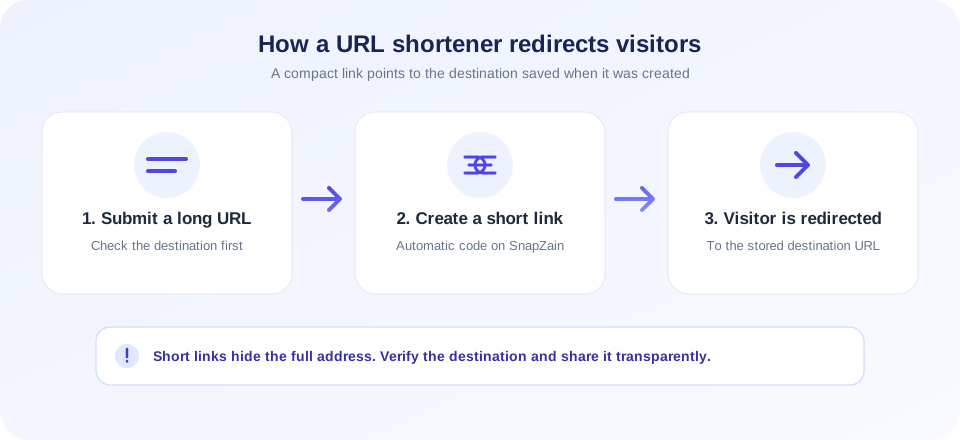
A short URL is a convenient pointer, not a safety check. Make sure you trust the destination before you shorten or share it.
How To Use This Free URL Shortener Online
The tool has one input and returns one shortened link at a time. Follow these steps:
- Copy the complete destination URL. Include the path and any query parameters that the recipient needs.
- Paste it into the URL field. The current input accepts up to 2,048 characters.
- Select Shorten URL. The page sends the address to the service to create or look up a short code.
- Review the result. Confirm that the short URL uses the expected SnapZain domain.
- Copy and test the link. Open it in a fresh tab or browser session to check the redirect before sending it to others.
- Share it with context. Tell recipients what the link is for rather than using the shortened form to disguise an unexpected destination.
The service accepts regular web addresses. If the input does not already begin with HTTP or HTTPS, the server adds HTTPS before storing it. Therefore, enter the complete URL whenever possible. The link shortener stores the destination and the generated code; opening the code uses a redirect to send the visitor onward.
What Happens When A URL Is Shortened
At a high level, the service stores a destination URL and associates it with a short code. It then presents a link on the same website, using a path like https://snapzain.com/s/abc123. When someone visits that path, the app looks up the matching code and sends a temporary HTTP redirect to the stored long URL. If no code exists, the redirect route returns a not-found response.
The generated code is automatic; the page does not let you edit it. If the same normalized destination is submitted again, the service may reuse the existing short link. That behavior is useful when you want the same destination pointer, but it does not create separate campaign links or click reports.
| Feature | Available in this tool | Important detail |
|---|---|---|
| Shorten a web URL | Yes | Enter an HTTP or HTTPS destination. |
| Short domain | Yes | The returned link uses SnapZain’s domain. |
| Automatic short code | Yes | The form does not allow a custom code. |
| Custom alias or branded domain | No | No custom URL or domain settings appear in the interface. |
| Click analytics | No | No click counter or reporting dashboard is exposed. |
| Expiration or delete control | No | Do not assume a link can be revoked or has a specific expiry date. |
When A URL Link Shortener Is Useful
A URL link shortener can make a long address easier to paste into a chat, printed material, presentation, or a place with limited space. It can also reduce visual clutter when a link contains a long path or query string. The original destination remains the page the recipient ultimately visits, however, so the source site still controls whether that page loads, redirects again, requires sign-in, or has moved.
A website URL shortener is useful when the address belongs to a public page you want to share in a compact format. More generally, a URL shortening service stores a mapping between a short code and a destination, then redirects visitors. This page provides that basic workflow, rather than a broader link-management platform.
Common appropriate uses include sharing a public event page, a product page you are authorized to promote, a help article, a public form, or a resource in a document. If the recipient needs to inspect the complete domain before opening, share the original URL instead. This is especially important for financial, medical, workplace, or account-related links.
Shorten for convenience—not to hide where a link goes. Clear context helps people make an informed choice before they click.
Free URL Shortener And Service Limits
People often search for a URL shortener free, a free URL shorteners comparison, or a best free URL shortener. “Free” does not mean every feature is included or that a link has unlimited availability. This page provides the basic shortening form, but it does not offer the management features that some paid or account-based platforms provide.
There is no custom domain, editable alias, batch processing, QR code generation, link expiration control, or built-in click analytics in the current interface. Service availability also depends on the application and its storage configuration. If the database is not configured or temporarily unavailable, the tool may show an error instead of creating a link.
For a time-sensitive campaign, keep the original destination and a record of where the short link was shared. For a link that must be editable, branded, revocable, or measured, choose a provider that explicitly supports those functions and review its privacy, retention, and account policies before use.
Custom URL Shortener: What Is And Is Not Supported
A custom URL shortener normally lets a user select a readable alias, choose a company domain, or manage branded short links. The current SnapZain page does none of those things. It generates an automatic short code under SnapZain’s own domain, so it is not a personalised URL shortener and cannot create a branded short domain.
Search phrases like url shortener custom, custom shortened URL, and shortened URL free may refer to tools with different plans and features. Do not assume an online URL shortener supports a feature just because other providers do. Check the controls and published policy for the specific service you plan to use.
If a consistent brand identity matters, a service with custom-domain support may be a better fit. Confirm how DNS configuration, link ownership, account recovery, redirects, and link removal work before you use it for printed campaigns or important public materials.
Best URL Shortener: Choosing The Right Tool
The best URL shortener depends on what you need. For a single basic share link, a simple web URL shortener may be enough. For a business campaign, you may need branded domains, permissions for a team, click reporting, expiration controls, or a way to update a destination. Those are distinct product capabilities and should be evaluated rather than assumed.
There is no universal best URL shortener free choice: compare the exact features, service policies, and destination controls. If you search for “shortener URL,” you may find providers with very different capabilities, so confirm that the service offers the functions you actually need before relying on it.
- Destination transparency: Can recipients preview or understand the destination before opening?
- Link management: Can you edit, disable, or delete a link after creation?
- Branding: Does it support a domain that your organization controls?
- Analytics: Are click metrics available, and what data is collected about visitors?
- Reliability: Does the provider explain service availability and what happens if a link fails?
- Privacy and policy: Are retention, abuse handling, and acceptable-use rules clear?
There is no single best free URL shortener for every user. Compare the actual feature set, conditions, and privacy implications. For sensitive or essential destinations, consider sharing the full URL or using a link on a domain you control.
URL Shortener Bitly And Other Providers
Some people search for a URL shortener Bitly when they want Bitly’s link platform. SnapZain’s tool is separate and is not affiliated with Bitly. Providers can differ in supported domains, branded aliases, analytics, account requirements, data retention, and terms. Features, pricing, and policies can change, so consult each provider directly instead of relying on assumptions from another service.
This page focuses on creating a simple SnapZain short link. It does not import existing links from another provider or offer a Bitly integration. If you already use a provider for campaign tracking, keep your link management consistent and avoid switching services without considering what happens to previously shared links.
Safety And Trust: Check Before You Click
A shortened URL conceals part or all of its destination from the visible text. That convenience can also be abused by scammers, spammers, and impersonators. A short link is not proof that its destination is safe; it can redirect to a legitimate page, a compromised website, or a harmful destination. Treat unexpected short links with the same caution as unfamiliar full URLs.
- Use links from people or organizations you recognize, and verify unexpected requests through a separate trusted channel.
- Check the visible short-link domain for misspellings or lookalike characters.
- Do not enter passwords, payment details, or verification codes on a page reached through an unexpected message.
- Use a reputable link preview or security checker if you need to inspect an unfamiliar destination; do not submit private or tokenized URLs to public scanners.
- When sharing, explain the destination and purpose so recipients can decide whether to open it.
- Do not use a shortener to disguise malware, phishing, impersonation, spam, or prohibited content.
The shortener itself does not crawl the destination, verify ownership, scan for malware, or guarantee the final page. A destination may also redirect again after the short link resolves. If anything about the context or landing page seems suspicious, close it without entering information.
Troubleshooting Shortened Links
If shortening does not work, first confirm that the field contains the intended full web address and is within the input limit. Check for accidental spaces, missing domain text, or an incomplete query string. The page requires a server response; a network issue or unavailable database can prevent a short code from being created.
- Input is rejected: Paste a complete HTTP or HTTPS URL and remove unrelated text.
- Service setup message: The short-link database may not be available. Retry later or contact the site administrator.
- Short URL redirects to an error: The original destination may be unavailable, removed, or blocked. Test the original address separately.
- Unexpected destination: Compare the submitted URL with the link record you intended to create; the tool has no edit dashboard.
- Copied link seems incomplete: Use the copy control again or select the displayed short URL and copy it manually.
- Link no longer works: The service or destination may have changed. Keep the original address for troubleshooting.
Do not repeatedly submit sensitive URLs to test the service. The system stores the destination to support redirects. Avoid creating links that include private access tokens, reset codes, or confidential query parameters.
Search And Sharing Considerations
A shortener is a sharing utility, not an SEO shortcut. Creating a shortened link does not guarantee that a search engine will index the target page, pass a particular ranking signal, or treat the short link as a replacement for a canonical URL. For your own website, use descriptive internal links and maintain correct canonical and redirect behavior on pages you control.
When sharing in a public article or resource list, use meaningful anchor text and make the destination clear. On printed material, include a readable label or a direct domain where appropriate. Do not put sensitive personal data in a query string simply because the URL is being shortened; shortening does not encrypt the destination or hide it from the service that processes it.
Related SnapZain Tools
Continue with TikTok To MP4 for authorized video-link retrieval, Website Checker to review publicly visible website technology clues, URL Decode to decode percent-encoded text, or URL Encode to encode a URL component. These tools have separate purposes and do not manage or scan shortened links.
URL Shortening Checklist
- Paste the complete destination URL, including any required path and query string.
- Check the short-link domain and test the redirect before sharing.
- Give recipients context instead of hiding where the link leads.
- Do not include confidential tokens or private data in a URL.
- Remember that there is no custom alias, analytics dashboard, or delete control in this tool.
- Keep the original destination in case you need to troubleshoot.
- Use another provider if you need branding, link editing, expiration, or campaign reporting.
Conclusion
Use this URL shortener free online when you need a basic compact link for a legitimate destination. The service creates a SnapZain short code and redirects it to the stored web address; it does not offer a custom alias, custom domain, click analytics, or a safety review. Test the result, be clear with recipients, and remember that shortening does not make the destination trustworthy or grant permission to share it.


