Binary to ASCII: Turn Binary Bytes into Readable Text
Binary data is made from only two digits, 0 and 1. To read a binary message as text, the bits must be grouped into bytes and each byte interpreted as a character code. This binary to ASCII guide explains the conversion with a clear formula, examples, and a compact character table. The online converter above handles continuous binary input as well as whitespace-separated byte groups, so you can decode a short message without calculating each value by hand.
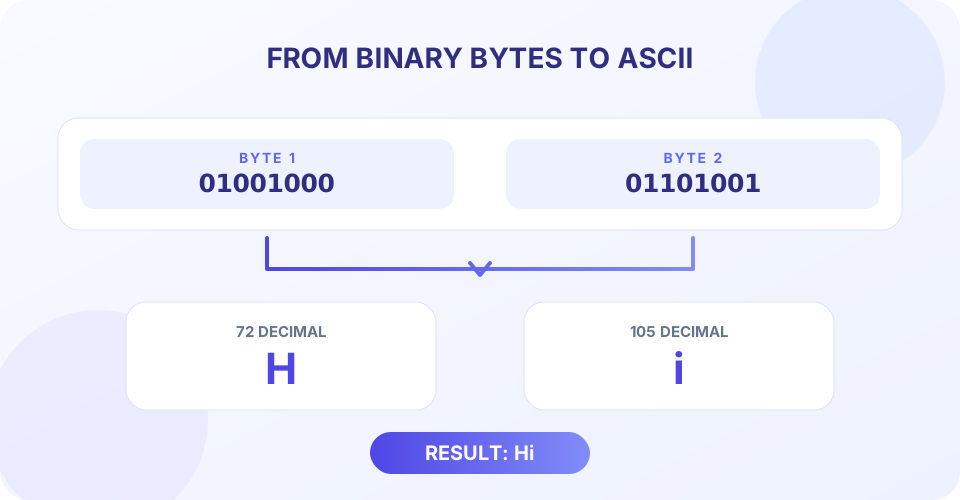
A useful example is 01001000 01101001. The first byte has the decimal value 72, which is uppercase H; the second has the value 105, which is lowercase i. Read in order, the result is Hi. The binary digits themselves do not spell letters: their meaning comes from the character encoding used to assign numbers to characters.
How Binary to ASCII Conversion Works
Converting binary to ASCII by hand means evaluating each byte and checking its character code. ASCII, short for American Standard Code for Information Interchange, assigns numeric values to letters, digits, punctuation, and control codes. Standard ASCII uses values from 0 through 127. A byte contains eight bits and can represent values from 0 through 255, so an eight-bit group can hold every standard ASCII value plus additional values that are not part of standard ASCII.
For one byte written as b₇b₆b₅b₄b₃b₂b₁b₀, calculate its value with the binary place-value formula:
Byte value = 128b₇ + 64b₆ + 32b₅ + 16b₄ + 8b₃ + 4b₂ + 2b₁ + b₀
Each b is either 0 or 1. A bit contributes its place value only when it is 1. For example, 01000001 has 1s in the 64 and 1 positions, so its value is 64 + 1 = 65. ASCII code 65 is the letter A. Repeating this process for each byte gives a binary to ASCII text conversion.
- Separate the bit stream into bytes. Read eight bits at a time from left to right.
- Evaluate each byte. Add the place values for the positions containing 1.
- Look up each character code. Match values 0–127 to ASCII; remember that some values are control codes rather than visible glyphs.
- Keep the original order. Append each character before moving to the next byte.
That is the basic binary to ASCII formula and the reason byte boundaries matter. If a message uses UTF-8 or another encoding, its bytes must be decoded using that encoding rather than treated as independent ASCII characters.
Binary to ASCII Table for Common Characters
This binary to ASCII table shows common printable characters and their decimal codes. It is a practical subset of the full ASCII chart; values 0–31 and 127 are control codes and generally do not appear as ordinary printable characters.
| Character | 8-bit binary | Decimal | Hex |
|---|---|---|---|
| Space | 00100000 | 32 | 20 |
| 0 | 00110000 | 48 | 30 |
| 1 | 00110001 | 49 | 31 |
| A | 01000001 | 65 | 41 |
| B | 01000010 | 66 | 42 |
| Z | 01011010 | 90 | 5A |
| a | 01100001 | 97 | 61 |
| z | 01111010 | 122 | 7A |
| ! | 00100001 | 33 | 21 |
| ? | 00111111 | 63 | 3F |
Each row represents one byte. The leading zeros are important when showing a fixed-width byte, even though they do not change its numeric value. A binary to ASCII chart is useful for a quick lookup, but understanding the place values makes it possible to decode any byte in the standard range.
Worked Examples: Convert Binary to ASCII
Convert 01000001 to ASCII
The 1 bits in 01000001 contribute 64 and 1. Their sum is 65, so the character is A. In hexadecimal the same code is 41, which is another compact way to write the same byte value.
Convert 01001000 01101001 to text
For the first byte, 01001000 equals 64 + 8 = 72, or H. For the second, 01101001 equals 64 + 32 + 8 + 1 = 105, or i. Therefore, the complete binary message reads Hi.
Decode a short word: CAT
The ASCII bytes for C, A, and T are 01000011, 01000001, and 01010100. Converting each byte gives decimal values 67, 65, and 84, which map to the letters C, A, and T. The binary string 010000110100000101010100 therefore decodes to CAT.
Read spaces and punctuation
Spaces and punctuation have numeric codes too. The byte 00100000 is decimal 32, the ASCII space. The exclamation mark is 00100001, decimal 33. A decoded result may therefore include spaces and punctuation between letters, not just alphabetic characters.
| Binary input | Decimal byte values | ASCII result |
|---|---|---|
01000001 | 65 | A |
01001000 01101001 | 72, 105 | Hi |
01000011 01000001 01010100 | 67, 65, 84 | CAT |
01000001 00100000 01000010 | 65, 32, 66 | A B |
Using the Online Binary to ASCII Converter
This binary to ASCII converter online performs the byte grouping and character lookup in your browser. It works as a binary to ASCII text converter for pasted bit strings; you can enter a continuous sequence or make byte boundaries visible with spaces. For continuous input, the converter groups from left to right in sets of eight. For separated groups, each group can have one to eight bits and shorter groups are padded with zeros on the left.
- Enter only binary digits, 0 and 1; whitespace can separate complete byte groups.
- Use eight bits per byte for the clearest and most portable input.
- A final incomplete group in continuous input is left-padded to eight bits.
- Each whitespace-separated group must be between one and eight bits; longer groups are rejected instead of truncated.
- The input field accepts up to 500 characters.
- Select Convert or press Ctrl+Enter; use Copy to clipboard or Clear as needed.
For example, entering 0100100001101001 continuously or 01001000 01101001 with a space produces Hi. A one-bit final group such as 1 is treated as the byte 00000001. That value is an ASCII control code, so it may not appear as a visible character even though conversion succeeded.
ASCII, Extended Bytes, and UTF-8
ASCII itself covers only code values 0–127. Because the converter accepts full eight-bit groups, it also accepts values 128–255. Those higher values are not standard ASCII. This page maps them directly to JavaScript character codes using String.fromCharCode; it does not identify a Windows code page, ISO-8859 encoding, or other legacy character set.
UTF-8 represents many characters using one or more bytes. Decoding those bytes requires interpreting the sequence together. This converter instead maps each byte separately, so a UTF-8 string containing accented letters, non-Latin scripts, or emoji may display as unrelated symbols. For UTF-8 text, choose a UTF-8-aware decoder and provide the original bytes intact.
Some valid ASCII values are control characters such as line feed, tab, and escape. They are useful in data formats but may be invisible or behave differently in a text field. A blank spot does not necessarily mean that the binary input was invalid; check the byte value and expected encoding before drawing conclusions.
Binary to ASCII in C, Bash, and File Workflows
Searches such as binary to ASCII C or binary to ASCII conversion in C usually refer to a small program that parses each byte and maps its value to a character. The conversion principle is language-independent: validate bits, evaluate each byte, then decode according to the intended character encoding. This web tool does not compile or execute C code.
A Bash binary to ASCII workflow may use local shell utilities to inspect byte values, but shell quoting and text encodings can affect the result. This page is a browser-based converter, not a command runner. Likewise, it is not a binary to ASCII file converter: it does not upload or inspect files. For file data, first obtain its bytes with a trusted local tool and confirm whether they represent ASCII, UTF-8, or another format before decoding.
These distinctions prevent a common mistake: a binary string is not automatically a text message. It might be a number, compressed data, an instruction stream, or bytes in an encoding other than ASCII. Convert it to characters only when the data source indicates that its bytes encode text.
Choose the Right Related Converter
Use ASCII to Binary when you have characters and need their binary representation. ASCII to Text helps interpret ASCII code values as characters. For a base conversion rather than character decoding, use Binary to Octal to express binary numbers in base eight, or Decimal to Octal to convert a base-ten number into octal.
The key question is whether each group represents a character code or whether the whole input is one numeric value. Character decoding needs byte boundaries and an encoding; number-base conversion changes the written form of a value without turning it into letters.
“A byte becomes readable text only when its value is interpreted using the character encoding that produced it.”
Conclusion: Decode Binary One Byte at a Time
To convert binary to ASCII, split the bits into eight-bit bytes, calculate each byte’s value, and map values 0–127 to their ASCII characters in order. The online converter accepts continuous or whitespace-separated binary, pads short groups on the left, and rejects separated groups longer than eight bits. It accepts up to 500 input characters and maps byte values directly rather than decoding UTF-8. Check the source encoding whenever the result contains control codes or characters outside standard ASCII.


