SEO Audit: Turn A Single-Page Snapshot Into A Useful Plan
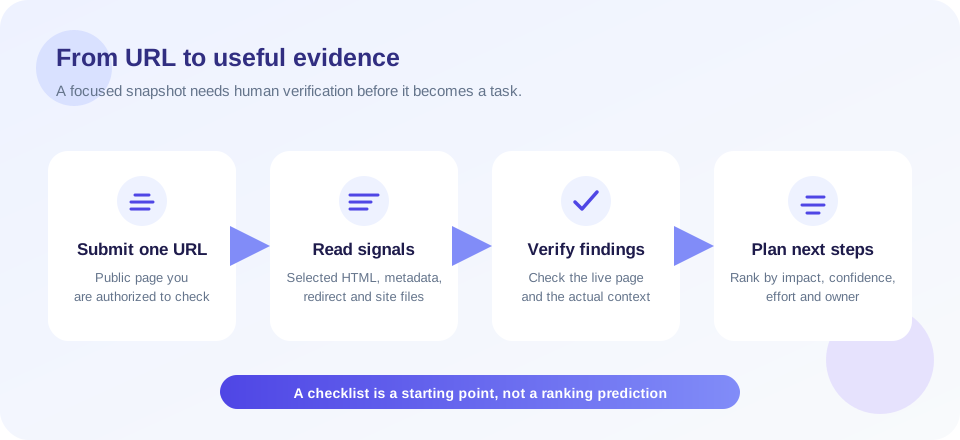
An SEO audit is a structured review of factors that influence how people and search engines access, understand, and use a website. The SnapZain tool lets you submit one public URL and generates a preliminary report from its fetched HTML and a small set of related requests. It reviews selected page signals, such as titles, descriptions, headings, image alt attributes, language, social metadata, viewport, redirects, HTTPS, robots.txt, and common sitemap locations.
This free SEO audit is a starting point, not an all-site crawl or a ranking promise. It does not render JavaScript, inspect every URL, measure real-user Core Web Vitals, or comprehensively validate backlinks and traffic. Some report areas are simplified, informational, or placeholders. Treat the score as this tool’s own checklist summary, then verify each important finding before making changes.
A practical audit has two jobs: identify verifiable problems and decide which ones matter to visitors and the organization. A missing tag may be easy to fix but low impact; a blocked canonical page or a broken migration route can deserve immediate attention. The goal is not to maximize a number by ticking every box—it is to improve the site’s discoverability, usefulness, accessibility, and technical reliability.
Teams that audit SEO regularly can compare changes over time, while well-scoped SEO audits help separate genuine technical risks from generic warnings that do not apply to a particular site.
What Is An SEO Audit And What Is This Tool?
When people ask what is SEO audit, they may mean anything from checking one page’s metadata to commissioning a technical crawl of a large site. Scope matters. This SEO audit tool inspects the submitted URL and some supporting signals; it does not examine every template, product, article, search query, conversion path, or server log.
After you submit a URL, the service fetches its HTML and extracts selected information. It also makes related requests for common root-level files and a redirect chain, and may inspect the homepage for social profiles when you audit a deeper URL. If an optional backlink provider is configured, the report may include data from it. Without that integration, backlink and traffic fields may be unmeasured or informational.
The report organizes criteria into on-page and off-page tabs with status filters. A displayed overall score is computed from scores assigned to report criteria; it is not a Google metric, industry benchmark, or prediction of search position. Some categories are explicitly marked neutral because the tool does not measure them, while other displayed checks may use simple heuristics or preset values. Read the details, not just the dial.
What The Report Checks—and What It Does Not
| Report area | Current check examples | Important limitation |
|---|---|---|
| Page content signals | Title, description, heading counts, image alt presence, language, link counts. | Lightweight parsing of one fetched HTML response; not editorial quality or full content understanding. |
| Indexing and URLs | Redirect resolution, common robots.txt and sitemap paths, canonical and robots metadata, HTTPS. | Does not verify Google indexing, crawl history, every sitemap URL, or all response headers. |
| Social metadata | Selected Open Graph and Twitter Card tags; social profiles discovered in page HTML and sometimes the homepage. | Does not guarantee social preview rendering or measure engagement. |
| Mobile and performance | Viewport metadata and selected report categories. | Does not run a mobile browser, measure Core Web Vitals, or fully test performance and accessibility. |
| Off-page metrics | Optional backlink provider values if configured; discovered social URLs. | Traffic estimates and many authority signals are not directly measured by this endpoint. |
| Whole-site health | Not crawled. | No full domain inventory, bulk URL coverage, comprehensive broken-link scan, or change monitoring. |
Some labels can look broader than the underlying measurement. For example, the report may show a broken-links category even though the current endpoint does not request each linked page to validate its status. Performance and accessibility sections can also contain unmeasured or preset information. Use those labels as a prompt to conduct a proper test, not as confirmation that the site passed.
How To Do An SEO Audit With A Repeatable Process
If you are learning how to do an SEO audit, separate data collection from decisions. Avoid changing several unrelated settings just because an automated report shows warning colors. A simple workflow helps make the work testable and reduces accidental regressions:
- Set an objective. Choose whether you are reviewing a new page, investigating lost traffic, preparing a migration, or checking a content update.
- Start with a representative URL. Submit a public page you own or are authorized to inspect. This tool checks one URL per request.
- Read the evidence behind each status. Review the title text, description, headings, image list, response chain, and metadata rather than relying on the overall score.
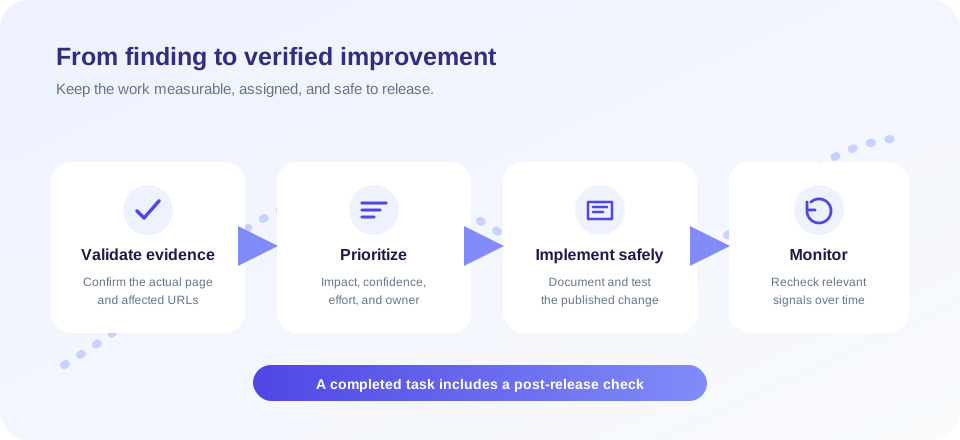
- Verify important signals independently. Check the live source, response headers, Search Console, analytics, and browser rendering where relevant.
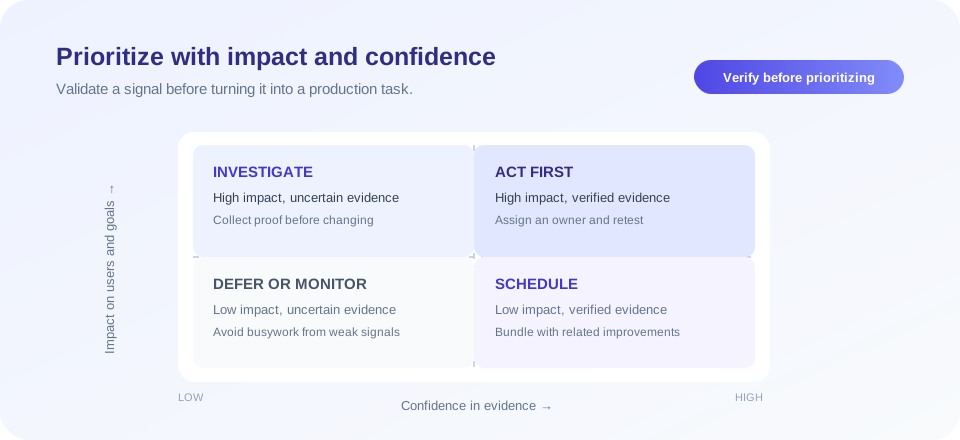
- Prioritize by impact and confidence. Fix clear access or destination problems before polishing low-impact metadata.
- Make a controlled change. Document what changed and where; avoid editing a live template without a backup or review process.
- Retest and monitor. Confirm the published result and watch the appropriate search, usability, or business metric over time.
A useful SEO audit report should distinguish verified evidence from hypotheses. Record the URL, date, check method, finding, confidence, owner, and next action. If an item cannot be confirmed with the tool, label it “needs investigation” rather than presenting it as a defect.
Prioritize Findings Instead Of Chasing A Perfect Score
Reports are most useful when findings turn into decisions. A status marked “bad” may be important, but context still matters. An absent canonical tag is not automatically harmful on every page; a sitemap is helpful for many sites but not a mandatory condition for crawling; and structured data is not required for every result type. Understand the page’s purpose and the system being checked.
| Priority | Examples to investigate | Reasoning |
|---|---|---|
| Urgent access | Important pages inaccessible, unintended noindex, redirect loop, incorrect final URL. | Users or crawlers may not reach the intended content. |
| High confidence improvements | Missing page title, empty description, missing viewport, important images without useful alt text. | These are observable page-level issues that can affect understanding or usability. |
| Site architecture | Canonical strategy, internal links, sitemap coverage, duplicate URL variants. | Requires examining more than one page and confirming the intended site structure. |
| Content quality | Outdated, shallow, duplicate, or mismatched content. | Requires editorial judgment and knowledge of visitor intent; automated tags cannot assess it reliably. |
| Performance and accessibility | Slow interactions, layout shifts, keyboard barriers, contrast problems. | Use real browser and assistive technology testing; this audit does not measure these comprehensively. |
| Off-page research | Relevant referring domains, local reputation, brand mentions. | Use trusted data sources and qualitative review; avoid treating one provider’s score as truth. |
On-Page SEO Review: Titles, Descriptions, Headings, And Images
On-page checks examine what a particular document communicates. The tool reports a title and a description value when it can extract them, counts detected headings, notes the presence of image alt attributes, and shows some link counts. These observations can help locate missing markup, but they cannot determine whether the page is actually helpful, accurate, well-written, or aligned with the visitor’s question.
Review a title for clarity and page-specific meaning rather than a rigid character formula. A description should summarize the page honestly; search systems may choose a different snippet. Headings should help people scan the content and reflect its structure, not exist only to repeat phrases. Alt text should describe an image’s relevant meaning in context; decorative images can use an empty alt value, while informative images need an appropriate description.
A seo content audit goes beyond counting headings or identifying tags. Compare the content with the audience’s intent, check factual accuracy, identify duplication and outdated details, and make sure the page provides a distinct reason to exist. This kind of review needs editorial judgment and should not be reduced to keyword density or a generated score.
Technical SEO Audit: Access, Indexing, And URL Signals
A technical SEO audit investigates whether important pages can be discovered, fetched, interpreted, and served reliably. This tool checks a subset: it follows redirects for the submitted URL, checks common root-level robots.txt and sitemap paths, looks for canonical and robots meta tags, and observes whether the submitted address uses HTTPS. It does not inspect every directive, crawl an entire sitemap, verify HTTP-level X-Robots-Tag headers, or report Google’s indexing state.
Robots.txt is a crawl-management file, not a way to guarantee privacy or deindex a page. A sitemap can help communicate preferred URLs, but a sitemap’s presence does not guarantee that every listed page will be crawled or indexed. Canonical tags are hints that should align with redirects, internal links, and the actual preferred version. HTTPS is important for secure connections, but the tool’s simple check does not audit certificate configuration or every mixed-content resource.
For a real seo technical audit, combine page-level checks with a crawl of pages you control, server logs, status-code review, canonical inspection, JavaScript rendering checks, sitemap validation, and Search Console evidence. A seo technical audit checklist should be tailored to the CMS, international setup, page templates, and business risks—not copied blindly from a generic scorecard.
Mobile, Performance, And Accessibility Need Dedicated Tests
The report includes a mobile viewport signal and groups several mobile, performance, and accessibility labels. Not every label is backed by an actual browser measurement. In particular, the current audit does not run a mobile rendering engine or collect field Core Web Vitals such as LCP, INP, and CLS. Some categories are informational or preset in the report structure.
Use a browser-based mobile test to inspect layout, readable text, touch targets, keyboard use, and content overflow. Use field and lab performance data for speed investigations, and test accessibility with keyboard navigation, screen readers, and appropriate automated tools. A page can have a viewport tag and still be difficult to use on a phone.
When improving performance, focus on the actual bottleneck. Measure server response, scripts, images, fonts, and layout stability before choosing optimizations. Avoid deleting useful content or delaying essential interaction merely to improve a synthetic score. Accessibility and usability support real visitors and should not be treated as search-engine tricks.
Local SEO Audit: What This Page-Level Tool Cannot See
A local SEO audit requires information beyond a single web page. This report cannot inspect a Google Business Profile, confirm business categories or opening hours, audit local citations, review customer feedback, or measure map-pack visibility. It may help you inspect the location page’s metadata and technical signals, but that is only one piece.
For a local review, confirm that name, address, and phone details are accurate and consistent where appropriate; make location pages genuinely useful; keep business hours current; and respond to reviews according to platform rules. Never create fake locations, fabricate reviews, or publish misleading service-area claims. Local search results vary by location, query, competition, and platform systems, so avoid promising a particular map ranking.
If you manage multiple locations, audit each location page and business profile with a documented process. A single homepage scan cannot validate the entire local footprint.
Ecommerce SEO Audit: Product And Category Checks
An ecommerce SEO audit must account for catalog scale and commerce-specific behavior. The SnapZain tool can check one public product, category, or landing page for selected HTML signals, but it does not crawl product variants, faceted filters, pagination, stock changes, duplicate parameter URLs, product structured-data validity, or checkout behavior.
For a fuller store review, examine how categories link to products, whether out-of-stock items are handled consistently, whether variants have a clear canonical strategy, and whether product information is original and accurate. Inspect structured data with a dedicated validator and verify that price, availability, and review claims match what shoppers see. Do not invent reviews or hide material product conditions to improve search presentation.
Large inventories benefit from sampling templates and combining crawler data with server logs and Search Console. Protect customer and order information; never include private account URLs or sensitive query strings in a public audit form.
Interpreting Off-Page Signals And Backlink Data
The report includes an off-page tab for backlinks, traffic, and social profiles. Social profile discovery looks for recognizable public links in the audited HTML and may also inspect the homepage for deeper URLs. Finding a profile does not measure its engagement or prove that a social account is official.
Backlink metrics depend on an optional external provider configuration. If it is not configured, values may remain zero or informational; this should not be read as proof that a site has no links. Traffic estimates in this implementation are not measured analytics. Treat third-party authority metrics as vendor-specific approximations, not as Google scores or direct ranking factors.
When researching links, prioritize relevance, editorial context, and genuine audience value. Avoid buying manipulative links or sending spam. Use first-party analytics and Search Console for your own performance data, while recognizing that each platform has its own attribution and reporting limits.
Free SEO Audit Versus A Professional Service
A seo audit free tool can provide a quick initial view. It is useful for checking whether a public page exposes certain tags or basic site files. It cannot interview stakeholders, inspect private analytics, understand a business model, crawl a complex site, or produce a verified remediation plan.
A seo audit service or technical seo audit service usually involves a defined scope, specialist review, evidence collection, and recommendations. A provider should state what it will crawl, which data it needs, how it handles access, what is included in the report, and which findings are confirmed versus speculative. For complex migrations or large platforms, technical seo audit services may include log analysis, template review, rendering tests, and implementation planning.
Website SEO audit services and enterprise SEO audit engagements can address large URL sets, international sites, integrations, governance, and release processes. They should not promise guaranteed rankings or traffic. A white label SEO audit is a commercial reporting arrangement; it does not change the underlying evidence quality, and clients should know who performed and reviewed the work.
| Approach | Best for | Typical boundary |
|---|---|---|
| Free website SEO audit | Initial checks on one public page. | Limited fetch, checklist heuristics, no site-wide verification. |
| SEO audit tools | Repeatable data collection and issue discovery. | Tool output needs validation and context. |
| Specialist audit service | Complex technical, content, or migration questions. | Scope, access, evidence, and deliverables should be defined in advance. |
| Enterprise SEO audit | Large multi-team websites and systems. | Needs governance, prioritization, implementation ownership, and ongoing monitoring. |
SEO Audit Online: Privacy And Responsible Use
When you run an SEO audit online, the browser sends the URL to SnapZain’s server, which fetches the page and a small number of related public resources. Submit only URLs you own or are authorized to assess. Avoid private staging links, intranet addresses, invitation URLs, reset tokens, and query strings containing personal or confidential data.
The tool is not a vulnerability scanner or a mechanism for bypassing access controls. It does not log into a website, inspect private dashboards, or crawl a full domain. For client sites, obtain written authorization and use a scope agreed with the owner. Review the site’s privacy policy for information about request processing and retention.
Do not treat a technical report as a complete evaluation of a website. This tool checks a limited set of page-level signals; it does not assess every content, accessibility, usability, or business requirement. Review its observations, confirm them on the live page, and prioritize changes that help visitors.
Related SnapZain Tools For Follow-Up Checks
Use the Redirect Checker to examine a URL’s HTTP redirect chain, the Cloaking Checker to compare response sizes for two user-agent requests, and the Google Cache Checker to try a legacy cache endpoint (Google retired its public cached-page feature). The Meta Tag Generator drafts basic tags, while Meta Tags Analyzer inspects detected tags from one fetched page. Each tool has a different scope and should be interpreted independently.
A Practical SEO Technical Audit Checklist
Use this checklist to organize follow-up work. It supplements the tool; it does not imply that every item is measured by the current report:
- Access: Can users and crawlers reach important public pages without loops or unexpected errors?
- Indexing intent: Do robots directives, canonical URLs, and access controls reflect which pages should be discoverable?
- URL consistency: Are host, HTTPS, slash, and parameter variants handled intentionally?
- Metadata: Are titles and summaries accurate, page-specific, and consistent with visible content?
- Content: Does each important page answer a real visitor need with current, original information?
- Mobile and accessibility: Can people use the page across screen sizes, keyboards, and assistive technologies?
- Performance: Have you measured actual loading and interaction behavior using appropriate tools and user data?
- Structured data: Does markup accurately describe visible content and pass a dedicated validation test?
- Measurement: Are analytics and Search Console configured for the property, with privacy obligations respected?
- Change control: Is each fix assigned, documented, tested, and monitored after release?
For a site-wide review, sample page types and then crawl URLs within an authorized scope. Prioritize high-value templates, major landing pages, recently migrated sections, and pages with known search or conversion issues. Re-run the relevant tests after deployment rather than assuming the change worked.
SEO Audit Summary
This seo site audit and seo website audit form gives you a fast snapshot of selected signals for a single public URL. It can help identify issues worth investigating, but it is not a full crawl, a complete technical review, or a ranking forecast. Use the report to ask better questions: is the observation real, does it matter for this page, and what evidence would confirm the fix?
Keep audit work grounded in useful outcomes. Make important pages accessible, write for people, maintain consistent URL and indexing behavior, test real performance and accessibility, and document changes. If you need a free SEO audit tool for a quick check, this page can help begin that process; complex or high-risk websites may need a scoped, human-reviewed audit in addition to automated tools.
Conclusion
A score is a summary of a checklist, not a substitute for evidence, context, or a useful website.


