Binary to Decimal: Convert Base 2 into Base 10
Binary and decimal represent quantities with different digit systems. Binary is base 2 and uses only 0 and 1; decimal is base 10 and uses 0 through 9. The SnapZain binary to decimal converter reads a non-negative whole number written in binary and returns its base-10 value. Enter one value or several space-separated values in the calculator above.
For example, binary 1011 means eight plus two plus one, so its decimal equivalent is 11. The calculator supports values up to 53 binary digits per value and 500 characters in total. It also provides copy, clear, and Ctrl+Enter controls.
Understand Binary Place Values
Every position in a binary number represents a power of 2. Starting at the right, the place values are 2⁰, 2¹, 2², 2³, and onward. Those powers equal 1, 2, 4, 8, 16, and so on. A bit set to 1 includes its place value in the total; a bit set to 0 contributes nothing.
| Position from right | Power of 2 | Decimal place value |
|---|---|---|
| 0 | 2⁰ | 1 |
| 1 | 2¹ | 2 |
| 2 | 2² | 4 |
| 3 | 2³ | 8 |
| 4 | 2⁴ | 16 |
| 5 | 2⁵ | 32 |
| 6 | 2⁶ | 64 |
A zero in the middle must stay in place because it identifies which power of two comes next. In 1001, the two zeros mean the 4s and 2s places are absent; the remaining 8 and 1 add to 9. Removing an internal zero would shift the other bits and change the value.
Binary to Decimal Formula
For a binary string with bits bₙ…b₂b₁b₀, the value is the sum of each bit multiplied by its positional power: b₀ × 2⁰ + b₁ × 2¹ + b₂ × 2² + … + bₙ × 2ⁿ. Each bit is either zero or one, so only positions containing a one add to the decimal result.
“Read the binary digits from right to left, label the powers of two, and add only the places marked 1.”
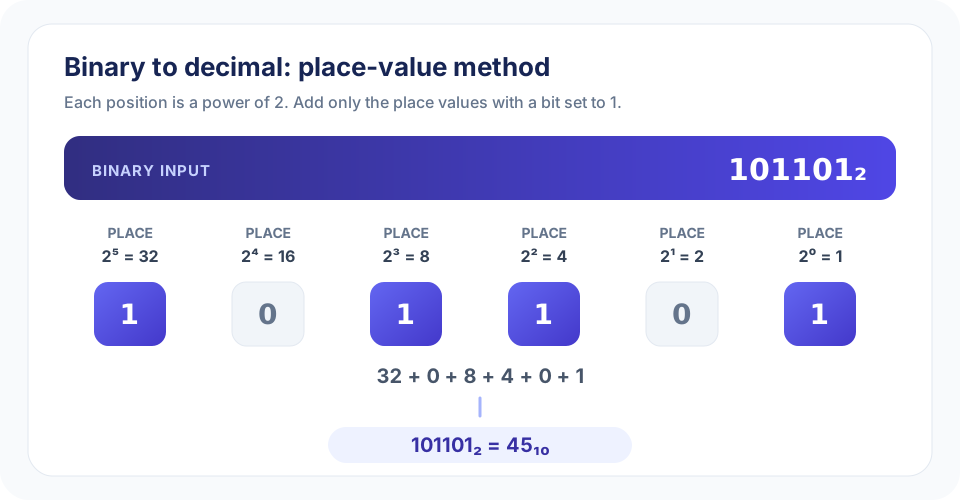
For 101101, the rightmost bit is position zero. The full expansion is 1 × 2⁵ + 0 × 2⁴ + 1 × 2³ + 1 × 2² + 0 × 2¹ + 1 × 2⁰. This becomes 32 + 0 + 8 + 4 + 0 + 1, which equals 45. The image above shows the same calculation at a glance.
How to Convert Binary to Decimal by Hand
Use this repeatable method to convert binary to decimal or independently check a calculator result:
- Validate the digits. A binary value contains only 0 and 1.
- Number positions from the right. Start with position zero and increase by one for every step to the left.
- Write the powers of two. Match each bit to 1, 2, 4, 8, 16, 32, and the next values as needed.
- Multiply each bit by its place. A 1 keeps the place value; a 0 contributes zero.
- Add the included values. Their sum is the equivalent decimal integer.
- Verify the result. Convert the decimal answer back to binary or test a known example.
For instance, 11010 expands to 1 × 16 + 1 × 8 + 0 × 4 + 1 × 2 + 0 × 1. Add 16, 8, and 2 to get 26. The number of digits does not change the method; it only adds more place values to consider.
Worked Binary to Decimal Examples
1111 binary to decimal
The four positions are 8, 4, 2, and 1. Every bit is one, so 8 + 4 + 2 + 1 = 15. Therefore, 1111₂ = 15₁₀.
1010 binary to decimal
The 1 bits occupy the 8 and 2 places. Add those values to get 10. This is a useful check because binary 1010 is a common example in base-conversion lessons.
10000000 binary to decimal
The leftmost one sits in position seven, whose value is 2⁷ = 128. All other bits are zero, so 10000000₂ = 128₁₀.
101101 binary to decimal
Using place values 32, 16, 8, 4, 2, and 1 gives 32 + 0 + 8 + 4 + 0 + 1. The total is 45.
| Binary | Calculation | Decimal |
|---|---|---|
| 0 | 0 | 0 |
| 1 | 1 | 1 |
| 10 | 2 | 2 |
| 111 | 4 + 2 + 1 | 7 |
| 1111 | 8 + 4 + 2 + 1 | 15 |
| 10110 | 16 + 4 + 2 | 22 |
| 10000000 | 128 | 128 |
| 101101 | 32 + 8 + 4 + 1 | 45 |
Using the Binary to Decimal Calculator
This online binary to decimal conversion tool accepts one whole-number value or a list of values, and follows the same place-value rule shown above. The converter reports the decimal output in the result field without adding commas.
- Type only 0 and 1 in each binary value.
- Separate multiple values with spaces, for example
1010 1111 10000000. - Keep the total input at or below 500 characters and each individual value at or below 53 bits.
- Select Convert, or press Ctrl+Enter while the input field is focused.
- Use Copy to clipboard to copy the output or Clear to reset both fields.
The converter from binary to decimal treats each space-separated token as an independent number. It does not combine separated groups into a single stream. For example, entering 10 10 returns two decimal values, 2 2; it does not mean one four-bit value.
Limits, Precision, and Common Input Errors
The 53-bit per-value limit is tied to exact integer representation in JavaScript. The largest accepted 53-bit value, 11111111111111111111111111111111111111111111111111111, equals 2⁵³ − 1, or 9,007,199,254,740,991. Keeping the input within that range means the binary to decimal calculator can return an exact integer.
A value longer than 53 bits may exceed the safe range and should not be shortened or guessed. Use an arbitrary-precision calculator, a programming language with big integers, or a tool designed for longer binary inputs if exactness is required. The field’s 500-character cap is a separate total-length limit; it does not increase the maximum digits allowed in each individual value.
| Input | Result | Explanation |
|---|---|---|
1011 | Accepted | Contains only binary digits. |
00101 | Accepted | Leading zeros are valid and do not change the value. |
1010 1111 | Accepted | Space-separated values are converted individually. |
0b1011 | Rejected | This input field does not accept a 0b prefix. |
1021 | Rejected | Digits 2 through 9 are not binary digits. |
10,11 | Rejected | Use spaces rather than commas to separate values. |
Binary to Decimal Conversion and Other Number Bases
Binary-to-decimal conversion changes the base used to write an integer. It does not turn a bit string into words, interpret computer instructions, or reveal hidden meaning by itself. A binary sequence can represent a number, a character code, or part of another data format; the intended interpretation depends on context.
That distinction matters when choosing a tool. If the bits are one numeric value, this binary to decimal calculator is suitable. If the groups represent encoded characters, use Binary to Text and check the byte grouping and character encoding. The two tools answer different questions even though both accept binary-looking input.
For reverse conversion, Decimal to Binary changes a base-10 integer into base 2. Decimal to HEX writes a decimal value in base 16, and HEX to Binary converts hexadecimal digits to binary groups. These related converters can help compare representations, but use matching input and output bases for each step.
“A base converter changes how a number is written; it does not change the number itself.”
Binary and Decimal in Excel
Excel includes a BIN2DEC function for binary-to-decimal conversion. If a binary value is in cell A1, a typical formula is =BIN2DEC(A1). Review the function’s documented input-length and signed-number behavior for the Excel version you use. Its format conventions may differ from this page, which accepts up to 53 bits as a non-negative whole number.
For a small worksheet, the formula can be convenient. For a manual check, expand the bits into powers of two and add the places containing 1. Confirm that the cell is treated as text when needed, since spreadsheet formatting can affect how long digit strings are displayed or stored.
Conclusion: Convert Binary Values with Powers of Two
To convert binary to decimal, number the bit positions from zero on the right, multiply each bit by its power-of-two value, and add the results. Examples include 1111₂ = 15₁₀, 1010₂ = 10₁₀, and 101101₂ = 45₁₀. Use the calculator for a quick answer and the formula or chart to check how each bit contributes.
Enter only 0s and 1s, separate independent values with spaces, and stay within the 500-character total and 53-bit per-value limits. When you need text decoding or a different number base, choose the related converter that matches that specific task.


