Decimal to HEX

Convert decimal to hexadecimal

0/500 characters. One number or space-separated decimals (e.g. 10 15 255 → A F FF).

Decimal to HEX: Convert Base 10 into Base 16

Decimal and hexadecimal are positional number systems. Decimal, or base 10, uses ten digits from 0 to 9. Hexadecimal, often written as HEX, uses sixteen symbols: 0–9 and A–F. Each hexadecimal position represents a power of 16. The SnapZain decimal to hex converter changes a non-negative decimal whole number into its base-16 representation. This decimal to hex conversion keeps the numeric value the same while writing it with hexadecimal digits.

For example, decimal 45 is hexadecimal 2D. Divide 45 by 16 to get quotient 2 and remainder 13; hexadecimal D represents 13. Reading the quotient followed by the remainder gives 2D. Enter a single number or space-separated values in the calculator above to perform the same conversion.
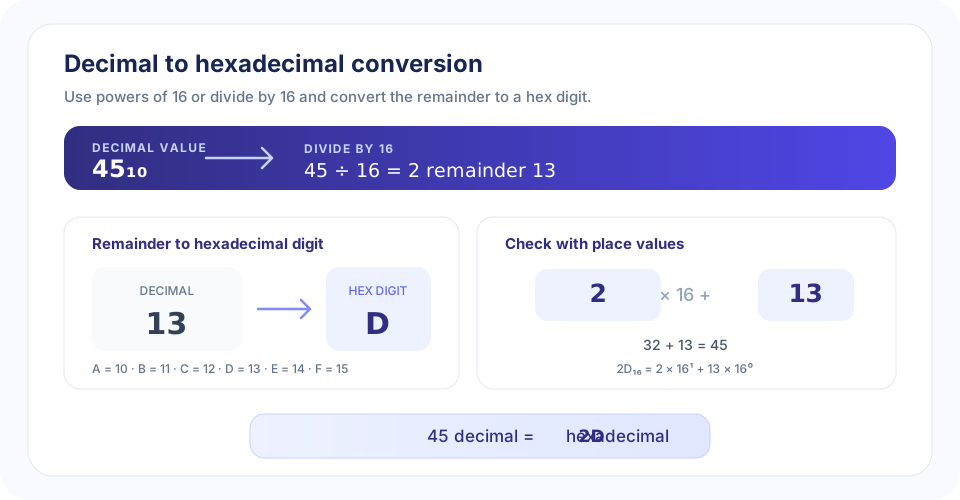
Decimal 45 divided by 16 gives quotient 2 and remainder 13; hexadecimal digit D represents 13, so the result is 2D.
45 ÷ 16 gives quotient 2 and remainder 13. Replace 13 with D to get 2D₁₆.

How to Convert Decimal to Hex by Repeated Division

The repeated-division method works for any non-negative whole number. Since hexadecimal is base 16, divide by 16 rather than 2 or 10. The remainders form the hexadecimal digits, starting at the rightmost position.

  1. Divide the decimal number by 16. Keep the whole-number quotient and remainder.
  2. Convert the remainder to a hex digit. Remainders 0–9 stay as digits; 10–15 become A–F.
  3. Divide the quotient by 16 again. Record the next remainder.
  4. Stop when the quotient is zero. Reverse the list of remainders to write the hexadecimal result.

For 45, the first division gives 45 ÷ 16 = 2 remainder 13. The quotient 2 is now less than 16, so it becomes the leading digit. Remainder 13 maps to D. Therefore, 45₁₀ = 2D₁₆. For larger values, continue dividing the quotient until it reaches zero, then read all recorded remainders in reverse order.

“Hexadecimal conversion is repeated division by 16; the only extra step is writing remainders 10–15 as A–F.”

The Decimal to Hex Formula

Each hexadecimal digit is multiplied by a power of 16 according to its position. The rightmost position is 16⁰, the next is 16¹, then 16², and so on. If a number has digits hₙ through h₀, its decimal value is:

hₙ × 16ⁿ + … + h₂ × 16² + h₁ × 16¹ + h₀ × 16⁰

For 2D, D has decimal value 13. Calculate 2 × 16¹ + 13 × 16⁰ = 32 + 13 = 45. This place-value formula converts hexadecimal to decimal and is a reliable way to check a decimal-to-hex result in the opposite direction.

Hexadecimal digit equivalents for decimal remainders
Decimal remainderHex digitDecimal remainderHex digit
0088
1199
2210A
3311B
4412C
5513D
6614E
7715F

The A–F mapping is essential: a remainder of 12 is C, not the two-character text “12.” This is why a conversion routine must replace each remainder above 9 with its single hexadecimal digit.

Decimal to Hex Table and Worked Examples

A small lookup table makes familiar values easier to recognize. Decimal values below 16 use a single hex digit. Decimal 16 is written as 10 in hex because it is one group of sixteen and zero ones.

Common decimal-to-hexadecimal conversions
DecimalHexadecimalCheck
00Zero in either base
10AA represents decimal 10
15FF represents decimal 15
16101 × 16 + 0
20141 × 16 + 4
261A1 × 16 + 10
452D2 × 16 + 13
255FF15 × 16 + 15
2561001 × 16²

20 decimal to hex

Divide 20 by 16: the quotient is 1 and the remainder is 4. Both are valid hexadecimal digits, so 20₁₀ = 14₁₆. Confirm with place values: 1 × 16 + 4 = 20.

Convert 255 from decimal to hex

255 divided by 16 gives quotient 15 and remainder 15. Decimal 15 is F in hexadecimal, so both digits are F: 255₁₀ = FF₁₆.

Convert 256 from decimal to hex

256 is exactly 16². In base 16, that is a 1 in the 16² place followed by two zeroes: 256₁₀ = 100₁₆.

Using the Online Decimal to HEX Converter

This decimal to hex calculator applies the same repeated-division rule and returns uppercase letters for hexadecimal digits. To convert decimal to hex, enter one non-negative whole number and select Convert. For a batch, separate the values with spaces, for example 20 45 255; the output will be 14 2D FF.

  • Use decimal digits 0 through 9 for each input number.
  • Separate multiple whole numbers with spaces; commas are not valid separators.
  • Fractions, negative values, and mixed text are not accepted.
  • The input field allows up to 500 characters.
  • Each number must be at most 9007199254740991 so JavaScript can represent it exactly.
  • Use Copy to clipboard for the result, Clear to reset, or Ctrl + Enter to convert from the input field.

The limit is about numeric precision, not the number of hex digits a person might write by hand. JavaScript’s ordinary number type exactly represents all integer values through 2⁵³ − 1. Values above that bound can be rounded, so the converter refuses them rather than claim an inaccurate conversion.

Decimal to Hex in C

C’s formatted output functions can display an integer in hexadecimal without manually dividing it. The %X format specifier prints uppercase A–F, while %x prints lowercase letters. Choose a type large enough for the values your program needs to represent.

#include <stdio.h>

int main(void) {
    unsigned int value = 20;
    printf("%X\n", value);  /* prints 14 */
    return 0;
}

This illustrates decimal to hex C code for a small unsigned integer. The C language’s integer type ranges depend on the implementation, so check the type limits when handling larger values. The web converter has a separate documented limit of 9007199254740991.

Binary, Decimal, and Hexadecimal Conversion

Binary, decimal, and hexadecimal can all describe the same integer. Hexadecimal is compact because one hex digit corresponds to four binary bits. For instance, hex D is binary 1101. If your task is binary to decimal to hex, first read the binary value as a number and then express it in base 16; alternatively, group the binary digits into four-bit blocks and map each block directly to a hex digit.

For a decimal to hex to binary workflow, convert decimal to hexadecimal and replace each hex digit with four bits. Decimal 45 becomes hex 2D; 2 maps to 0010 and D maps to 1101, resulting in 00101101. Dropping leading zeros gives the minimal binary form 101101. Pick the route that makes each source and destination clear.

Related tools: Binary to Text interprets binary groups as characters; HEX to Decimal converts base 16 back to base 10; Binary to Decimal converts base 2 to base 10; and Decimal to Binary converts base 10 to base 2. Each converter has a distinct direction and purpose.

“A base conversion changes the digits used to write a value; it does not change the value itself.”

Conclusion: Convert Decimal Values in Base 16

To convert decimal to hex, divide the non-negative whole number by 16, translate remainders 10–15 into A–F, and read the digits in reverse order. Check the result with powers of 16 or convert it back to decimal. SnapZain’s converter handles one value or space-separated batches, returns uppercase hexadecimal, and enforces a 500-character input limit and a maximum exact integer of 9007199254740991.

How do I convert decimal to hex?

Divide the non-negative decimal whole number by 16, record the remainder, and repeat with the quotient until it reaches zero. Convert remainders 10 through 15 to A through F, then read the digits from last to first. Decimal 45 becomes hexadecimal 2D.

How to convert from decimal to hex?

To convert from decimal to hex, repeatedly divide by 16 and record each remainder. Change remainders 10–15 to A–F, then reverse the remainder sequence to get the hexadecimal digits.

What does a decimal to hex converter do?

It expresses a base-10 whole number using hexadecimal, or base-16, digits. Hexadecimal uses 0–9 and A–F, with each position representing a power of 16.

How do I use this decimal to hex calculator?

Enter a non-negative whole number, or several numbers separated by spaces, and select Convert. Each result appears in the same order. The input field accepts up to 500 characters, and each value must not exceed 9007199254740991.

What is 20 decimal to hex?

Decimal 20 is hexadecimal 14. Divide 20 by 16 to get quotient 1 and remainder 4; reading the quotient and remainder gives 14₁₆.

What is 45 in decimal to hex?

Decimal 45 is hexadecimal 2D. Dividing by 16 gives quotient 2 and remainder 13, and hexadecimal digit D represents 13.

What is the decimal to hex formula?

For hexadecimal digits hₙ…h₁h₀, the decimal value is h₀ × 16⁰ + h₁ × 16¹ + h₂ × 16² + … . To convert decimal to hex, repeated division by 16 finds those digits from right to left.

How do I convert from decimal to hex by hand?

Repeatedly divide the number by 16 and write down each remainder. Replace remainders 10, 11, 12, 13, 14, and 15 with A, B, C, D, E, and F, respectively. Stop when the quotient is zero, then reverse the remainders.

Can I convert decimal to hexadecimal with powers of 16?

Yes. Find the powers of 16 that sum to the decimal value, then write each coefficient as a hexadecimal digit. For 45, 45 = 2 × 16 + 13, so its digits are 2 and D, giving 2D₁₆.

What are the hexadecimal digits A through F?

They represent decimal values 10 through 15: A = 10, B = 11, C = 12, D = 13, E = 14, and F = 15. The converter returns uppercase hexadecimal letters.

Can I convert multiple decimal numbers at once?

Yes. Enter whole numbers separated by spaces, such as 20 45 255. The tool returns 14 2D FF. Commas are not used as separators.

Which decimal inputs are accepted?

Enter non-negative whole numbers using digits 0 through 9. Fractions, negative values, commas, letters, and mixed strings are not valid input. Leading zeros are allowed and do not change the result.

What is the maximum value this converter can process?

Each value can be up to 9007199254740991 (2⁵³ − 1), JavaScript’s largest exactly represented integer. The entire input is limited to 500 characters.

Why does this tool limit large decimal values?

JavaScript number arithmetic cannot exactly represent every integer above 2⁵³ − 1. The converter rejects larger values so that rounding does not produce a misleading hexadecimal result.

How can I check a decimal-to-hex result?

Convert the hexadecimal digits back by multiplying each digit by its power-of-16 place value and adding the products. For 2D, calculate 2 × 16 + 13 = 45.

How does a decimal to hex table help?

A decimal to hex table provides quick equivalents for small values. For example, decimal 10–15 correspond to A–F, 16 is 10, 20 is 14, and 255 is FF. Larger values can be found with repeated division.

Where can I find a convert decimal to hex calculator?

The calculator at the top of this page converts decimal whole numbers to uppercase hexadecimal. It works for one value or space-separated batches and displays an error for invalid or out-of-range input.

Can I convert decimal to hex in C?

Yes. In C, printf with the %X format specifier prints an unsigned integer in uppercase hexadecimal. For example, unsigned int value = 20; printf(\"%X\", value); prints 14. Choose a C integer type that can hold the input.

What is decimal to hex C code for a basic value?

A simple C example is: #include <stdio.h> then int main(void) { unsigned int value = 20; printf(\"%X\\n\", value); return 0; }. The %X conversion specifier displays the value in uppercase hexadecimal; %x uses lowercase letters.

Is decimal-to-hex conversion the same as binary-to-decimal-to-hex conversion?

No. Decimal to HEX starts with a base-10 value. For a binary to decimal to hex workflow, first interpret the binary value as decimal, then express that same integer in hexadecimal. You can also group binary digits into four-bit groups to convert directly.

How do I convert decimal to hex to binary?

Convert the decimal value to hexadecimal first, then replace each hex digit with its four-bit binary equivalent. For 45, decimal becomes 2D; 2 is 0010 and D is 1101, so the binary value is 00101101 (or 101101 without leading zeros).

Does hexadecimal conversion encrypt a number?

No. Hexadecimal is a number notation, not encryption. It represents the same integer in base 16 rather than base 10.

Can I copy or clear the result?

Yes. Select Copy to clipboard after converting. Clear removes the current input and output, and Ctrl+Enter in the input field runs the conversion.

Which related number converters can I use?

Use Binary to Decimal to read a base-2 number as decimal, Decimal to Binary for the reverse of this page, HEX to Decimal to interpret hexadecimal as base 10, and Binary to Text when binary groups represent character codes.

Do different phrases like “convert decimal to hexa” mean the same thing?

Yes. “Decimal convert to hex,” “conversion decimal to hex,” “convert decimal to hexa,” and “convert from decimal to hex” generally refer to writing a base-10 value in base 16. Confirm the input and output bases when choosing a converter.

Latest Posts

Browse practical guides and updates to help with PDF conversion, document editing, and everyday file workflows.

SEO Audit Explained: A Complete Website Health Check and Improvement Guide

SEO Audit Explained: A Complete Website Health Check and Improvement Guide

By M Seemab •

A website can have useful content, attractive design, and a growing collection of pages, yet still struggle to appear in search results. Sometimes the...

Read More →
How to Increase Website Traffic in 2026: SEO, GEO, AEO and Paid Growth Strategies

How to Increase Website Traffic in 2026: SEO, GEO, AEO and Paid Growth Strategies

By M Seemab •

Getting visitors to a website is important, but attracting the right visitors is what creates long-term value. A website may receive thousands of visi...

Read More →
Meta Tags: Complete Guide to SEO Meta Tags, Examples, Optimization, and Best Practices

Meta Tags: Complete Guide to SEO Meta Tags, Examples, Optimization, and Best Practices

By M Seemab •

Meta tags are an important part of technical SEO because they provide search engines and other platforms with information about individual web pages....

Read More →