JavaScript Obfuscator: Transform Code For Less Readable Output
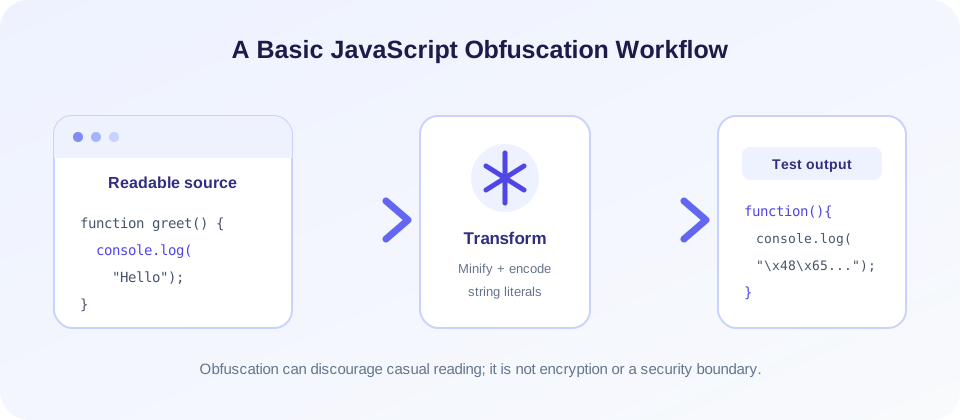
A JavaScript obfuscator changes the appearance of source code so that it is less convenient to read at a glance. This tool applies basic minification and converts many quoted string literals into hexadecimal escape sequences. Paste JavaScript or upload a .js file, select Obfuscate, then inspect, copy, or download the result as obfuscated.js.
The transformation is intentionally lightweight: it removes comments, compresses whitespace, and encodes string characters. It does not rename identifiers, encrypt code, or provide advanced options such as control-flow flattening. Treat the output as a basic code transformation, not as a reliable security layer or a replacement for a production build pipeline.
People looking for a JavaScript obfuscator online, a JavaScript obfuscator tool, or a way to “javascript obfuscate code” may expect a full compiler-grade transformation. This page is more limited: it offers one simple preset, so review its behavior and test your source rather than assuming all obfuscators work alike.
Most importantly, the current implementation uses regular expressions and a simple scanner rather than a complete JavaScript parser. That means it may alter valid source in unexpected ways, particularly around comment-like text, whitespace inside string literals, regular expressions, and complex syntax. Always keep the original source and test the output before using it.
How To Obfuscate JavaScript Code Online
- Prepare a copy. Keep the original JavaScript in your project or version control so you can restore it if the transformation changes behavior.
- Enter the source. Paste JavaScript into the editor, or choose Upload JS to load a
.jsfile into the browser. - Run the transformation. Select Obfuscate to produce minified, string-encoded output.
- Review the result. Compare a small sample with the source and check for syntax or behavior changes.
- Test in context. Run your normal tests and try the features that use the code in a development or staging environment.
- Copy or download. Use Copy or Download JS to save the output as
obfuscated.js.
Uploading a file only loads its text into the input area; it does not automatically obfuscate it. Similarly, a generated output is not a guarantee that the transformed code will run correctly. Validate it with the same browser versions, Node.js runtime, build tools, and tests that your project uses.
What This JavaScript Obfuscator Changes
The page describes its process as minification with basic string encoding. Its implementation first removes block comments and certain line comments using regular expressions, then collapses whitespace. It next scans the resulting text and attempts to convert many single- and double-quoted string literals into strings composed of hexadecimal or Unicode escape sequences. Template literals are left largely unchanged during that string conversion stage.
For example, a simple statement such as console.log("Hello"); may become a compact expression with the literal represented using escapes like "\x48\x65\x6c\x6c\x6f". JavaScript interprets those escapes as the corresponding characters at runtime. This changes the written representation; it does not conceal the value from someone who can inspect or execute the script.
| Transformation | Current tool behavior | Practical note |
|---|---|---|
| Remove comments | Uses regular expressions for block and line comments. | Comment markers inside strings or regex literals may be misread. |
| Compress whitespace | Collapses whitespace across the source. | Whitespace inside strings and syntax-sensitive constructs can be affected. |
| Encode string literals | Converts many quoted characters to hex or Unicode escapes. | It is a representation change, not encryption. |
| Rename variables | Not provided. | Existing names remain in output. |
| Advanced transformations | No control-flow, dead-code, or custom configuration options. | Use a maintained build tool when these features are required. |
| Upload and download | Reads a JavaScript file in the browser and downloads transformed text. | Review code and avoid shared-device exposure. |
Obfuscation Is Not Encryption Or Access Control
JavaScript that runs in a browser must be delivered to the browser. A user can inspect downloaded scripts, observe runtime values, set breakpoints, and transform escaped strings back into ordinary text. Obfuscation may add friction for casual reading, but it cannot keep client-side code secret from people who receive it.
Do not place API secrets, passwords, private keys, access tokens, or privileged business rules in browser JavaScript on the assumption that obfuscation will protect them. Move sensitive operations to a trusted server, restrict access with appropriate authentication and authorization, and issue only credentials designed for public client use when that is necessary. The security boundary must be enforced outside the client-controlled code.
Important: Obfuscation can discourage casual inspection, but it does not make browser code confidential, tamper-proof, or safe from reverse engineering.
When To Obfuscate JavaScript
Why obfuscate JavaScript? There are legitimate reasons: a publisher may want to make copied code less immediately readable, reduce casual reuse, or add friction when distributing a client-side component. Obfuscation may also be part of a build process alongside bundling and minification. It should be treated as a trade-off, because harder-to-read output can make debugging, support, and error analysis more difficult for your own team.
Before you obfuscate JavaScript code, ask what problem the transformation is meant to solve. If the goal is smaller downloads, a syntax-aware minifier and compression at the server or CDN may be more appropriate. If the goal is protecting server-side logic, keep that logic on the server. If you only need to deter casual copying, a modest build-time transformation may be sufficient, but use an established tool that fits your project's language version and test coverage.
Do not confuse obscurity with licensing, copyright notices, or technical access controls. A transformation cannot grant rights to use a library, prevent a determined person from studying behavior, or validate that the source is benign. Choose a solution that matches the actual requirement and document the limits for maintainers.
Important Limitations Of This Basic Obfuscator
JavaScript is a complex language with lexical rules that depend on context. Comment syntax can appear inside strings, regular expressions, and template content. Whitespace can be meaningful within a quoted string or affect automatic semicolon insertion. A simple global regular-expression minifier cannot reliably distinguish all those contexts. The page's scanner handles common quoted strings, but it is not a standards-compliant parser and is not designed to transform every JavaScript program safely.
This limitation is relevant even when the output looks plausible. A transformation can produce syntactically valid code that returns a different string, changes a regular expression, or breaks a less common syntax form. Test inputs that include URLs, comment markers, multiline strings, escaped quotes, template expressions, regular expressions, Unicode, and modern language features. If correctness is important, prefer a syntax-aware tool and automated checks.
For larger projects, run obfuscation as a reproducible build step rather than editing deployed source manually. Pin the tool version, keep source maps private if generated, run unit and integration tests on the built artifact, and compare bundle size and runtime performance. Do not deploy a changed artifact merely because the command finished or the output was produced.
JavaScript Obfuscation Techniques In Context
JavaScript obfuscation techniques range from simple transformations to complex rewriting. Common categories include removing whitespace and comments, renaming local identifiers, encoding strings, restructuring expressions, and changing control flow. More aggressive methods can increase output size, slow execution, interfere with debugging, and complicate compatibility. The right balance depends on how the code is distributed and how it must perform.
This JavaScript code obfuscator implements only a small subset: minification-like cleanup and basic string-literal encoding. It does not provide a settings panel for selecting techniques or tuning a protection level. The phrase “JavaScript obfuscation” can describe many different tool behaviors, so inspect the actual output and documentation rather than assuming every obfuscator uses the same transformations.
Search phrases such as “obfuscate JavaScript,” “JavaScript obfuscate,” “obfuscating JavaScript,” “obfuscation JavaScript,” and “obfuscation in JavaScript” describe the general goal, not a fixed technical standard. Likewise, “obfuscator JavaScript” is often used as shorthand for many different utilities. Check whether a tool changes names, encodes strings, alters control flow, or only minifies; the resulting trade-offs are different.
Production tools often offer options for reserved names, source maps, target environments, string arrays, and transformation intensity. Those options can change both behavior and runtime cost. Start with conservative settings, measure the resulting bundle, and test all supported environments. Avoid turning on advanced rewriting without understanding its effects on stack traces, dynamic property access, reflection, and debugging.
How To Test Obfuscated JavaScript
Testing should confirm both syntax and behavior. First, run a parser, linter, or build step that checks the output using the same language target as your application. Then run automated tests against the transformed artifact rather than only the original source. Finally, exercise important flows manually in a staging environment and watch the browser console or server logs for errors.
- Keep a known-good original. Use version control or a separate copy so you can compare and revert.
- Start with a small sample. Try representative code containing strings, comments, templates, and regular expressions.
- Check runtime compatibility. Test the browsers and JavaScript engines your audience uses.
- Run automated tests on output. A passing test on source code alone does not verify a transformed file.
- Inspect performance and errors. Obfuscation can alter startup time, file size, stack traces, and debugging effort.
- Deploy gradually. Use a staging environment or a rollback-capable release process before broad deployment.
For a quick browser-side snippet, manual verification may be enough to decide whether the basic output is usable. For a customer-facing application, treat the obfuscated artifact as production code: build it consistently, test it, monitor it, and retain a way to restore the previous release.
Deobfuscating JavaScript And Inspecting Output
People often search for a JavaScript de obfuscator or ways to convert obfuscated JavaScript back into readable form. Some transformations can be reversed or simplified: a formatter can add indentation, string escapes can be decoded, and static analysis can help reveal control flow. But the original source may not be recoverable. Comments, meaningful names, and formatting removed during transformation usually cannot be reconstructed exactly from the output alone.
“Decrypt obfuscated JavaScript” is often an inaccurate description because obfuscation is not necessarily cryptography and may not use a key. When you are authorized to inspect code, analyze it in a safe environment, avoid executing untrusted scripts on a sensitive workstation, and use static inspection or an isolated test environment as appropriate. A readable-looking result is not proof that the code is safe.
If you need to convert obfuscated JavaScript for maintenance, search for the original source, build artifacts, source maps, or version-control history first. Those are often more reliable than trying to reconstruct a transformed program. When analyzing a third-party script, respect applicable licenses and policies, and do not treat deobfuscation as permission to copy or redistribute someone else's work.
Online Tool Or Command Line JavaScript Obfuscator?
An online JavaScript obfuscator is convenient for a small snippet or for learning how string escaping changes code. This tool reads pasted source or an uploaded file in the browser, then creates output locally in the page. That means the shown code does not send the source to a SnapZain obfuscation endpoint. Still, avoid entering secrets, use care on shared devices, and remember that the page itself depends on the browser and its loaded scripts.
A command line JavaScript obfuscator is usually better for repeatable project builds. A CLI can be pinned to a version, configured with project-specific options, run in continuous integration, and followed by automated tests. Review package provenance, maintenance, license terms, configuration, and generated output before adding a dependency. Do not select a tool solely because it advertises the strongest obfuscation; compatibility and maintainability matter too.
There is no universal “best JavaScript obfuscator”: the right option depends on the language features, runtime targets, build pipeline, and support costs for your project. If a script is described as JavaScript obfuscated, that label alone does not tell you whether it is safe, compatible, or difficult to reverse.
For production use, prefer a parser-based toolchain that understands the syntax version and bundler used by your project. Keep source code in version control, build into a separate output directory, test the exact artifact that will be deployed, and retain a rollback path. This process is more reliable than pasting a large application into an online editor and replacing the source by hand.
Common JavaScript Obfuscator Problems
- Output no longer runs: The basic scanner may not understand a language construct. Compare the result with the original and try a syntax-aware build tool.
- Strings change unexpectedly: The preliminary whitespace and comment cleanup is not aware of all string contexts. Test string-heavy code before relying on the output.
- Comments disappear: Comment removal is part of the minification pass; preserve important license notices according to the library's license requirements.
- Code remains easy to read: This tool does not rename variables or apply advanced control-flow transformations.
- Output becomes harder to debug: Keep the original and use a controlled build process with appropriate source-map handling.
- Secrets still appear in the bundle: Obfuscation cannot protect client-delivered credentials. Remove them and move privileged logic server-side.
- Download does not work: Check browser download permissions or copy the output manually.
Related SnapZain Tools
Other utilities can help with separate tasks: Hours Calculator calculates time intervals, Password Generator creates a character-based password, MD5 Generator computes an MD5 digest, and Text to Binary encodes text characters as binary values. They do not obfuscate, encrypt, or secure JavaScript source code.
A Safe, Practical Workflow
Use obfuscation only after you understand what the transformation changes and what it cannot protect. Keep a clean source copy, avoid embedding secrets in frontend code, choose a parser-aware tool for important applications, and run tests on the generated artifact. If the goal is smaller files, optimize and compress your build rather than relying on unreadability as a performance strategy.
Conclusion
This online JavaScript obfuscator is best viewed as a basic convenience for small snippets and experiments. It offers no guarantee that all valid code will be transformed correctly, and it provides no security boundary. Review the output, verify the behavior in the intended runtime, and use a maintained project build workflow whenever reliability, repeatability, or production compatibility matters.


