Decimal to Binary: Convert Base 10 into Base 2
Decimal and binary are positional number systems that describe the same values with different digits. Decimal, or base 10, uses the digits 0 through 9. Binary, or base 2, uses only 0 and 1. The SnapZain decimal to binary converter turns a non-negative decimal whole number into its binary representation. Enter one number or a list of space-separated values in the calculator above.
For example, decimal 13 is binary 1101. The positions in that binary value represent 8, 4, 2, and 1; adding the positions with a 1 gives 8 + 4 + 1 = 13. The converter also supports multiple values, copy and clear controls, and a 500-character input limit. Each individual number must remain within JavaScript’s exact integer range.
What Decimal-to-Binary Conversion Means
In a positional system, a digit’s meaning depends on its position. Decimal place values are powers of 10: ones, tens, hundreds, and so on. Binary place values are powers of 2: 1, 2, 4, 8, 16, 32, and onward. Converting decimal to binary finds a sequence of binary digits whose weighted place values add up to the original decimal number.
This is a notation change, not encryption and not a change in the quantity itself. Decimal 13 and binary 1101 name the same integer. The small base labels in 13₁₀ and 1101₂ make the representation explicit; without labels, context must tell you which base is intended.
The Repeated-Division-by-2 Method
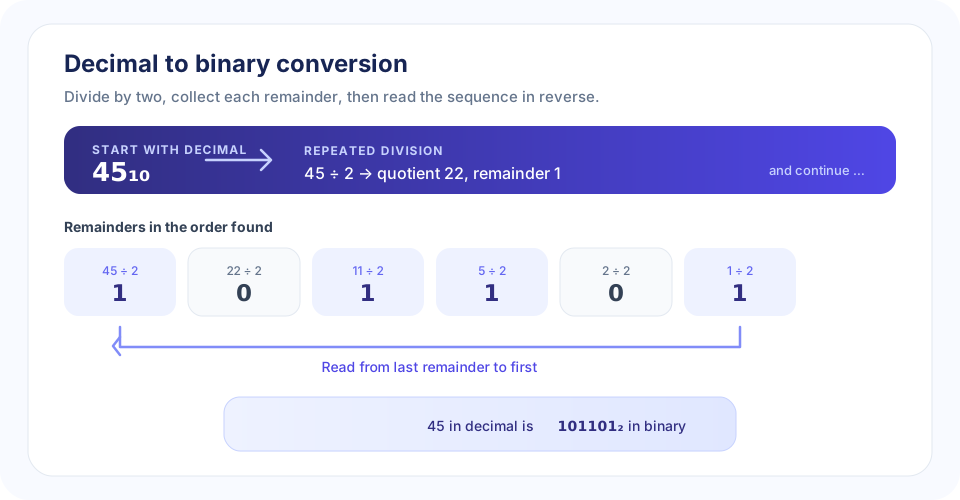
For a positive whole number, repeatedly divide by 2 and keep each remainder. Every remainder is either 0 or 1, exactly the digits used in binary. The first remainder is the rightmost (least significant) bit, so the list must be read in reverse when the divisions finish.
- Start with the decimal value. Divide it by 2.
- Record the remainder. An even quotient leaves remainder 0; an odd quotient leaves remainder 1.
- Continue with the quotient. Divide the whole-number quotient by 2 and record its remainder.
- Stop at zero. The final division is the one whose quotient becomes 0.
- Read the remainders upward. This reversed sequence is the binary answer.
For 45, the divisions are 45 ÷ 2 = 22 remainder 1; 22 ÷ 2 = 11 remainder 0; 11 ÷ 2 = 5 remainder 1; 5 ÷ 2 = 2 remainder 1; 2 ÷ 2 = 1 remainder 0; and 1 ÷ 2 = 0 remainder 1. The remainders in the order found are 101101, and reversing that order gives 101101₂. The illustration lays out each step.
“The remainder order is the key: record from rightmost bit to leftmost bit, then reverse the list to write the binary number.”
A Second Method: Build the Number from Powers of Two
You can also find the binary digits by expressing the decimal value as a sum of powers of 2. For 45, the largest power of 2 that fits is 32. Subtracting 32 leaves 13; subtracting 8 leaves 5; subtracting 4 leaves 1; and subtracting 1 leaves 0. The used powers are 32, 8, 4, and 1.
Write one bit for every power position from 32 down through 1. The positions 32, 8, 4, and 1 are included, while 16 and 2 are skipped. This produces 101101. The method is useful for checking a result and for understanding why each binary digit has its particular value. Repeated division is generally easier when converting a number without first identifying its powers.
| Binary position from right | Power of 2 | Decimal value |
|---|---|---|
| 0 | 2⁰ | 1 |
| 1 | 2¹ | 2 |
| 2 | 2² | 4 |
| 3 | 2³ | 8 |
| 4 | 2⁴ | 16 |
| 5 | 2⁵ | 32 |
| 6 | 2⁶ | 64 |
Worked Decimal-to-Binary Examples
Convert 13 from decimal to binary
Divide 13 by 2 to get 6 remainder 1; then 6 gives 3 remainder 0; 3 gives 1 remainder 1; and 1 gives 0 remainder 1. Read the remainders from bottom to top: 13₁₀ = 1101₂. Check by place value: 8 + 4 + 0 + 1 = 13.
Convert 10 from decimal to binary
The repeated divisions produce remainders 0, 1, 0, and 1 when recorded from first to last. Reverse them to get 10₁₀ = 1010₂. The binary one-bits correspond to 8 and 2, whose sum is 10.
Convert 25 from decimal to binary
Repeated division produces remainders 1, 0, 0, 1, and 1. Reading upward gives 25₁₀ = 11001₂, which checks as 16 + 8 + 1.
Convert 100 from decimal to binary
Decimal 100 is 1100100₂. Its one-bits represent 64, 32, and 4, and 64 + 32 + 4 = 100. Internal zeros are important because they preserve the positions of the other bits.
| Decimal (base 10) | Binary (base 2) | Check using powers of 2 |
|---|---|---|
| 0 | 0 | 0 |
| 1 | 1 | 1 |
| 2 | 10 | 2 |
| 5 | 101 | 4 + 1 |
| 10 | 1010 | 8 + 2 |
| 13 | 1101 | 8 + 4 + 1 |
| 25 | 11001 | 16 + 8 + 1 |
| 45 | 101101 | 32 + 8 + 4 + 1 |
| 100 | 1100100 | 64 + 32 + 4 |
Using the Online Decimal to Binary Converter
This online decimal to binary conversion tool automates the same base conversion. To convert decimal to binary, type a non-negative whole number and select Convert. For a batch, enter values with spaces between them, such as 10 13 45. The result contains one binary value for each input number, in order. Whether converting decimal to binary by hand or using a converter from decimal to binary, reverse the recorded remainders to write the result.
- Use decimal digits 0 through 9 for each value.
- Use spaces—not commas—to separate multiple values.
- Enter whole numbers only. Fractions, negative values, and mixed text are rejected.
- Keep the full input within 500 characters.
- Keep every individual value at or below 9007199254740991.
- Select Copy to clipboard to copy the output, or Clear to reset both fields.
- Press Ctrl + Enter while in the input field to convert without selecting the button.
The numeric limit protects accuracy. JavaScript can represent all integers exactly up to 2⁵³ − 1, but not every larger integer. Rejecting values outside that range helps prevent a rounded decimal value from being presented as an exact conversion. For calculations beyond the limit, use a converter based on arbitrary-precision integer arithmetic.
Common Conversion Mistakes
- Reading remainders in the wrong direction: The first remainder is the rightmost bit. Reverse the sequence to write the final result.
- Stopping before the quotient is zero: Continue dividing the quotient until the last step yields zero.
- Dropping an internal zero: Zeros hold place positions. Removing one changes the represented value.
- Confusing the input and output bases: This page accepts decimal and returns binary. For binary input and a decimal result, use the reverse converter.
- Entering punctuation or fractions: The tool expects unsigned whole numbers, not values such as
1,000,-8, or2.5. - Exceeding exact integer precision: A long decimal string can look valid but still exceed the calculator’s documented maximum.
Leading zeros are different: they do not change a decimal number’s value. For example, 00013 converts to the same binary result as 13, which is 1101.
Decimal-to-Binary Conversion and Other Bases
Binary is convenient for describing values in digital systems because each bit has two possible states. Hexadecimal offers a shorter way to write groups of binary digits: each hexadecimal digit corresponds to four bits. Decimal remains familiar for everyday quantities and many user-facing measurements. Converting between bases lets you inspect the same integer in the notation best suited to a task.
Use a converter that matches both the source and destination bases. Decimal to HEX changes a base-10 value to base 16. HEX to Binary converts hexadecimal digits to binary, while Binary to HEX performs the reverse. HEX to Text interprets hexadecimal character values as text, which is a different task from converting a number between bases.
“Before converting, identify what the input represents and what format you need at the end; the direction determines the right tool.”
Conclusion: Convert Decimal Values by Dividing by Two
To convert a non-negative decimal whole number into binary, divide by 2, record the remainders, and read them in reverse when the quotient reaches zero. Check the answer by adding the powers of 2 represented by its 1 bits. SnapZain’s converter applies this process to single values or space-separated batches, with a 500-character input limit and a maximum exact integer value of 9007199254740991. Use the matching converter when your starting or target base is different.


