HEX to Binary: Convert Base 16 into Base 2
Hexadecimal (HEX) and binary are positional number systems used to write the same numeric values in different ways. Hexadecimal is base 16 and uses digits 0–9 plus letters A–F. Binary is base 2 and uses only 0 and 1. The SnapZain hex to binary converter changes a hexadecimal integer into its binary representation, with an optional 0x prefix and space-separated batch input.
For example, hexadecimal 2D becomes binary 101101. Each hex digit maps directly to a four-bit group: 2 is 0010 and D is 1101. Joining them gives 00101101; the calculator removes zeros from the far left, so the displayed answer is 101101. Zeros between other bits remain in place.
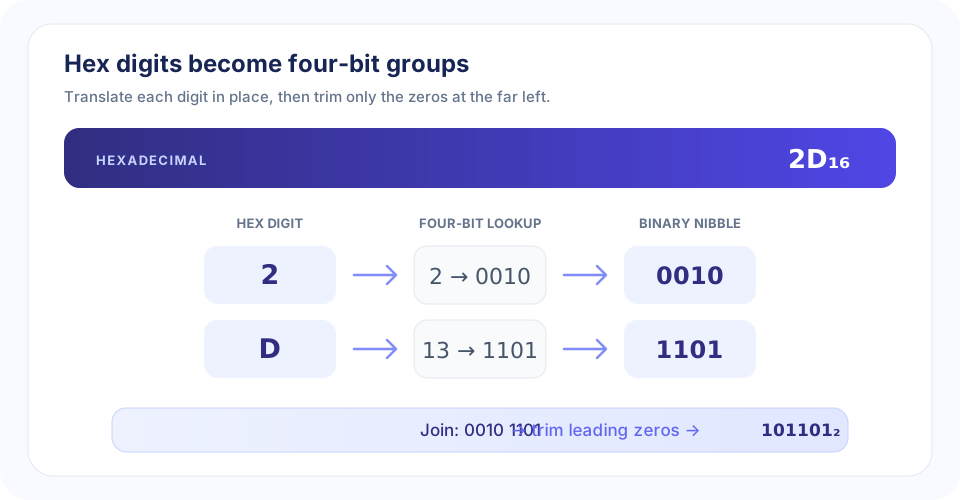
How to Convert Hex to Binary with Four-Bit Groups
The easiest way to convert hex to binary is to look up each digit separately. One hexadecimal digit represents a value from 0 to 15, which fits in exactly four binary bits. This four-bit group is often called a nibble. Keep the digits in their original order, translate them one by one, and join the groups.
- Read the hexadecimal input. Use digits 0–9 and letters A–F. Treat an initial 0x or 0X as a prefix, not as part of the number.
- Replace each hex digit. Convert it to its four-bit equivalent using the table below.
- Join the binary groups. Do not rearrange digits or remove zeros between groups.
- Choose the output width. Keep all four-bit groups for a fixed nibble width, or remove zeros only from the start for the shortest number.
For 3A, digit 3 maps to 0011 and A maps to 1010. Together they form 00111010. The converter returns 111010, the same value without leading zeros. If a task expects exactly eight bits, retain or add the two initial zeros.
“Translate each hexadecimal digit independently; preserve the order and every zero inside the number.”
Hex to Binary Table
This lookup table gives the four-bit binary group for every possible hexadecimal digit. It is the core reference for conversion of hex to binary by hand.
| Hex digit | Decimal value | Four-bit binary | Hex digit | Decimal value | Four-bit binary |
|---|---|---|---|---|---|
| 0 | 0 | 0000 | 8 | 8 | 1000 |
| 1 | 1 | 0001 | 9 | 9 | 1001 |
| 2 | 2 | 0010 | A | 10 | 1010 |
| 3 | 3 | 0011 | B | 11 | 1011 |
| 4 | 4 | 0100 | C | 12 | 1100 |
| 5 | 5 | 0101 | D | 13 | 1101 |
| 6 | 6 | 0110 | E | 14 | 1110 |
| 7 | 7 | 0111 | F | 15 | 1111 |
The table always shows four bits per digit, including zeros at the beginning of a nibble. Those nibble zeros preserve the digit’s width while you are grouping. When producing the shortest binary value for the entire number, only the zeros before its first 1 can be omitted.
Worked Hex-to-Binary Examples
A hex to binary
Hex A equals four-bit binary 1010. It has no leading zero, so both fixed-nibble and minimal forms are 1010.
D hex to binary
Hex D maps to 1101. The letter D represents decimal 13, which is 8 + 4 + 1 in binary place values.
0A hex to binary
Convert 0 to 0000 and A to 1010. The full grouped result is 00001010; after leading-zero trimming, the calculator displays 1010.
0F hex to binary
Hex digit F maps to 1111, while the leading zero maps to 0000. Thus 0F becomes 00001111 in two nibbles, or 1111 as a minimal result.
0x08 and 0x10 hex to binary
The 0x prefix is an optional marker. For 0x08, the digit 8 maps to 1000 and the preceding zero only adds leading bits, so the output is 1000. Hex 0x10 is 0001 0000, which trims to 10000.
100 and 1000 hex to binary
Hex 100 is 0001 0000 0000 as three groups, yielding minimal binary 100000000. Hex 1000 is 0001 0000 0000 0000, or 1000000000000 without its leading zeros.
| Hexadecimal input | Four-bit groups | Converter output | Decimal value |
|---|---|---|---|
| 1 | 0001 | 1 | 1 |
| 10 | 0001 0000 | 10000 | 16 |
| 11 | 0001 0001 | 10001 | 17 |
| 0A | 0000 1010 | 1010 | 10 |
| 0F | 0000 1111 | 1111 | 15 |
| 100 | 0001 0000 0000 | 100000000 | 256 |
| 111 | 0001 0001 0001 | 100010001 | 273 |
| 1000 | 0001 0000 0000 0000 | 1000000000000 | 4096 |
Using the Online HEX to Binary Calculator
This online hex to binary calculator follows the digit-to-nibble method and returns the minimal binary value. Enter one hex number or several complete values separated by spaces. For example, 0A 0F FF produces 1010 1111 11111111. You can use uppercase or lowercase letters, and each token may begin with 0x.
- Use hexadecimal digits 0–9 and A–F only.
- Use spaces to separate values; commas are not supported.
- The 0x or 0X prefix is optional and is removed before conversion.
- Each value can contain up to 13 hex digits, not including its prefix.
- The whole input field accepts up to 500 characters.
- The output omits leading zeros; preserve or add them if a fixed-width bit string is required.
- Select Copy to clipboard or Clear; Ctrl+Enter also runs the conversion from the input field.
Thirteen hexadecimal digits contain at most 52 bits, safely within JavaScript’s exact integer range. The digit-by-digit mapping also preserves the numeric value because each hex position represents a power of 16, equal to four consecutive binary place values.
HEX to Binary in Python
Python can parse a hexadecimal string as an integer and format that value in base 2. This short example converts 2D and optionally requests an eight-bit display:
value = int("2D", 16)
minimal_bits = format(value, "b")       # 101101
eight_bits = format(value, "08b")       # 00101101
The width in the format string controls left-padding; it does not change the numeric value. Python integers can grow beyond fixed machine-word sizes, while this page’s browser calculator deliberately limits each value to 13 hex digits.
C HEX to Binary Conversion
In C, a hexadecimal digit can be translated with a lookup table or by parsing the value and inspecting its bits. The following small example prints the four binary bits for one valid hex digit:
#include <stdio.h>

int main(void) {
    unsigned int digit = 0xD;
    for (int bit = 3; bit >= 0; --bit) {
        putchar(((digit >> bit) & 1u) ? '1' : '0');
    }
    putchar('\n');  /* prints 1101 */
    return 0;
}
This demonstrates the core of C hex to binary conversion for a single nibble. To handle a full string, validate each character, map it to a value from 0 to 15, and print its four bits in the original order. Decide whether to retain all nibble padding or trim only the leading zeros from the complete result.
Hexadecimal, Binary, and Text Are Different Representations
Hex-to-binary conversion changes how a numeric value is written. Text conversion has another step: it interprets a sequence of bits or bytes as character codes under a defined encoding. For example, the hex string 41 converts numerically to binary 1000001; interpreting byte 0x41 as ASCII yields the character A. The number-base result and the decoded text answer separate questions.
Use HEX to Text when hexadecimal byte values should become characters. Binary to ASCII interprets binary codes as ASCII characters. ASCII to Binary converts text characters into binary codes, while ASCII to Text handles ASCII code values as text. Choose based on the input format and whether you need a numeric bit string or readable text.
“Hex digits map neatly to four bits each; character decoding is a separate interpretation step.”
Conclusion: Convert Hex Digits into Binary Nibbles
To convert hex to binary, translate every hexadecimal digit to its four-bit equivalent, keep the order, and join the groups. Only leading zeros may be removed when you want the shortest result; internal zeros must remain. SnapZain’s converter accepts optional 0x prefixes, multiple space-separated values, up to 13 hex digits per value, and up to 500 input characters. Use a text or ASCII converter instead when the goal is to interpret character data.


