Sentence Checker: Review Basic Writing Patterns
The SnapZain sentence checker gives you a quick way to scan text for a few visible patterns. Paste text into the checker and select Check sentences. It splits the text into sentence-like pieces and reports whether each piece may be very short, written in all caps, missing a likely ending mark, or contain a repeated word.
These are basic reminders, not a full grammar or proofreading service. The tool does not understand sentence meaning, identify every grammar error, or reliably distinguish a run-on sentence from a correctly punctuated one. A flag can be intentional, and a clean result does not prove that the sentence is correct. Use the notes as prompts for your own review.
Because it uses a few simple browser-side rules, the checker is most useful for quick checks of ordinary English text. For important writing, read the whole passage in context, confirm facts and punctuation, and use a dedicated grammar editor or qualified reviewer if you need a comprehensive assessment.
How To Check For Sentence Issues
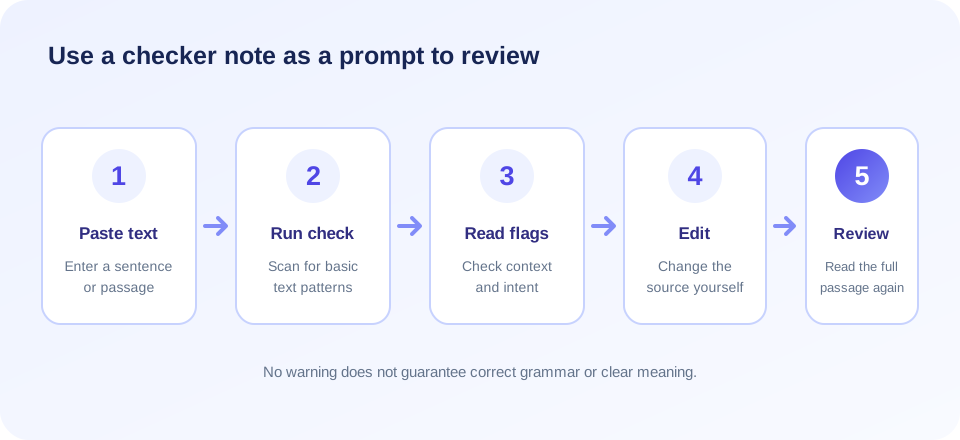
To check for sentence patterns with the page, enter a passage and follow this routine:
- Paste your writing. You can enter one sentence, a paragraph, or multiple paragraphs in the text box.
- Select Check sentences. The browser examines the submitted text using its current punctuation and word-pattern rules.
- Read each result row. Rows are numbered and show a short excerpt of the detected sentence along with any notes.
- Confirm each note. Decide whether the flag points to a real issue or a valid choice such as a heading, acronym, or deliberate repetition.
- Edit the source yourself. The checker does not change the input, so revise the original text and review the complete passage again.
The checker processes the text you enter in the page; it does not upload a document or modify a file. Its output is a set of pattern-based notes, not a corrected version. If you need to compare drafts, save your original separately before editing.
What The Sentence Check Looks For
The tool currently checks a small group of heuristics. Knowing exactly what each one does helps prevent a simple indicator from being mistaken for a language judgment.
| Flag | Current rule in brief | Why it needs human review |
|---|---|---|
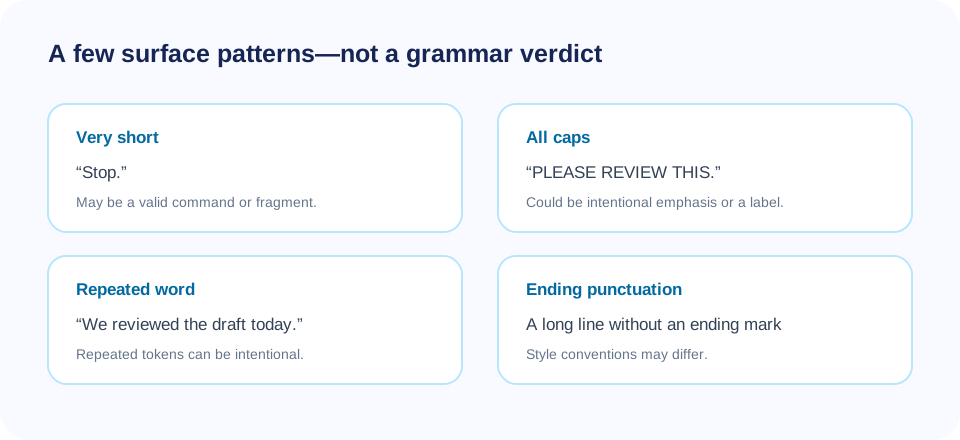
| Very short | Flags a detected sentence with fewer than three word-like tokens. | Headings, answers, and commands can be intentionally brief. |
| All caps | Flags text longer than six characters if it is entirely uppercase and contains an English A–Z letter. | Acronyms, labels, and headings may correctly use capitals. |
| No ending . ! ? | For text longer than 40 characters, flags if it does not end with a supported period, exclamation mark, question mark, or ellipsis pattern. | Titles, bullets, quotations, and other styles may omit final punctuation by convention. |
| Repeated word | Flags a repeated word token anywhere within one detected sentence. | Repeated words are not necessarily adjacent or erroneous; they may be deliberate. |
The implementation labels a row “OK — no basic flags” if none of these rules triggers. “OK” means only that no listed pattern was found. It is not a guarantee about grammar, spelling, clarity, factual accuracy, or complete-sentence structure.
Check My Sentence: Read The Result In Context
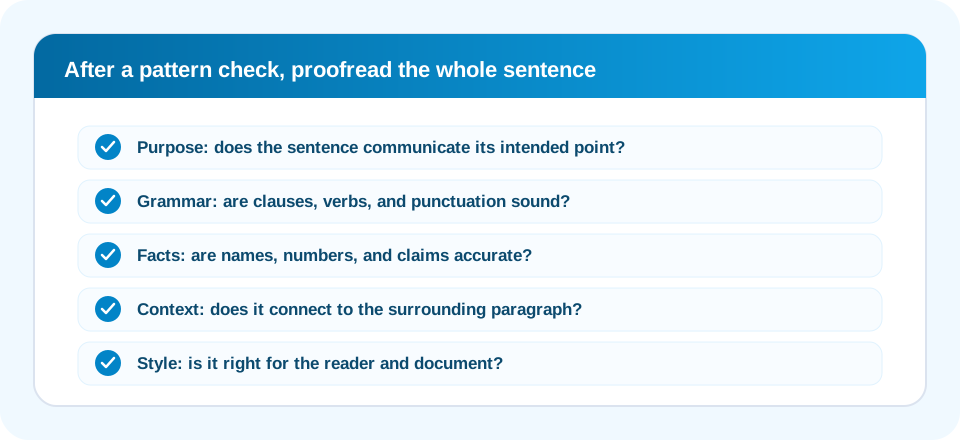
If you want to check my sentence, start by identifying its purpose. Is it making a claim, asking a question, giving an instruction, or connecting two ideas? A short sentence can be complete, and a long sentence can be grammatically sound. Length alone does not determine correctness.
The “very short” heuristic flags detected text with fewer than three word-like pieces. “Stop.” is a complete imperative in many contexts, while “The report” may be a fragment depending on the surrounding text. The checker cannot tell the difference because it does not parse subject and predicate, read neighboring sentences, or understand the writer’s intended meaning.
Use the flag as a reminder to look at the sentence. If it is a heading, label, answer, or intentional fragment, it may need no change. If the reader needs a complete thought, add the missing subject, action, or explanation. Consider the document’s style before adding punctuation or extra words.
Run On Sentence Checker: What This Tool Does Not Detect
People often search for a run on sentence checker when they need help separating independent clauses. This SnapZain checker does not reliably detect run-on sentences. It splits text at periods, exclamation marks, or question marks followed by whitespace, then checks each resulting segment for its limited flags. It does not analyze clauses, conjunctions, or sentence boundaries semantically.
A run-on can happen when independent clauses are joined without appropriate punctuation or a conjunction. A genuine review requires understanding which parts can stand as complete thoughts and how they are related. A short rule-based check cannot reliably infer that structure. It may overlook a run-on without punctuation, or split a valid abbreviation followed by a space into misleading pieces.
When checking for a possible run-on, look for two ideas that could each form a sentence. Depending on the intended relationship, you might use a period, semicolon, or a comma together with a coordinating conjunction. Do not insert punctuation mechanically; preserve the meaning and verify that the relationship between the clauses is clear.
People who search “check run on sentences” should use a tool that explicitly analyzes clauses, or inspect each independent clause themselves. This page’s punctuation-based sentence splitting is not that kind of run-on analysis.
“A checker can point to a pattern; a reader decides what the sentence means.”
Grammar Check Sentence: Useful Limits To Know
A search for grammar check sentence may imply a full grammar engine, but this page does not provide one. It does not check subject–verb agreement, verb tense, articles, prepositions, spelling, comma rules, parallel structure, or whether a pronoun has a clear reference. The browser’s own spellcheck behavior may be available in the text box, but that is separate from the tool’s result rows.
Grammar depends on context and intended style. A sentence fragment may be acceptable in a headline or conversational message but unsuitable in a formal report. A repeated word may be an error in one paragraph and necessary emphasis in another. A checker that only sees punctuation and tokens cannot reliably decide these questions.
For a thorough check, read the sentence aloud, inspect how it fits the paragraph, and use a grammar reference or editor appropriate to your language. For high-stakes text, ask a qualified person to review it. Treat the tool’s flags as a narrow first pass rather than as a substitute for proofreading.
If you check your sentence here, remember that it is not a complete sentence checker: a result with no flags is not a certificate of grammatical completeness. The checker does not identify a missing main verb or decide whether a dependent clause stands alone.
Sentence Structure Checker: Understand Its Boundaries
A true sentence structure checker may inspect clauses, phrase relationships, and grammatical roles. The SnapZain tool does not perform that kind of analysis. It does not identify the subject or predicate, tell whether a clause is dependent, or explain how one sentence relates to the next. It checks a few textual patterns and displays notes.
To check my sentence structure manually, locate the main subject and verb, then ask whether the sentence communicates a complete idea. Check that modifiers sit near the words they describe, pronouns have clear references, and transitions express the intended relationship between clauses. If a sentence carries too many ideas, divide it and make the connection explicit.
Do not make every sentence the same length or shape just to satisfy a formula. Variation can improve rhythm, while parallel structure can make related items easier to compare. The best structure depends on purpose, audience, and genre; a generic heuristic cannot determine those choices.
Repeated Words And Sentence Check Results
A sentence check may highlight repetition, but this tool’s implementation does not limit that flag to adjacent duplicate words such as “the the.” It tracks tokens within a detected sentence and adds a repeated-word note when a token appears again. That means ordinary words repeated naturally later in a sentence may also trigger a result.
The checker removes most punctuation before identifying tokens and uses case-insensitive matching. This is a simple method, not a full linguistic tokenizer. A repeated word in a quotation, a technical phrase, or an intentional rhetorical pattern may be correct. Conversely, unusual punctuation or word forms may affect what the tool sees.
When a repeated word is flagged, read the whole sentence. If the repetition is accidental, rewrite or remove the extra word. If it is intentional or needed for clarity, keep it. Avoid replacing a precise word with a vague synonym just to make the counter show no warning.
Free Sentence Checker: Simple First Pass, Not Final Approval
A sentence checker free option can be useful for a quick scan without installing an editor. This page provides basic pattern notes in the browser. A free sentence checker does not automatically mean full grammar coverage, professional editing, or guaranteed correctness; compare tools by their actual functions and limitations.
The checker’s logic runs in client-side JavaScript and does not send the entered passage to a sentence-checking endpoint. The page is still a website, so review site privacy information and your organization’s rules before entering confidential information. Use an approved offline editor when content is sensitive or restricted.
Keep an untouched copy if you are working on important text. The checker does not alter the source, but any manual revision you make afterward may change it. For a final review, look at the complete passage rather than considering each row in isolation; sentence meaning often depends on the surrounding paragraph.
Sentence Splitting, Punctuation, And Languages
The tool divides the input whenever a period, exclamation mark, or question mark is followed by whitespace. This approach works for many ordinary examples but can misread abbreviations, initials, decimal numbers, quoted speech, and unconventional punctuation. A period in an abbreviation can look like a sentence boundary to a regular expression, while a sentence without terminal punctuation may remain attached to nearby text.
The all-caps rule relies on English A–Z characters, and the token pattern is designed around common word characters. The text area is marked as English. Other languages may use different word separators, capitalization systems, punctuation, or sentence-ending marks, so results should not be treated as reliable language analysis outside the supported assumptions.
The checker does not impose a visible maximum input length in its client code. Very large passages may still be affected by browser memory or device performance. If the output becomes difficult to review, divide the work into logical sections and keep paragraph context available while checking.
A Practical Proofreading Routine
Use the tool as one step in a broader review, not as the whole process. A practical proofreading routine can include the following:
- Confirm the purpose. Make sure each sentence supports the point of the paragraph.
- Review flags individually. Decide whether a warning is relevant before editing.
- Check grammar and punctuation separately. The checker does not cover them comprehensively.
- Verify facts and names. Pattern checks cannot validate the information in a sentence.
- Read the complete passage aloud. Listen for confusing transitions, missing context, and awkward rhythm.
- Preserve the intended tone. A fragment or repetition may be deliberate in informal writing.
- Ask for another review when stakes are high. A subject expert can identify meaning or domain issues a basic tool cannot see.
Proofreading is not just removing warnings. Clear writing serves its reader and purpose, and sometimes that means keeping a short sentence, an acronym in capitals, or a repeated term that prevents ambiguity.
Related Text And PDF Tools
Checking sentence patterns is separate from converting document formats. To create a PDF from plain text, use TXT to PDF. For structured data extracted from a PDF, visit PDF to JSON. You can also convert PDF content to PDF to Markdown or PDF to XML.
These tools do not correct grammar or validate sentence structure. Text extraction and conversion can change line breaks or reading order, so proofread extracted text before relying on it. Keep the original document and verify that the converted output contains the intended words and formatting.
| Task | Related tool | Review after processing |
|---|---|---|
| Create a PDF from text | TXT to PDF | Page breaks, text rendering, and document completeness. |
| Represent extracted PDF data in JSON | PDF to JSON | Fields, reading order, and any extraction gaps. |
| Convert PDF text to Markdown | PDF to Markdown | Headings, lists, links, and paragraph boundaries. |
| Convert PDF content to XML | PDF to XML | Structure, tags, and whether the desired text was captured. |
Sentence Checker Summary
The SnapZain sentence checker flags a few simple patterns: very short text, all-caps lines, some missing ending punctuation, and words repeated within a detected sentence. It does not provide a complete grammar check, semantic sentence-structure review, or reliable run-on detection. It also does not automatically rewrite or correct your text.
Conclusion
Use each result as a prompt to inspect the sentence in context. Confirm whether a flag is meaningful, proofread independently, and preserve the original intent. A basic sentence check can help focus attention, but your judgment—or a suitable professional review—remains essential for accurate writing.


