Paragraph Rewriter: Explore A Clearer Draft
The SnapZain paragraph rewriter gives you a place to paste one or more text blocks and explore a mechanically altered version. Choose Standard, Formal, Shorten, or Expand, then click Rewrite paragraphs. The original and result are shown in separate panels, alongside approximate word and character counts. Blank lines separate paragraphs in the input and are preserved in the output.
Before using it, understand the implementation: the current form runs a fixed list of word and phrase substitutions in JavaScript in your browser. It does not send text to an AI model, understand an argument, or independently generate supporting details. Although Standard mode has an “AI” badge in the interface, its current code applies predefined replacements. That badge should not be taken as a claim that the form uses contextual AI.
A rule-based draft may still prompt you to reconsider a repeated word or look at your paragraph from another angle. But substitutions are not editorial judgment. Some terms have several meanings, and replacements can affect certainty or tone. Review the result against your original, correct awkward language, and verify that claims and qualifications still say what you intend.
How To Rewrite A Paragraph With The Tool
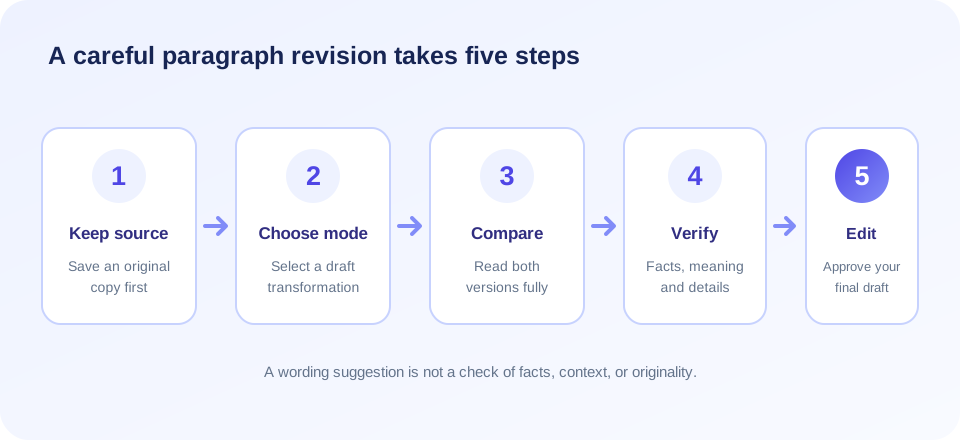
If your goal is to rewrite paragraph text without losing its purpose, start by keeping an unchanged copy. Then follow these steps:
- Paste your passage. Enter one paragraph or several. Put a blank line between separate paragraphs; a single block without blank lines is treated as one paragraph.
- Select a mode. Choose Standard for substitutions, Formal for contraction expansion plus substitutions, Shorten for filler removal and possible truncation, or Expand for a repeated version.
- Click Rewrite paragraphs. The page processes each blank-line-separated block in your browser and displays the result in the output panel.
- Compare the two versions. Look for changes to numbers, names, terms, evidence, conditions, and the relationships between ideas.
- Revise and proofread. Restore important details, remove awkward phrases, and make sure the paragraph still reads naturally in its larger document.
The tool does not show a separate copy button in the visible form; select the output text and copy it with your browser’s normal controls. Word counts split on whitespace, and character counts use JavaScript string length. They are approximate and can differ from a word processor, especially with emoji, combined characters, punctuation, or languages that do not use spaces in the same way.
What The Paragraph Rewrite Modes Actually Do
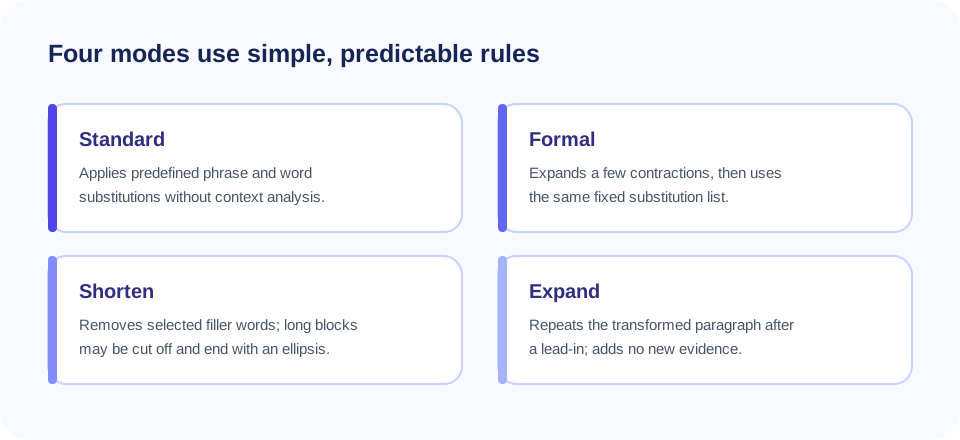
Each mode has a specific, limited transformation. A mode name does not promise a particular writing quality. The following table summarizes the current behavior and the risks to check before using a result.
| Mode | Current behavior | Review for |
|---|---|---|
| Standard | Applies a fixed list of phrase and word substitutions. Blocks up to 150 characters have at most six replacements; longer blocks can receive every matching rule. | Nuance changes, odd synonyms, and claims that have become stronger or weaker. |
| Formal | Expands a small set of contractions, then applies the same substitution list. | Whether the whole paragraph really suits the reader and sounds professional. |
| Shorten | Removes selected filler words and compresses whitespace. If more than 12 words remain, keeps roughly the first 60% and adds an ellipsis. | Missing conclusions, exceptions, examples, instructions, and supporting points. |
| Expand | Applies substitutions, then repeats the paragraph after “To elaborate further,”. | Duplicated content; no new explanation or researched facts are added. |
The replacement list includes examples such as “simple” to “straightforward,” “good” to “excellent,” “use” to “utilize,” and “for example” to “for instance.” Those terms are not interchangeable in every context. “Good” is not always “excellent,” and “utilize” can sound unnatural where “use” is clearer. The software does not check whether a replacement preserves a technical definition or the author’s intended emphasis.
Standard mode can leave a paragraph unchanged if it contains no listed phrase. Conversely, it may change a matching word even if that word has a different sense in the sentence. A small number of substitutions should not be mistaken for a complete rewrite or quality review.
Rewrite My Paragraph: Keep The Meaning In View
When you ask a tool to rewrite my paragraph, focus first on the message rather than the number of changed words. Identify the central point, the evidence that supports it, and any limitations or conditions that make it accurate. Keep those pieces even if you change the order or shorten the wording.
For example, “The update may reduce processing time for some files” makes a limited claim. Changing “may” to “will” removes uncertainty; dropping “some” makes the scope broader; deleting “for files” may leave unclear what is affected. A seemingly small edit can turn a careful observation into a guarantee. Check modal words, quantities, exceptions, and scope after every transformation.
Paragraphs often combine a topic sentence, support, and a transition. If you reorder these parts, ensure that pronouns still have clear references and that each supporting detail still relates to the main point. Keep citations attached to the facts or ideas they support. A fluent-looking paragraph can still be incomplete or misleading if its evidence no longer matches its claim.
“A useful rewrite protects the idea first and improves the wording second.”
How To Rewrite A Paragraph Manually
For more control than a paragraph rewriting tool can provide, use a deliberate editing routine. First, write a short note describing the paragraph’s purpose. Then mark details that must remain: names, figures, conditions, evidence, definitions, and citations. With those boundaries clear, revise the structure and wording in your own voice.
- Lead with the point. Put the paragraph’s main idea where a reader can find it quickly.
- Group related details. Keep supporting facts or steps together instead of jumping between topics.
- Remove true repetition. Delete an idea only when it is repeated without adding emphasis or context.
- Prefer familiar words. A simple, precise term is often better than an elaborate synonym.
- Break up overloaded sentences. Use more than one sentence when the paragraph contains several distinct claims.
- Read the paragraph in context. Check transitions with the text before and after it.
- Check source attribution. Keep quotations, citations, and references accurate and close to the ideas they support.
This approach is useful for reports, study notes, help documentation, and everyday drafts. It also helps you see whether a paragraph needs a real structural revision instead of a word swap. If you cannot summarize the point simply, pause and clarify the idea before polishing its sentences.
Free Paragraph Rewriter: What “Free” Does And Does Not Mean
A paragraph rewriter free option can be convenient when you need a quick drafting aid without installing software. The SnapZain form provides four modes and runs its current transformations in the browser. That does not mean that the result has been checked, that all languages are supported equally, or that every source text can be used without permission.
Searches such as free paragraph rewriter, rewrite my paragraph free, rewrite paragraph free, and free rewrite paragraph can lead to services that work in different ways. Compare the actual features, data handling terms, language support, and whether the product explains how suggestions are generated. “Free” alone does not establish privacy, accuracy, or permission to reuse content.
Similarly, an online paragraph rewriter may use a local rule list or a remote service. This implementation’s visible transformations run locally in the browser and do not send text to a paragraph-rewriting endpoint. Still, the web page itself is online; review the published privacy terms and never enter confidential data unless the service is approved for it.
Paragraph Rewriting Software And Brand Comparisons
People looking for paragraph rewriting software may compare products such as a notegpt paragraph rewriter or a grammarly paragraph rewriter. SnapZain is separate from those providers and is not affiliated with them. Product features can change; consult each company’s current official product information instead of assuming that a shared label means the tools work alike.
When you compare a paragraph rewriting tool, look for a clear description of its method, support for your language, an easy way to compare original and suggested text, appropriate privacy information, and control over final edits. If you need a contextual rewrite, verify that the provider actually offers that capability. The current SnapZain tool uses predefined substitutions and does not interpret context or generate independently reasoned prose.
The interface’s AI badge can be confusing, so this page states the behavior plainly: the visible client-side code applies replacements, contraction changes, filler removal, truncation, or repetition. It does not connect to an AI generation endpoint. Regardless of the product, no automated output should be treated as fact-checked or ready to publish without review.
Rewrite Paragraphs For Different Readers
The same idea may need a different structure for a customer, a colleague, a student, or a technical specialist. Before you rewrite paragraphs, decide what the reader already knows and what action or understanding the text should support. The right edit might use a concrete example, define a term, shorten a long lead-in, or move a condition closer to the statement it limits.
A formal tone is not automatically better. In some contexts, direct and familiar language is easier to understand. In others, careful terminology and qualified claims are essential. Do not replace a technical word just to make a paragraph look different. If a key term has a defined meaning, preserve it or ask a subject-matter expert before changing it.
To rewrite a paragraph for clarity, inspect the flow of ideas as well as individual vocabulary. Make sure a reader can tell what “it,” “they,” or “this result” refers to. Check that transitions show the intended relationship—cause, contrast, sequence, or example. A substitution-only tool cannot determine these relationships.
People also search for “rewrite a paragraph for me,” “rewrite paragraph tool,” or “rewrite paragraph generator.” Those phrases can refer to quite different services. This SnapZain page transforms text you provide with fixed rules; it does not generate a researched paragraph from a prompt or create new supporting ideas. If you choose to use any paragraph rewriting software, check the actual workflow and review its output yourself.
Shorten And Expand: Check The Actual Result
Shorten and Expand have especially literal behavior. In Shorten mode, the tool removes the words “really,” “actually,” “basically,” “just,” “very,” and “quite,” compresses whitespace, then checks the remaining word count. If there are more than 12 words, it keeps the first portion—approximately 60 percent—and adds an ellipsis. It does not decide which ideas matter most.
That can remove a conclusion, safety note, exception, or citation near the end. Use Shorten only as a rough experiment and compare carefully with the original. If you need a genuine summary, identify the main point and supporting evidence yourself; do not assume a prefix cut is a meaningful summary.
Expand mode first applies the substitution list, then repeats the same changed paragraph after “To elaborate further,”. The second passage is not a new explanation, example, or evidence. The result may be longer, but length is not the same as detail. Remove duplicated text and write any additional explanation based on verified information.
Paragraph Rewriting And Originality
Paragraph rewriting is not a method for disguising copied writing. Changing a few words does not make another author’s work your own, remove a license requirement, or eliminate the need to cite a source. If the idea or information comes from elsewhere, follow the citation conventions and permissions that apply to the context.
For school assignments, follow your instructor’s rules for editing assistance and disclose tool use when required. In professional documents, preserve records and sources and use only approved services for confidential text. For public content, check that an edit has not overstated evidence or removed an important qualification.
A responsible paraphrase begins with understanding the source, then explaining the idea in a genuinely independent structure and voice. Retain attribution when the idea is not yours. Do not use an automated rewriter to evade plagiarism detection or misrepresent authorship.
“Changing the wording does not change where an idea came from.”
Related PDF Tools
Rewriting text changes wording; document tools change file structure or format. If you need to save selected pages from a document, use Extract PDF Pages. To create a PDF from text, visit Text to PDF. For PDF content in HTML form, see PDF to HTML, and to turn HTML content into a PDF, use HTML to PDF.
These conversion tools do not rephrase a paragraph. Conversion can affect layout, tables, images, or text structure, so keep a copy of your source and inspect the final file. Choose a tool based on the task: edit prose for writing changes, and convert a document only when you need a different format.
| Goal | Useful action | Review after the action |
|---|---|---|
| Improve paragraph flow | Reorganize the topic sentence, supporting points, and transition. | Meaning, evidence, tone, and citations. |
| Save only some PDF pages | Use Extract PDF Pages. | Page selection, sequence, and completeness. |
| Create a PDF from text | Use Text to PDF. | Line wrapping, fonts, and page breaks. |
| Convert PDF content to HTML | Use PDF to HTML. | Text order, links, images, and layout. |
| Convert an HTML document to PDF | Use HTML to PDF. | Styles, images, page sizing, and print output. |
A Responsible Review Checklist
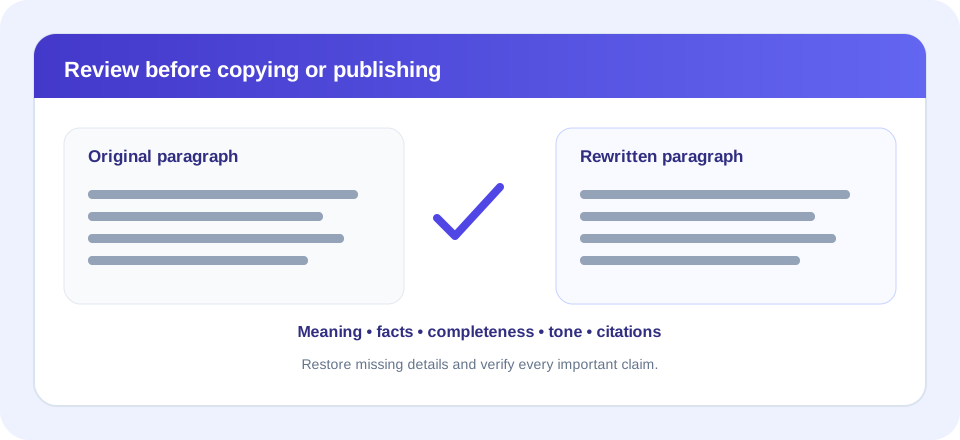
Before you copy a transformed passage into a report, essay, website, or message, compare it with the original. A brief review can catch changes that a counter or mode label cannot show:
- Main point: Does the new paragraph preserve the same central claim?
- Scope and certainty: Are words such as “some,” “may,” “must,” and “only” still correct?
- Evidence: Does each fact still support the claim it was attached to?
- Completeness: Did Shorten mode remove a condition, ending, or example?
- Repetition: Did Expand duplicate the paragraph instead of clarifying it?
- Readability: Are sentences grammatical, direct, and appropriate for the audience?
- Attribution: Are quotes, citations, permissions, and references preserved?
- Privacy: Was the text appropriate to enter into an online tool?
If any item is uncertain, do not accept the output as-is. Return to the source, consult a reliable reference, or ask a qualified reviewer. In high-stakes communication—such as legal, medical, financial, or safety instructions—get appropriate expert review rather than relying on automated wording changes.
Paragraph Rewriter Online: Privacy And Practical Limits
The current paragraph transformation function is client-side JavaScript and does not submit input to a paragraph-rewriting API. The page is still served by a website, so this detail should not replace reading the site privacy information or following your organization’s data-handling rules. Do not paste passwords, private customer records, protected health information, or confidential business material unless the service and your policies permit it.
The form’s visible code does not impose an explicit character cap, but very large inputs can still be limited by browser memory and device performance. For long documents, process manageable portions and preserve paragraph boundaries. The output panel is not a version-history system, so keep your source in a separate editor or file before trying modes that may truncate or duplicate text.
There is also no comprehensive proofreading, grammar score, plagiarism report, reference manager, or fact-checking service in the form. Use a dedicated editor for those tasks and consult subject experts for specialized content. When rewriting paragraphs, check each block in its full context; accurate descriptions help you decide when this lightweight rewriting aid is appropriate and when a different workflow is needed.
Paragraph Rewriter Summary
The SnapZain paragraph rewriter offers four browser-based modes for blank-line-separated text blocks. Standard and Formal apply fixed substitutions, Shorten removes selected fillers and may cut off the end, and Expand repeats the transformed paragraph after a lead-in. The form’s AI badge does not describe an AI model in the current code.
Conclusion
Use it to explore a draft, then compare every change with the original. Protect meaning, verify facts, restore omitted details, proofread for your audience, and cite sources appropriately. Whether you want to rewrite this paragraph for me, use a paragraph rewriter online, or rewrite paragraph online, the finished wording remains your responsibility.


