Small Text Generator: Superscript And Subscript Unicode
The SnapZain small text generator converts supported letters and numbers into Unicode superscript or subscript characters. Type or paste into the Plain text field, choose a style, and see the output update immediately. When it looks right, use Copy to place the result on your clipboard and paste it into a profile, message, caption, or other text field.
“Small text” can mean different things. This tool does not shrink the font size, install a typeface, or create typographic small capitals. It substitutes selected characters with separate Unicode code points that many fonts display above or below the normal text baseline. Because Unicode has no equivalent for every letter in these styles, some characters remain unchanged.
The result is therefore decorative text rather than a complete replacement for ordinary writing. Appearance varies by device, app, browser, and font. Search, screen readers, text-to-speech, and copy/paste may treat these code points differently from standard letters. Keep important messages readable and accessible, and use the Unicode output only where its styling is appropriate.
How To Make Small Text With This Tool
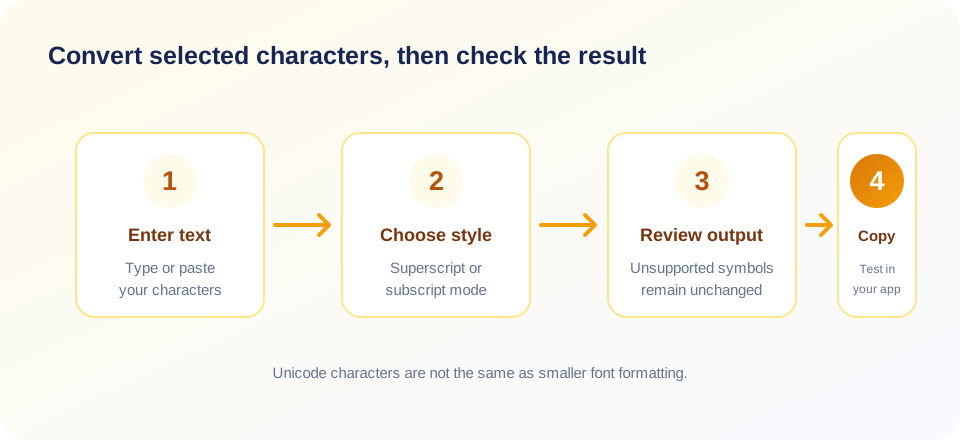
- Type or paste your text. The converter accepts a string, including letters, numbers, spaces, punctuation, and emoji.
- Choose Superscript or Subscript. Superscript characters generally sit above the baseline; subscript characters generally sit below it.
- Review the live output. The generated text appears as you type. Unsupported characters are passed through, so the whole line may not look uniformly small.
- Copy the result. Select Copy and check the on-screen feedback. If clipboard access is unavailable, the page may report that it could not copy.
- Test the destination. Paste into the app or document where you plan to use it and confirm that the characters render as expected.
As a small text generator online, this page updates the converted output in your browser while you type. Some visitors search for a “text small generator” to create decorative lettering; whatever the name, check the converted characters rather than assuming that every glyph becomes uniformly smaller.
The input and output counters show character counts based on JavaScript string length. Some visible symbols, including emoji, can consist of multiple code units, so their displayed count may not match a person’s idea of one character. The counts are practical indicators, not a measurement of visual width or reading time.
What Unicode Small Characters Mean
Unicode assigns code points to characters so text can be represented across software and writing systems. Superscript and subscript forms exist for many common digits and a selection of Latin letters. They are not simply regular letters rendered at a smaller size: they are distinct characters with their own text identity and typical positioning.
That distinction matters. A font-size change would keep the underlying character as an ordinary “a,” while this generator may replace it with a superscript “ᵃ” character. Some applications normalize, search, pronounce, or style those code points differently. A result that looks good in one profile preview may appear differently in a post, document, or screen reader.
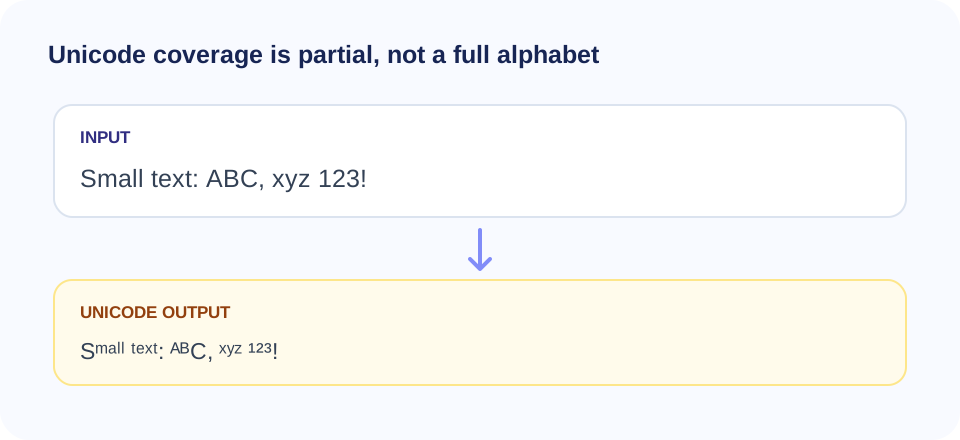
Unicode coverage is incomplete and asymmetric. For example, the tool’s superscript mapping does not include every uppercase letter, and its subscript mapping supports only a subset of lowercase letters and digits. The converter leaves unmapped characters as they were. The absence of a glyph is a property of the available Unicode mappings, not an error that can be solved by changing the font.
| Style | Typical appearance | Useful distinction |
|---|---|---|
| Superscript | Raised relative to the baseline. | Some digits and selected letters have Unicode forms; not every letter does. |
| Subscript | Lowered relative to the baseline. | Coverage is limited, especially for uppercase letters and many lowercase characters. |
| Small capitals | Capital-shaped letters rendered at a smaller typographic height. | This is a font feature or separate character set, not the superscript/subscript styles offered here. |
| Reduced font size | Ordinary text displayed smaller by formatting. | Requires a destination that supports rich-text or CSS styling; this generator does not apply font sizes. |
Small Letter Text Generator: Why Some Letters Stay Normal
A small letter text generator can only convert characters for which an equivalent or suitable Unicode character is included in its mapping. This tool supports selected lowercase and uppercase letters for superscript, and a smaller set for subscript. If you type a character with no corresponding map entry, it passes through unchanged. You may see a mixture of raised, lowered, and regular-sized text.
In superscript mode, the mapping includes many lowercase letters and selected uppercase letters, along with digits zero through nine. It does not contain every capital, and some letters may look unlike their standard counterparts. In subscript mode, only a subset of lowercase letters is mapped, alongside digits. An uppercase letter without a map remains an uppercase letter in the result.
Spaces, most punctuation, and symbols also pass through as typed. That preserves readability between words, but means punctuation will not be raised or lowered with the letters. The tool does not attempt to approximate unsupported characters with similar-looking symbols, which helps avoid misleading substitutions.
Small Caps Text Generator Is A Different Style
People searching for a small caps text generator or text generator small caps may be looking for capital-shaped letters that appear shorter than full capitals. Small caps are usually a typographic feature in a font. They are not the same as superscript, whose characters appear raised, or subscript, whose characters appear lowered.
This page does not convert text into typographic small capitals. It creates selected superscript or subscript Unicode output. If your intended design requires genuine small caps, choose a font or rich-text editor that supports that feature. If your platform accepts only plain text, be aware that Unicode lookalikes are not a universal substitute and may not cover all letters.
Likewise, “small” can refer to text rendered at a reduced font size. This generator does not control visual sizing in the destination. It changes character identity, not formatting. The receiving app decides how each Unicode glyph is displayed.
Small Text Font Generator: Unicode, Not A Font File
A small text font generator is a common way to describe decorative text tools, but this utility does not generate or embed a font. It maps supported input characters to Unicode superscript or subscript code points already defined by the Unicode standard. The selected font in the target app determines the final glyph design.
This means the output can be copied into many text fields without attaching a font file, but results are not guaranteed to match everywhere. A device may use a fallback font, display a box for an unavailable glyph, or position the character differently. Some platforms may restrict how they handle unusual Unicode characters in usernames, search fields, or forms.
If consistency is important—for example, in a logo, print design, or branded heading—use a design or document workflow with explicit font and layout controls. Unicode decorative text can be convenient for informal use, but it is not a substitute for typographic production.
Super Small Text Generator For Profiles And Captions
A super small text generator may be useful for a short decorative label, a playful caption, or an informal profile detail. Keep the use modest. When every word uses unusual Unicode, a short bio can become harder to scan, copy, search, or read with assistive technology. Ordinary text is usually the better option for names, directions, contact information, and essential announcements.
Before publishing, paste the output into the destination and view it on more than one device if the message matters. Check that numbers and punctuation are still clear and that no unsupported letter breaks the style unexpectedly. Do not assume that a character that looks like a small standard letter will be indexed or searched as that ordinary letter.
For accessibility, avoid using decorative Unicode as the only way to communicate emphasis, status, or meaning. A reader may hear a character name or a different pronunciation rather than the word you intended. Keep a plain-text alternative where practical and use semantic formatting in documents and web pages when available.
Discord Small Text Generator And Platform Compatibility
A Discord small text generator search often means someone wants decorative text to paste into a message, channel description, or profile. This generator creates Unicode characters rather than Discord-specific formatting, so it may display in a text field that accepts those code points. The appearance is controlled by Discord’s interface, operating system, and available fonts.
Compatibility is not guaranteed. An application may reject certain characters in a name, render a fallback glyph, normalize text, or handle search and accessibility differently. Test a short sample in the relevant place before using a longer string. Follow the platform’s current rules and avoid using unusual characters to impersonate another account, evade moderation, or make important notices difficult to read.
For ordinary emphasis in Discord, the platform’s supported formatting conventions may be clearer than Unicode substitutions. Choose a style based on whether readers can still understand and find the text, not just on how distinctive it looks in one preview.
Very Small Text Generator And Readability
Queries such as really small text generator and very small text generator may suggest the goal is to make content physically tiny. Unicode superscript or subscript characters do not let this page set a font size, and their visual size can vary. They may still be difficult to read, especially in long passages or on small screens.
Do not use decorative characters to hide terms, make disclosures hard to notice, or put important conditions in text that is difficult to perceive. For legal, financial, health, safety, or accessibility-related communication, use ordinary readable text and the formatting controls of a suitable document editor. Readability and clarity are more important than a visual effect.
If you want a typographically smaller but fully searchable line, use an editor that changes font size while retaining normal letters. That approach preserves the text’s underlying character identity, unlike Unicode substitution.
“Style works best when it adds personality without making the message harder to read.”
Small Font Text Generator For Everyday Writing
A small font text generator can sound like a tool that changes text size, but SnapZain’s generator does not apply a font size. It creates superscript or subscript characters and leaves unsupported input unchanged. Think of it as a Unicode character converter rather than a font or image generator.
This difference affects editing. A recipient cannot necessarily return converted letters to the exact original through normal formatting controls, because the code points themselves have changed. Some editors may provide character normalization or substitutions, but you should keep the source text separately rather than relying on the recipient to reverse the conversion.
For a document intended for editing, collaboration, translation, or search, preserve ordinary text and apply styling within the document. Use Unicode styles for short optional decoration, and keep an editable source copy whenever the exact original wording matters.
Privacy And The Copy Workflow
The current conversion function operates in the browser and maps characters locally; it does not send the entered string to a text-conversion endpoint. That statement describes the visible tool logic, not every aspect of the website’s operation. Review the site privacy information and follow your organization’s data rules before entering personal or confidential content.
Avoid pasting passwords, customer records, private correspondence, protected information, or unpublished business material into a website unless the service is approved for it. For sensitive strings, use a trusted offline editor. The Copy button uses the browser clipboard API when available and falls back to a browser copy command; clipboard access can be restricted by browser security settings or permissions.
Because output updates automatically, changing the style after typing converts the same input again rather than transforming the previous output. You can compare Superscript and Subscript by toggling the style while keeping the original input intact. Copy only after confirming that the selected style is the one you want.
Related PDF Conversion Tools
This generator changes selected text characters; it does not create or edit document files. If you need a spreadsheet saved as a PDF, visit CSV to PDF. To inspect document properties, use PDF Metadata. For Rich Text Format conversion, see RTF to PDF, or convert vector artwork using SVG to PDF.
These are distinct document workflows: CSV conversion formats tabular data, metadata tools inspect PDF properties, and RTF or SVG conversion creates PDF output from supported source files. They do not change the Unicode characters produced by this page. Keep original documents and inspect converted files for layout and content before sharing.
| Need | Suitable direction | What to verify |
|---|---|---|
| Decorative Unicode characters | Use superscript or subscript output here. | Glyph coverage, readability, and destination support. |
| Convert comma-separated values | Use CSV to PDF. | Column headings, page breaks, and table layout. |
| Review PDF properties | Use PDF Metadata. | Document title, author, dates, and other available fields. |
| Convert a rich-text source | Use RTF to PDF. | Fonts, emphasis, page breaks, and special characters. |
| Convert vector artwork | Use SVG to PDF. | Page size, scaling, fonts, and visual rendering. |
A Practical Checklist Before You Share
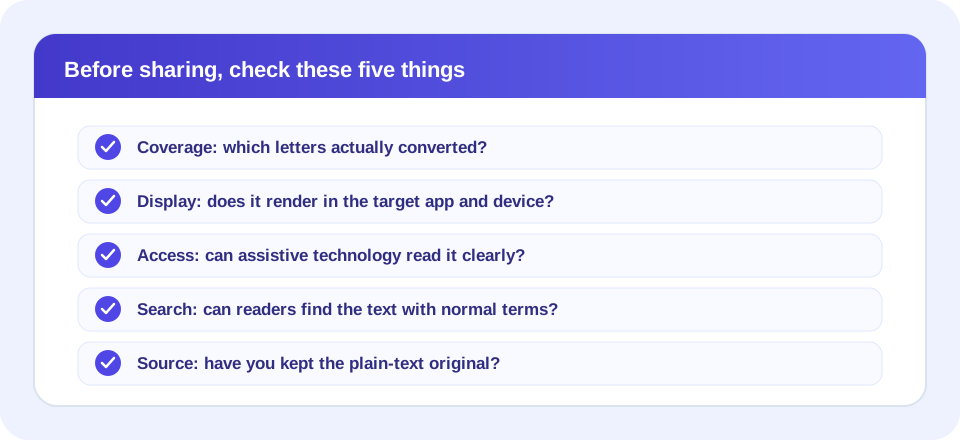
- Coverage: Did every letter convert as expected, or are some characters still regular size?
- Meaning: Does the output still read as the intended word, formula, or label?
- Compatibility: Does it display correctly in the actual app and on a second device?
- Accessibility: Can readers using assistive technology understand it, and is there a plain-text alternative?
- Search: Will people still be able to find the text using ordinary search?
- Privacy: Was the input appropriate to process on the website?
- Source: Do you still have a copy of the original text?
If a message is important or must be accessible, favor ordinary letters and standard formatting. Use Unicode decoration sparingly, and check the result in the environment where it will appear.
“The clearest small text is still text your reader can recognize, search, and understand.”
Small Text Generator Summary
The SnapZain small text generator converts supported characters to Unicode superscript or subscript forms, updates output as you type, and offers a Copy button. It is not a small-caps tool, a font-size control, or a font-file generator. Unsupported letters, spaces, punctuation, and emoji pass through unchanged.
Conclusion
Use it for short decorative text when the destination supports the characters. Test how the result looks, consider search and accessibility, and keep ordinary text for important information. The output is a different set of Unicode characters—not merely smaller formatting—so preserve your original and review the final result before sharing.


