Sentence Rewriter: Try A Different Way To Say It
The SnapZain sentence rewriter gives you a quick way to test alternative wording for a sentence or a longer passage. Paste your draft into the input area, choose Standard, Formal, Shorten, or Expand, and select Rewrite sentences. The result appears beside the original, with approximate word and character counts to help you compare the two versions.
It is important to know what this page actually does. The visible form applies a fixed list of phrase and word substitutions in JavaScript in your browser. It does not send your writing to an AI model or interpret the point of a sentence. The interface displays an “AI” badge on Standard mode, but the implementation is a rule-based replacement tool, not generative artificial intelligence. The badge should not be taken as a claim of contextual understanding.
This can still be useful for a low-stakes first pass: you can see whether a wording alternative works, learn to notice repeated terms, or start an edit from a fresh angle. Treat every output as a draft suggestion. Check facts, tone, grammar, and meaning yourself before using or sharing it.
People arrive with different needs: some want to rewrite these sentences, others type “rewrite sentences for me” or “rewrite a sentence for me.” A rewrite sentence tool can offer a starting variation, but only a person can judge whether that variation fits the facts and audience.
How To Rewrite A Sentence With The Tool
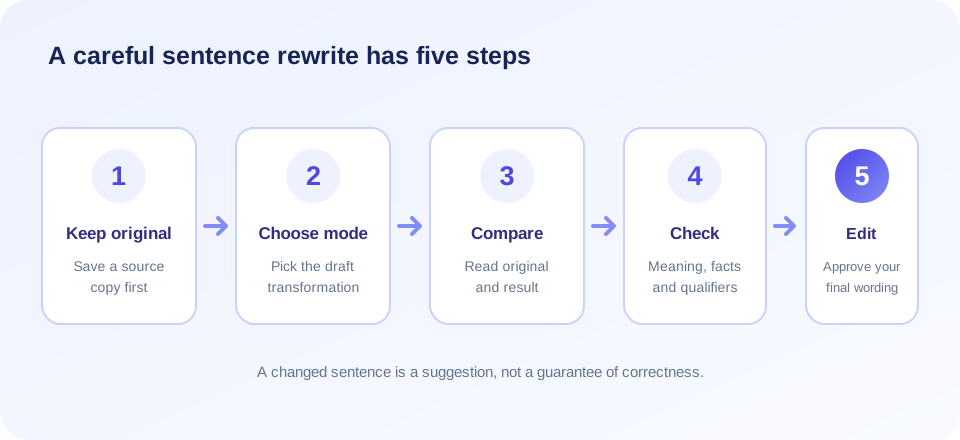
If you want to rewrite my sentence or rewrite a sentence quickly, follow a simple review workflow:
- Keep the original. Save or copy your source before testing a mode, especially if the text contains important details.
- Paste one sentence or a passage. You can include several sentences and paragraphs, but each one will be processed separately.
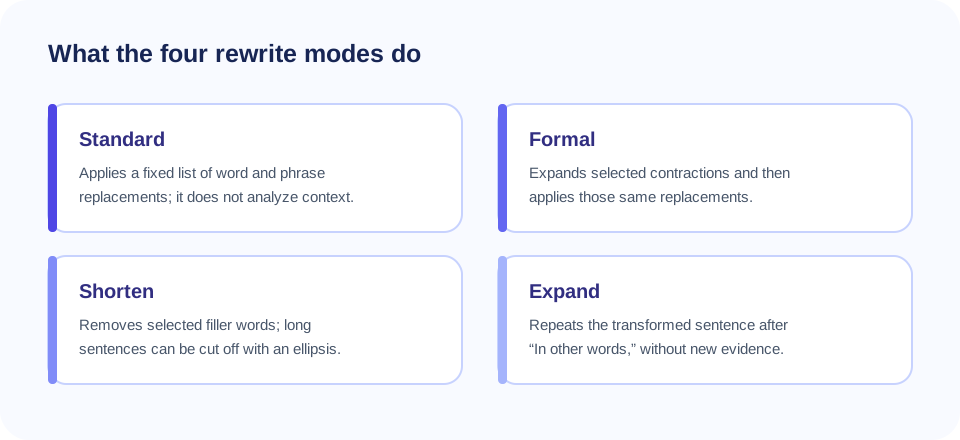
- Choose the transformation. Standard applies substitutions, Formal expands selected contractions, Shorten removes filler words and can truncate long sentences, and Expand repeats each transformed sentence.
- Select Rewrite sentences. The browser displays the output in the result panel. The tool updates approximate counts for the input and rewritten text.
- Compare meaning, not just vocabulary. Check the subject, action, conditions, certainty, and relationships between ideas.
- Make a human edit. Correct awkward wording, restore omitted details, and proofread the final version for its intended audience.
The application does not offer a separate copy button in the visible sentence-rewriter form. You can select the result text and copy it through your browser’s normal controls. The two counters are estimates: words are counted by whitespace, while characters are counted using JavaScript string length. These figures may not match the conventions of a word processor.
What Each Sentence Rewrite Mode Actually Does
The mode names describe mechanical operations, not a promise that the result is better. A word may have several meanings, and the fixed substitution list does not choose among them based on sentence context. The behavior below follows the current client-side implementation.
| Mode | What it does | What to review |
|---|---|---|
| Standard | Replaces listed terms and phrases. Sentences up to 150 characters receive at most six matching replacements; longer sentences can receive all matching rules. | Substitution nuance, grammar, and whether the wording changed a factual claim. |
| Formal | Expands a few contractions, then applies the same predefined substitutions. | Whether the whole sentence really suits a formal audience and remains natural. |
| Shorten | Removes selected filler words. For sentences over 12 words, keeps roughly the first 60% of remaining words and adds an ellipsis. | Missing conclusions, conditions, warnings, evidence, or details cut from the end. |
| Expand | Applies the word substitutions and repeats the transformed sentence after “In other words,”. | Duplicate ideas; this mode does not create a new explanation or supporting fact. |
Standard’s replacement list includes examples such as “simple” to “straightforward,” “good” to “excellent,” “use” to “utilize,” and “for example” to “for instance.” Such pairs are not always interchangeable. A “good” result is not necessarily “excellent,” and “utilize” may be unnecessarily formal. Use your judgment to keep a word that better fits your intended meaning.
Rewrite Sentences Without Distorting The Point
When you rewrite sentences, pay attention to small words that control meaning. Terms such as “may,” “must,” “only,” “not,” “unless,” “before,” and “after” can establish certainty, restrictions, or timing. Even if a word looks ordinary, changing or omitting it can alter a promise, instruction, or safety warning.
Consider the difference between “The update may reduce processing time” and “The update will reduce processing time.” The first describes a possibility; the second sounds certain. Or compare “some customers reported an issue” with “customers reported an issue”: the second statement may imply a broader group. A rewrite needs to preserve the scale and confidence of the original claim.
For a manual revision, identify what the sentence is meant to do. Is it stating a fact, giving an instruction, making a request, or introducing a limitation? Then simplify the structure while keeping that purpose. If the sentence contains a technical term, keep it unless a knowledgeable reviewer confirms that an alternative is accurate.
“Clear writing does not replace precise meaning; it makes the meaning easier to check.”
Rewrite This Sentence: A Useful Editing Checklist
If you are asking the tool to rewrite this sentence, begin by checking the sentence yourself. Look for a clear subject and verb, remove unnecessary repetition, put the main point near the beginning, and split a sentence that tries to do too many things. The tool can suggest substitutions, but it cannot decide which details matter to your reader.
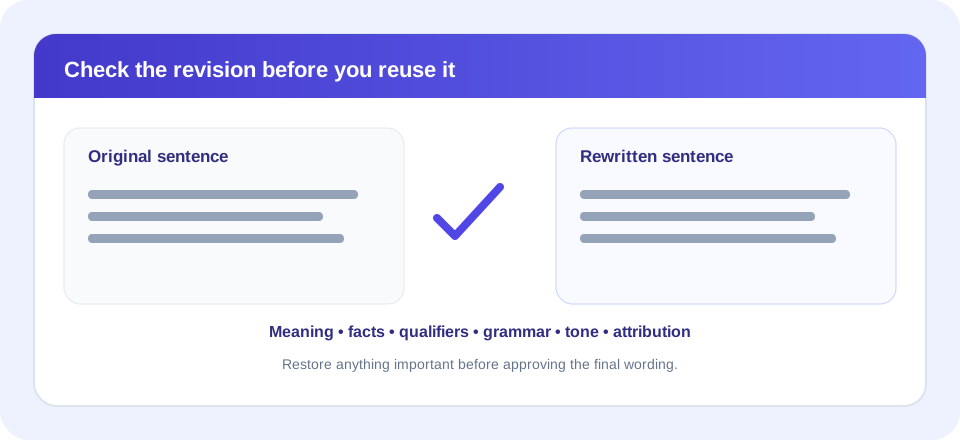
Before accepting its output, use this quick checklist:
- Core message: Does the revised sentence say the same thing as the original?
- Qualifications: Are conditions, uncertainty, and exceptions still included?
- Facts: Are names, dates, units, numbers, and technical details unchanged?
- Grammar: Do the new words fit the sentence’s tense and structure?
- Tone: Does it sound appropriate for the intended reader?
- Completeness: Has Shorten mode cut off anything important?
- Attribution: Are quotations and source acknowledgments still handled correctly?
If any check fails, edit the result or return to your original. There is no benefit in keeping an alternative simply because a tool produced it. The most useful version is the one that is understandable and accurate in context.
Rewrite The Sentence For Different Purposes
One source sentence can be revised in several legitimate ways, depending on the goal. A reader-friendly version may use familiar words. A formal version may avoid contractions. A concise version may remove repeated context. A persuasive version may put a supported benefit first. These goals are different, so decide which one matters before editing.
For example, an instruction may need a direct verb and an explicit condition. A support response may benefit from a considerate opening and a clear next step. A report may need cautious language that reflects the evidence. Replacing words without knowing the purpose can make the sentence longer, vaguer, or more confident than the facts allow.
The Sentence Rewriter’s Formal mode only expands a short set of contractions and applies its replacement list. It does not add politeness, adjust a reading level, or identify the right tone for an email, essay, or report. You can use the mode as one draft variation, then reshape the sentence for the actual situation.
How The Tool Handles Paragraphs And Punctuation
Although the page is called a sentence tool, you can paste multiple sentences and paragraphs. It divides paragraphs at one or more blank lines. Within each paragraph, it attempts to split after a period, exclamation mark, or question mark followed by whitespace. Each segment is transformed and then joined back with spaces; paragraph breaks are kept.
This lightweight splitting rule is not a full language parser. Abbreviations, initials, decimal values, quotations, web addresses, and unusual punctuation can confuse sentence boundaries. For example, a period inside an abbreviation might be treated as the end of a sentence if followed by a space. If sentence order or boundaries matter, check the result and restore punctuation as needed.
The interface does not show an explicit character cap in its JavaScript. Very long passages may still use substantial memory or make an older device feel slow. For easier checking, work with a manageable portion at a time and keep an untouched copy of longer source material.
Free Sentence Rewriter: Practical Uses And Limits
A sentence rewriter free tool can be a convenient way to explore wording without installing an application. A free sentence rewriter may help you notice an alternative verb or phrase, create a rough draft, or prompt you to reconsider a sentence that feels repetitive. The SnapZain form runs its transformations on the page in your browser and includes four modes.
Free access does not mean that the output has been proofread or verified. The tool does not supply full grammar correction, fact checking, citation management, translation, or a guarantee that your original meaning remains intact. It also does not make copied work original. For important documents, use a qualified editor or subject-matter reviewer when necessary.
Searches such as rewrite sentences free and rewrite sentences online free can lead to products with very different features. Compare what each service actually does, whether it uses local rules or a remote model, its data handling information, and whether you can review the original and proposed text. Do not infer a privacy or quality promise from a “free” label.
Queries including “rewrite my sentence free,” “rewriting sentence,” and “rewriting sentences” all describe the same broad drafting goal, but a phrase match is not an assessment of writing quality. Likewise, someone asking “how can i rewrite this sentence” should first decide what must stay true, then review alternatives against that purpose.
Grammarly Sentence Rewriter And Other Comparisons
Some people search for a grammarly sentence rewriter while comparing writing products. SnapZain is independent and is not affiliated with Grammarly. Product features and operating methods can change, so consult each provider’s current official documentation instead of assuming that two tools offer the same type of rewrite.
When evaluating a sentence rewriter tool, look for clear explanations of how suggestions are generated, a way to compare the source and result, relevant language support, understandable privacy information, and control over which changes to accept. A tool that changes more words is not automatically more useful. Measure the output by its accuracy and suitability, not by how different it looks.
The Standard button on this page shows an AI badge, but the current code performs predetermined replacements in the browser. It does not request a rewrite from a server-side language model. This distinction matters: a rule-based tool is limited and predictable in its operations, while contextual generation is a different capability and still needs careful review.
Responsible Use, Sources, And Originality
Rewording is not a way to hide copied material. Replacing several words in a sentence does not remove the need to credit the source, follow a license, or comply with a school or workplace policy. If an idea, fact, or distinctive expression comes from another source, provide the appropriate attribution. For direct quotations, preserve exact wording and format the quotation as required.
For academic writing, learn the instructor’s rules on editing software and disclose assistance when required. For business communications, verify factual statements and do not paste sensitive information into tools that your organization has not approved. For public content, make sure readers are not misled by a stronger claim or missing qualification introduced during editing.
Use the rewriter to support your process, not to misrepresent authorship or bypass plagiarism checks. A responsible paraphrase comes from understanding the source, expressing the idea in a genuinely independent structure and voice, and citing the source when the idea is not your own.
“A changed sentence is not automatically a new idea. Give credit where the information came from.”
Related PDF Tools
Sentence editing is different from converting or modifying a document. If you need an editable document from a PDF, visit PDF to Word. To make a PDF from a spreadsheet, use Excel to PDF. You can insert a page with Add PDF Page, or reduce a document’s file size with Compress PDF.
These file tools do not rephrase sentences. Conversion may affect document layout, while compression changes file characteristics rather than wording. Keep your source document and inspect the result after any conversion or modification.
| Your task | Appropriate next step | What to verify |
|---|---|---|
| Change phrasing in a sentence | Use the rewriter as a draft aid, then revise manually. | Meaning, tone, completeness, and attribution. |
| Edit PDF text in a word processor | Convert PDF to Word, then check the converted layout. | Text recognition, tables, page breaks, and fonts. |
| Export a spreadsheet as a document | Use Excel to PDF and review the generated pages. | Print area, column widths, page scaling, and readability. |
| Add a blank or prepared page | Use Add PDF Page for the document task. | Page placement, sequence, and final file integrity. |
| Reduce a PDF’s size | Use Compress PDF and inspect the output. | Legibility, image quality, and the file’s intended use. |
Privacy And Handling Your Draft
The sentence transformation logic visible in the form runs in browser-side JavaScript; it does not send the text to a sentence-rewriting API endpoint. That describes the rewriting behavior in the current page code, not every aspect of the website or its hosting. Review the published privacy information and use your organization’s approved services for confidential material.
Avoid pasting passwords, personal records, customer information, protected health details, or unpublished confidential material unless your policies explicitly allow it. When a text is sensitive, choose an approved offline editor or a service with controls appropriate to the data. Always keep a separate source copy before experimenting with Shorten mode, which can remove the end of a sentence.
A Better Manual Sentence Revision Process
If the fixed substitutions do not produce a usable result, revise the sentence directly. First, state its main point in plain language. Next, identify details that must remain, including numbers, exceptions, evidence, and uncertainty. Then remove filler, make the subject clear, and put related ideas together. Finally, read the sentence in context to ensure it connects smoothly with what comes before and after.
Long sentences often become easier to follow when divided into two. A passive construction can be useful when the actor is unknown or unimportant, but an active construction may clarify who needs to act. A technical term should not be replaced merely to make the vocabulary look different; accuracy is more valuable than novelty.
Ask a reader to explain what they understood if the sentence carries a high-stakes instruction or claim. If their interpretation differs from your intention, refine the sentence and test it again. This feedback process is more reliable than counting synonyms or assuming that a rewritten sentence is correct because it sounds polished.
Sentence Rewriter Summary
The SnapZain sentence rewriter offers Standard, Formal, Shorten, and Expand modes for text typed or pasted into its browser form. Standard and Formal apply fixed word replacements; Shorten removes selected filler and can truncate longer sentences; Expand repeats a changed sentence after a brief lead-in. The form’s AI badge does not reflect an AI model in its current implementation.
Conclusion
Use it to explore a draft alternative, not to outsource factual judgment, grammar review, or authorship. Keep the original, compare each change, restore anything important, and cite sources where necessary. Whether your goal is to rewrite this sentence for me, rewrite the sentence correctly, or simply to find a clearer expression, you remain responsible for the final text.


