Unlock PDF: Make An Authorized Copy You Can Open
SnapZain’s unlock pdf tool is designed to create a separate PDF copy with protection removed when you own the document or have permission to modify it. Select one PDF file up to 10 MB, provide the known password when the file requires one, and choose Unlock PDF. If processing succeeds, the browser downloads a new file. Keep the original protected document as a backup.
PDF locks serve different purposes. Some files require a password just to open; others open normally but have permission settings that restrict actions such as printing or editing. The tool asks for an optional password and relies on server-side PDF utilities to process the document. Compatibility depends on the kind and strength of protection, the password you supply, and which utilities are available on the server.
This is not a password finder or cracking service. It cannot tell you a forgotten password, and it should not be used to get around someone else’s access controls. If you do not own the file or have authorization, ask its owner or administrator for access. The instructions below focus on legitimate use and explain what to review before using an unlocked pdf.
How To Use The PDF Unlocker
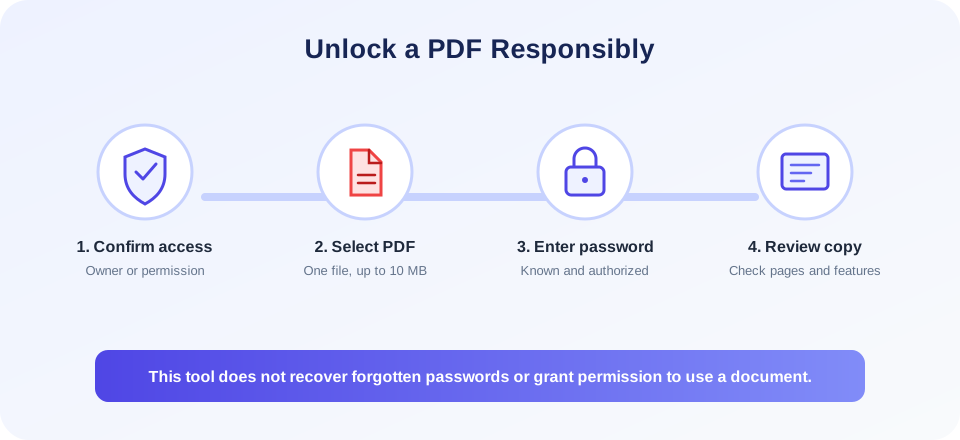
Use the pdf unlocker when you have a legitimate reason to make an accessible copy and can provide any required password. Follow these steps:
- Confirm your authority. Check that you own the file or have explicit permission to remove its protection. Follow any applicable confidentiality, copyright, workplace, or licensing rules.
- Keep the original. Save a backup of the protected PDF before uploading. The output is a new file, and processing may change document features.
- Select a PDF. Choose or drag one PDF into the upload area. The visible form accepts PDF files up to 10 MB.
- Enter the known password if needed. The password field is optional. Leave it blank when the PDF does not need a password; for a protected file, enter the correct password you are authorized to use.
- Start the process. Select Unlock PDF and wait for a successful response. The file is uploaded to the server and processed using available PDF utilities.
- Review the download. Open the resulting file and check every page, signature, form field, link, annotation, bookmark, and any information important to your task.
If the converter reports an error, do not keep guessing passwords or repeatedly upload sensitive copies. Verify the password with the document owner, confirm the PDF opens in a trusted reader, and check the file size. If the file remains incompatible, use an approved local PDF application or contact the administrator.
What Does “Unlock PDF” Mean?
A pdf unlock operation typically means producing another copy that no longer has a particular password or permission restriction. The exact result depends on the security applied to the source. A password required before viewing is commonly called an open password or user password. Permission restrictions may allow the file to open while limiting printing, copying, or editing.
People sometimes search for a pdf to unlock pdf converter when they need to make an authorized copy accessible. In practical terms, the input is the protected PDF and the output is another PDF; the original is not changed in place. The words “pdf unlocked” describe that output state, not a recovery method or new right to use the document.
These are different conditions, and a pdf unlock free utility cannot necessarily handle every security configuration. This service accepts a password, then attempts processing with installed tools such as qpdf, pdftk, Ghostscript, or FPDI. An encrypted file may need the correct password and a compatible utility. A PDF that is not encrypted may be rebuilt into a new document without requiring a password, but page recreation can affect features.
Unlocking does not restore an original authoring file, remove digital rights outside the PDF, recover missing text, or guarantee that every restriction is handled. It also does not mean the document is now free of copyright or confidentiality obligations. Treat any processed copy under the same permissions and obligations that apply to the source unless the owner expressly tells you otherwise.
| Protection or file state | What to expect | Responsible next step |
|---|---|---|
| Password required to open | The form provides an optional password field; successful processing depends on the correct password and available server utility. | Obtain the password from the owner or administrator. |
| Opens, but actions are restricted | Some PDF tools may create a new copy, but compatibility and permissions vary. | Confirm the owner authorizes changing those restrictions. |
| Password is unknown | The tool does not recover, guess, or crack passwords. | Ask the owner for access or a permitted copy. |
| Digitally signed PDF | Rewriting the file may invalidate its signature. | Preserve the signed original and ask for an authorized editable copy. |
| Damaged or unsupported PDF | The server utilities may be unable to read or recreate the document. | Validate the file locally or use a trusted application. |
Unlock PDF Online: Passwords, Permission, And Privacy
An unlock pdf online workflow sends a document to a web server for processing. In the current SnapZain form, the selected PDF and any password you enter are submitted to the site’s server. The controller removes the uploaded source after a successful conversion, while the generated result is placed in the site’s output area for download. Because this is server processing, only upload files your privacy policy and organization permit you to share with the service.
Think carefully before using an online free pdf unlocker for a client file, legal record, personnel document, financial statement, medical record, or unpublished work. Even when you are authorized to read a file, uploading it to a third-party or web service can require separate approval. If that approval is unclear, use a locally installed tool that your organization has reviewed or request help from the document owner.
Enter only the correct password for the specific document. Avoid placing a shared or reused password into a service unless that is allowed by your security policy. If the password is managed by your organization, follow its approved method for providing credentials. Do not share the resulting unlocked file more widely than the source’s terms allow.
There is also a practical distinction between removing encryption and obtaining permission. A successful pdf file unlock changes how a copy can be opened or handled; it does not grant new rights to use, distribute, alter, or republish the content. Your authorization should cover both processing and the intended use of the output.
How To Check A PDF Before Unlocking It
Before submitting a document, make sure it is the right file and that you understand its security state. Open the PDF in a trusted reader if you can. Note whether it asks for a password immediately, opens but restricts selected actions, or displays a signature warning. Check the filename, page count, and whether you have a clean local backup.
A PDF may be password-protected for a reason, such as restricting accidental edits or limiting access to confidential information. Ask the owner what the protection is intended to do and whether an unprotected copy is appropriate. If you only need to read or print a file, the owner may be able to provide a version that permits that specific task instead of a generally unlocked copy.
Do not use an unlock workflow to bypass controls on a document from an employer, school, publisher, client, or another person. If an access prompt appears unexpectedly, contact the source. This is especially important when the file contains sensitive data, digital signatures, or legal terms about permitted use.
What Can Change In An Unlocked PDF?
The server-side converter can use different utilities to decrypt or recreate a PDF. The exact method depends on the security and the available software. Some methods preserve much of the page appearance, while a reconstruction workflow may import pages into a new document. As a result, the output can differ from the original even when all pages appear to be present.
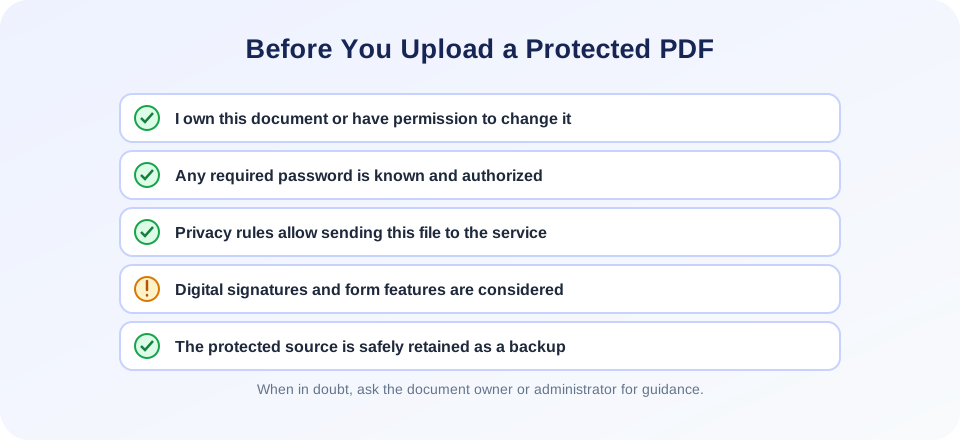
Review features beyond the visible page. Digital signatures can become invalid after any modification. Interactive forms, annotations, embedded files, bookmarks, hyperlinks, layers, metadata, accessibility tags, or document structure may not survive all conversion methods. If the PDF contains a signature or an important form, ask the owner whether an alternate source file is available before processing.
For important content, compare the output with the protected original using a trusted PDF reader. Confirm page count and orientation, inspect text and images, test links, and check that form fields behave as expected. Do not assume that a file is correct just because it opens or the download completed.
| Feature to verify | Why review it | Suggested check |
|---|---|---|
| Page count and order | Missing or reordered pages can change document meaning. | Compare the first and last pages and page totals. |
| Text and layout | Fonts, line breaks, or page dimensions can shift. | Read critical paragraphs and inspect tables and headings. |
| Digital signature | Modifying a signed file may invalidate its signature. | Keep the original and check signature status in a trusted reader. |
| Forms, links, annotations | Interactive elements may not be preserved during reconstruction. | Test fields, hyperlinks, comments, and bookmarks. |
| Metadata and accessibility | Document properties or reading structure may be altered. | Inspect properties and accessibility where required. |
When A PDF Unlocker Cannot Help
A pdf unlocker free service is not a substitute for a known password, an owner’s authorization, or a valid source document. The same applies when you need to unlock pdf document access for a shared work file: follow the owner’s approved process. If a password is forgotten, contact the person or organization that created the file. If the document is yours, look for a saved password in your approved password manager, a secure records system, or a previous authorized copy. Avoid untrusted “password recovery” downloads that claim to crack files; they may expose your documents or install unwanted software.
If the PDF opens but still cannot be processed, it may use a feature unsupported by the installed conversion utilities, be damaged, or be larger than the form permits. The 10 MB limit is enforced by the upload flow. Do not alter or split a document in a way that removes important context just to force it through the form. Instead, ask the owner for another copy or use a locally approved PDF application.
For permissions-only restrictions, the owner may be able to change the settings in the original software and provide a suitable output directly. That is often a better choice when preserving forms, signatures, tags, or bookmarks is important. If the document belongs to an organization, consult its administrator rather than experimenting with security settings.
“A lock on a document is a permission boundary. Use an unlocked copy only when the owner has authorized the change.”
Related PDF Tools For Authorized Workflows
When you have permission to work with the document, these related SnapZain tools can support other tasks. Create a document from pictures with Image to PDF. Export pages as image files with PDF to Image. Add a signature using Sign PDF. Extract searchable or selectable content with PDF to Text.
These are separate operations, not ways to obtain access to a restricted source document. Use them only with files you are allowed to process, and retain originals when a conversion may change signatures, forms, page structure, or text. For example, exporting signed pages as images can preserve their appearance but cannot preserve a verifiable digital signature in the same way as the original signed PDF.
| Task | Tool | What to check |
|---|---|---|
| Make a PDF from image files | Image to PDF | Page order, scaling, and image clarity. |
| Render PDF pages as images | PDF to Image | Resolution, page sequence, and readability. |
| Add a signature to an authorized document | Sign PDF | Signature placement and whether the workflow is suitable for your legal requirements. |
| Extract document text | PDF to Text | Reading order, accents, symbols, and table alignment. |
Unlock PDF Summary
SnapZain’s pdf unlocker accepts one PDF file up to 10 MB and offers an optional password field. For files you own or are authorized to modify, provide a known password if needed and request a separate output copy. Successful processing depends on the document’s protection and the PDF utilities installed on the server.
Conclusion
The tool does not discover or crack forgotten passwords and does not grant permission to use someone else’s document. Upload only files approved for server processing, preserve the original, and review the output for missing pages, changed layout, broken forms, annotations, links, and invalidated signatures. When access or authorization is uncertain, ask the document owner or administrator for help instead of trying to bypass the restriction.


