Sign PDF Online With A Visible Signature
SnapZain’s sign pdf tool lets you place a visible signature mark on a PDF. Select a document, then create the mark by drawing in the signature area, typing a name, or uploading a signature image. Position the preview overlay and choose Download Signed PDF to get a new copy. The current interface accepts a PDF up to 10 MB and stamps the signature on the first page.
This distinction matters: the tool adds a signature image to the page; it does not apply a certificate-based cryptographic digital signature. A visual signature can be useful for routine forms or drafts when the recipient accepts that method, but it does not independently verify the signer’s identity, timestamp the signing event, or prove that the document remained unchanged after signing.
Before using any pdf sign workflow, check the recipient’s requirements and your organization’s rules. Some documents require an identity-verified e-signature service, a certificate-backed digital signature, witnesses, a specific signing order, or a particular document platform. If those conditions apply, use an approved signing method rather than relying on a visual stamp alone.
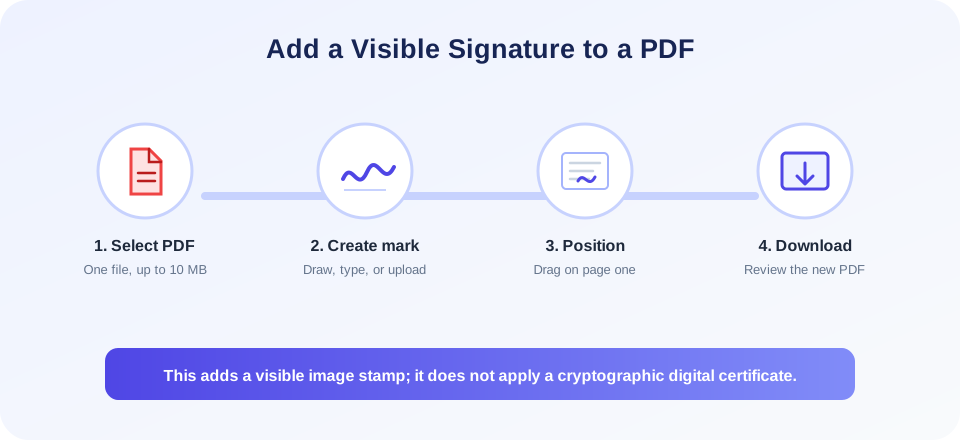
How To Sign A PDF With This Tool
To sign pdf online, prepare the file and signature before starting. Use this straightforward workflow:
- Confirm the right document. Open the PDF and verify that it is the final or intended version. Make sure you are allowed to sign and upload it.
- Select the PDF. Choose Upload PDF in the tool and select one .pdf file no larger than 10 MB. The document appears in the preview when the browser can display it.
- Choose a signature method. Use Draw to make a freehand mark, Type to render a name in one of the provided fonts, or Upload to select a signature image.
- Place the signature. Add the signature to the preview and drag its overlay to a suitable visible position. Check that it does not cover text, dates, instructions, or another person’s signature.
- Download the signed copy. Choose Download Signed PDF. The browser sends the PDF, signature image, and placement details to the signing endpoint, which returns a generated PDF.
- Review the result. Open the downloaded file in a PDF reader. Confirm that the mark appears on the intended page and that the document content remains readable.
The form’s current signing endpoint targets page one. The interface does not provide a page selector or an option to apply the signature to every page. It also sends a placement width and position based on the preview overlay; always inspect the downloaded PDF because the preview and final page coordinates may not match perfectly on every browser or PDF size.
Draw, Type, Or Upload A Signature
The online pdf signer presents three ways to create a visible mark. Each option ultimately produces an image that is inserted into the PDF. Choose one that is clear, appropriate, and consistent with the recipient’s instructions.
- Draw: Use the drawing canvas to make a handwritten-style mark with a mouse, stylus, or touch input. Draw slowly enough for the strokes to remain legible. If the canvas is too small or the signature is difficult to read, clear it and draw again.
- Type: Enter a name and select a font from the available list. A typed name may be convenient, but its appearance does not prove who typed it or whether the person agreed to sign.
- Upload: Select an image of a signature. The server accepts PNG, JPG, and JPEG files up to 5 MB. Although the browser picker may list other image types, use a supported format to avoid submission errors.
For an uploaded signature image, use a clear image with a plain or transparent background where possible. Crop unnecessary borders, avoid including unrelated personal details, and check the appearance against the PDF preview. Do not upload a signature that belongs to someone else without clear authorization. A signature image can be copied, so store and share it responsibly.
A drawn or typed mark can be suitable for low-risk internal workflows if all parties accept it. For formal agreements, financial approvals, regulated records, or documents where signer identity and tamper detection matter, confirm the required process before signing. The tool does not send a verification code, identity check, certificate chain, or audit trail as part of this visible-stamp workflow.
Electronic Signature Versus Digital Signature
People often use the terms electronic signature and digital signature as if they mean the same thing, but they can describe different methods. An electronic signature is a broad category for electronic actions or marks used to indicate agreement. A digital signature commonly refers to a cryptographic mechanism that uses a digital certificate to help verify identity and detect changes to the signed file.
This page provides a visible signature stamp. It places a drawn, typed, or uploaded image on the PDF page. It does not embed a cryptographic certificate, validate identity, provide a signing audit trail, or prove document integrity after signing. Therefore, this tool should not be represented as a certificate-based digital signing service.
| Signing method | What it generally does | What this tool provides |
|---|---|---|
| Visible signature image | Displays a drawn, typed, or image-based mark on a PDF page. | Yes. The image is stamped on page one of the generated PDF. |
| Electronic-signature platform | May capture signer consent, identity checks, timestamps, and an audit record. | No such verification or audit workflow is provided by this page. |
| Certificate-based digital signature | Uses cryptographic signing to support identity and integrity validation. | No. This tool does not apply a digital certificate. |
| Wet-ink signature | Is signed by hand on paper, then may be scanned for a visual copy. | The tool can stamp an uploaded image, but it does not verify how it was created. |
Whether a particular electronic or digital signature is accepted depends on the law, contract, document type, recipient, and signing procedure. This article is general product guidance, not legal advice. When enforceability or regulatory compliance matters, ask the receiving organization or a qualified professional which signing method is required.
Positioning And Reviewing The Signature
After you add the signature image, the preview overlay can be dragged within the preview region. Place it in a designated signature line when one exists. Avoid covering a printed name, date, witness field, page number, or important instruction. If the PDF contains multiple signers, do not obscure their fields or add your signature on another person’s behalf.
Check the downloaded PDF rather than relying only on the preview. Browser PDF viewers can render pages with different scales, and the server inserts the image using placement values derived from the preview container. The exact placement can look slightly different on the output page. If the position is unsuitable, start with the original PDF and create a new signed copy.
The endpoint accepts a page number, but the current form submits page one and offers no page control. For a signature on a later page, use an application with explicit page selection or an approved e-signature service; scrolling the preview does not change the target page.
“A signature is only useful when it is placed correctly, accepted by the recipient, and attached to the intended document version.”
Privacy, Document Safety, And Responsible Use
To sign a pdf online, the selected document and signature image are sent from your browser to the website’s server. The endpoint generates a PDF and returns it for download. Do not upload confidential, personal, financial, medical, employment, or legally sensitive information unless your policies allow it and you understand the service’s handling terms.
Keep a copy of the unsigned source before you start. Store the signed output in an appropriate secure location and share it only with the intended recipients. A signature image is sensitive because another person might reuse it if they obtain the file. If you upload a signature graphic, remove it from shared folders or temporary locations when no longer needed, following your own retention policy.
Use only your own or authorized signature; never impersonate another signer or alter a signed agreement without permission. Follow the agreed signing order for multi-party documents.
A PDF may already contain a digital signature, form fields, annotations, or certification settings. Adding a visible image modifies the document and may invalidate or change the validation status of an existing signature. Preserve the original signed PDF and consult the document owner before editing it.
Common Questions Before You Sign
Before you sign pdf documents, check what the recipient considers acceptable. Some organizations accept a visible image or typed name for informal records; others require a dedicated signing platform with identity verification and an audit trail. A signatory may also need to use a particular certificate or complete additional steps.
The phrase sign pdf online free often refers to a no-cost way to place a signature mark. A free interface does not automatically mean every type of signature is supported or that processing is appropriate for sensitive documents. Review the site terms and choose the method that matches the document’s importance.
When a form has a dedicated signature line, position the mark within that area and do not cover nearby text. If the PDF asks for a date, title, initials, or witness details, complete those fields only as instructed. A signature image by itself does not fill missing required information.
If a recipient asks for a “digital signature,” clarify whether they mean a visible signature mark or a certificate-backed signature. The terms are sometimes used loosely, but the technical results differ. Asking before signing can prevent delays or rejected paperwork.
“For sensitive agreements, confirm the required signing method before adding a signature image.”
Related PDF Tools
When you need to prepare or inspect PDF documents, these related tools may help. Convert an existing PDF into web-ready markup with PDF to HTML. Create a PDF from a webpage or HTML file using HTML to PDF. Turn tabular data into a document with CSV to PDF. Review document properties with PDF Metadata. Convert a rich-text document into PDF using RTF to PDF.
| Related task | Tool | Purpose |
|---|---|---|
| Convert PDF pages to web markup | PDF to HTML | Extract a page representation for an HTML workflow. |
| Create a PDF from HTML | HTML to PDF | Render webpage or HTML content into document pages. |
| Turn data rows into a PDF | CSV to PDF | Format tabular data as a document for viewing or sharing. |
| Inspect PDF properties | PDF Metadata | Review document information such as title or author fields. |
| Convert rich text to a PDF | RTF to PDF | Create fixed pages from a rich-text source file. |
These tools do not verify signatures. Converting a signed document may change its structure or affect signature validation. Keep the original and use an approved workflow when authenticity or recordkeeping matters.
Sign PDF Summary
SnapZain’s sign pdf online free workflow adds a visible signature image to a PDF. You can draw a mark, type a name in a provided font, or upload a supported signature image. The form accepts one PDF up to 10 MB, places the mark on page one, and returns a separate PDF download after successful processing.
Conclusion
This tool is not a certificate-based digital signature service and does not verify signer identity, record consent, or provide a cryptographic audit trail. Check the recipient’s requirements, protect sensitive documents and signature images, retain the unsigned source, and inspect the downloaded result. For legal or regulated documents, use the signing method required by the recipient or your organization.


