Turn an Image Into a Document You Can Share
A PNG is a picture file. A PDF is a document container that is easy to distribute, store, and open across many devices. Converting between them is useful when a form, portal, or recipient asks for a PDF copy of an image. This PNG to PDF tool places an image on a PDF page and provides a separate file to download.
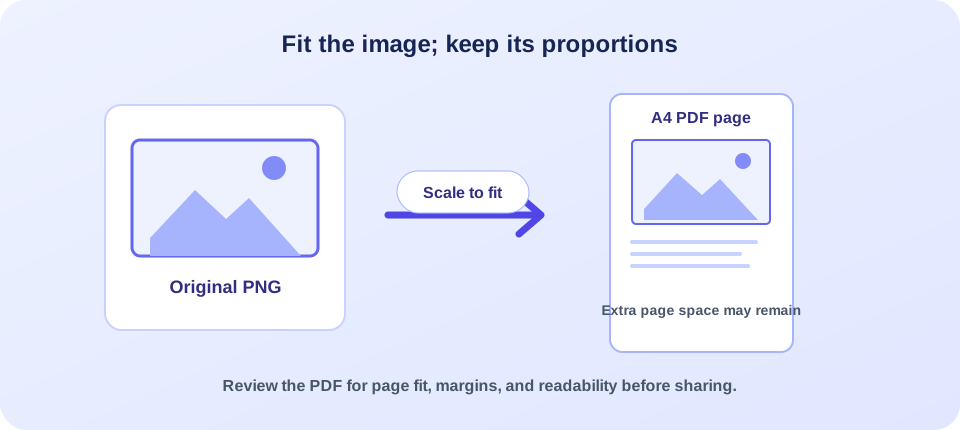
The current upload form accepts PNG, JPG, and JPEG files up to 10 MB, but it selects and submits one image at a time. It does not expose controls for combining multiple images, choosing page size, or changing orientation. The converter fits the image within an A4-sized page while preserving its proportions. Review the result before sharing or printing, especially if the image is tall, wide, or contains small details.
How to Convert PNG to PDF Online
The steps are simple, but taking a moment to prepare the image can prevent a poor fit or unnecessary rework:
- Check the source. Open the image and confirm it is the correct version, readable, and under the 10 MB limit.
- Select one image. Use the file picker or drop one PNG, JPG, or JPEG into the upload area. The current form is not a multi-image batch selector.
- Start conversion. Press the button and keep the browser page open while the image uploads and is processed.
- Download the PDF. When conversion succeeds, the page starts a PDF download and provides a backup link.
- Inspect the output. Open the PDF and check its page size, image fit, orientation, clarity, and background before sending it onward.
In practical terms, convert PNG to PDF means placing the pixels from an image into a PDF document. It does not convert lettering in the image into editable text. The PDF page contains the visual image, so a scan of a form or printed page will remain a picture unless you run OCR separately.
This browser-based workflow uploads the selected image to the site for server-side processing. If you are handling sensitive documents, first consider whether an online service is approved for that information. For a routine image that you are allowed to upload, the page offers a direct way to create a shareable PDF copy without installing desktop conversion software.
A useful conversion is not just a new file extension; it is a document that opens cleanly and shows the image at a practical size.
What Happens to Size, Shape, and Detail
The converter reads the image dimensions and fits the image inside an A4 page, preserving the image’s aspect ratio. The source code uses A4 measurements and scales the image to stay within the page boundaries. As a result, a landscape graphic may have empty space above and below, while a tall portrait may leave room at the sides. That space is expected when the image shape and paper shape differ.
Fitting an image onto a page can also change its physical print size. A small image may be enlarged; a very large image may be reduced. Resizing does not add genuine detail that was absent from the original. If the source is low resolution, small text may still look soft when printed or magnified. Conversely, a crisp high-resolution image may produce a larger PDF than a simple graphic.
The image format matters too. PNG commonly works well for diagrams, screenshots, text-heavy graphics, and transparent artwork. JPG is often used for photographs and may already use lossy compression. The converter also accepts JPG/JPEG, but the output appearance depends on the source image and how it is embedded. Review edges, color, and transparent areas rather than assuming every image will look identical in every PDF viewer.
| Image shape or content | Likely page fit | What to check |
|---|---|---|
| Portrait photo or scan | Often sits vertically on the A4 page with side margins. | Small print, page edges, and whether the full image is visible. |
| Wide banner or chart | May fit across the page with extra space above and below. | Labels remain readable after scaling down. |
| Square graphic | Can be centered by the page fit with margins on two sides. | Background and transparent regions render as expected. |
| Large high-resolution image | Usually scales down to stay within the page bounds. | Output file size and fine detail after resizing. |
A PDF can contain vector artwork and text objects, but this particular workflow adds the uploaded raster image to the page. It does not redraw a PNG as vector shapes, so enlarging the PDF indefinitely will not reveal additional detail. If the image contains words that must be searchable, consider OCR after conversion and verify the recognized text carefully.
“PNG to PDF format” is sometimes used to describe the resulting file, but the image remains raster content inside a PDF page. The PDF wrapper can make the image easier to send as a document, but it does not change the underlying pixels into scalable vector artwork. When the next person needs to edit the design, send the original image or its editable project file as well.
One Image at a Time: Combining and Joining Files
Searches such as combine PNG to PDF, “join PNG to PDF,” and “combine PNG files into one PDF” describe a multi-image workflow: several pictures are placed in one document, usually one image per page, in a chosen order. The current form does not provide that experience. Its file input does not have a multi-select control, and the page sends the first selected image as a single file.
The underlying converter can accept one image path or an array of image paths, but the visible tool form currently exposes only one image at a time. That distinction matters: do not assume you can select several PNGs in the interface and receive a combined PDF. If you need a multipage document, use a page that explicitly supports multiple images and lets you review their sequence, or create one PDF per image and combine those PDFs with a suitable merge tool.
When joining images, order is part of the document’s meaning. A sequence of receipts, scanned pages, or presentation graphics should be checked from first page to last. A tool with multi-file support should make the sequence clear before conversion. If you are using this single-image form, it is better to convert images individually than to imply that one run has combined them.
For a multi-page PDF, confirm both parts of the job: the right images were included, and they appear in the intended order.
PDF, PNG, and the Best Fit for Your Task
Choosing a format depends on the next step. A PNG is convenient as an image asset; a PDF is convenient as a paged document. A PDF created from a PNG is useful for sending or printing an image in a familiar document format, but it does not automatically make the content editable, searchable, or accessible.
| Need | Format or workflow to consider | Important limitation |
|---|---|---|
| Share one picture as a document | Convert PNG to PDF. | The image is placed on a page; text remains part of the picture. |
| Combine several image pages | A multi-image-to-PDF workflow with ordering controls. | This page’s visible form accepts one image per run. |
| Search words in a scanned picture | Use OCR on the image or resulting PDF. | Recognition can make mistakes and requires review. |
| Keep editing individual pixels | Keep the original PNG or edit it in an image application. | A PDF is not a replacement for an image editor. |
A PDF can be easier to attach to an email or submit to an application that expects documents. A PNG can be easier to place into a design, website, or slide. Neither is universally better. “Change PNG to PDF” is appropriate when the receiving workflow needs a PDF, but preserve the source PNG if future editing or alternate exports may be needed.
Before You Upload: Check the Image
A quick source check usually saves time. Open the picture at a useful zoom and make sure all edges and content are present. If the image is crooked, blurry, or cropped incorrectly, conversion will generally preserve those problems rather than repair them. Edit a copy first when you have permission and need to improve the source; retain the untouched original where it is important.
- Confirm the image is the final version and the correct orientation.
- Check that the file is PNG, JPG, or JPEG and smaller than 10 MB.
- Look closely at small text, signatures, labels, and thin lines.
- Make sure the background and transparent areas will look appropriate in a PDF viewer.
- Consider whether page margins from the A4 fit will suit printing or submission.
For an image of a printed page, readability depends on the scan or photo: focus, lighting, contrast, and angle all matter. A file extension cannot restore text that was too blurred to read in the source. For charts and screenshots, check that the graphic was exported at a sufficiently large size before you convert from PNG to PDF.
If you are learning how to convert a PNG to PDF for a specific portal, read its upload requirements first. Some services specify paper size, maximum file size, orientation, or whether they accept image-based PDFs. This converter uses an A4 page and does not expose a setting to alter it. If the destination requires a different page format, use an appropriate export option rather than assuming that any PDF will pass validation.
For photographs, look at the final PDF on a screen and, if needed, print a test on ordinary paper. A document preview can look large because it is scaled to fit the monitor; actual print output is determined by the page dimensions and the embedded image size. For a scanned document, check whether the content reaches close to the page edges and whether the page margins are acceptable. Avoid repeated resizing because every edit and re-export can make image details harder to read.
If the content should become structured text instead of staying a picture, this is a format conversion, not an OCR or document reconstruction tool. For a plain-text document, TXT to PDF creates a PDF from text rather than embedding a raster image. Pick the workflow that matches the actual source material.
Download and Verify the Result
After processing, use the automatic download or the displayed backup link. Open the PDF in a trusted viewer instead of relying only on the browser’s download notification. Check that it opens, contains the intended image, and has a reasonable page layout. If you plan to print or submit it, preview at the expected size and check the recipient’s requirements.
Different PDF viewers can display colors and transparency a little differently. If a transparent area looks unexpected, try an image with a solid background and convert a fresh copy. If the image seems too small, remember that the converter fits it within an A4 page; a custom page-size tool may be needed for other dimensions. Do not simply stretch an image to fill the page if that distorts faces, logos, or diagrams.
When comparing a PNG to PDF converter online, look beyond the word “free.” Check accepted file types, upload limits, privacy terms, page sizing, and whether multiple images can be added in one document. This page accepts one image per run; an online PNG to PDF converter that advertises batch processing may behave differently. A quick test with a non-sensitive image is a sensible way to evaluate fit and readability before a time-critical task.
Searches such as “convert a PNG to PDF,” “PNG to PDF convert,” or “convert PNG to PDF online free” often point to the same basic need: make a portable document from an image. A good result should open reliably, show the whole image, and match the destination’s page requirements. Before sending it, confirm the download is a PDF rather than the original image, and keep both files if you may need to revise the artwork. If you are evaluating a free online PNG to PDF converter, read its file-handling information and verify any usage limits instead of assuming all services work the same way.
There is also an important distinction between converting and assembling. This converter creates a PDF from one image selected in its visible form. A separate multi-file workflow is needed to merge a sequence into a single multi-page document. For records that must remain in order, check the number of pages after any merge operation and compare each page with its source before sharing.
Keep the original image separately. A PDF copy is convenient for sharing, but it may not be the best master file for later image edits. Naming both files clearly—such as the source image and its PDF counterpart—can prevent confusion in a project folder. For larger document workflows, the PDF to JSON tool handles a different task: extracting PDF content into structured data, not creating an image-based PDF.
Similarly, PDF to Markdown is intended for extracting document text and structure into Markdown, while PDF to XML offers a structured-data path. Those tools do not replace PNG-to-PDF conversion, but they may fit better when the goal is to work with document content instead of packaging a picture.
Privacy, Ownership, and Responsible Use
This converter uploads the selected image to the website’s server for processing. Before using an online PNG to PDF converter, consider the contents of the file and any privacy requirements that apply. Personal identification, medical information, financial records, confidential business material, or unpublished work may require an approved local application or managed service. Review the current privacy policy and your organization’s rules rather than assuming the file stays on your device.
Only convert files you have permission to use and share. Changing PNG to PDF does not change who owns the image or grant permission to redistribute it. If the image includes a watermark, attribution, signature, or other important notice, conversion preserves the visible artwork rather than changing its legal meaning. Keep context and attribution when sharing the document.
For public distribution, inspect the image for details that were not meant to be shared, including visible account numbers, addresses, private annotations, or background objects. Use a proper editing or redaction process when information must be removed; simply covering content visually may not securely remove it from the original file.
Conclusion: Make a PDF Copy, Keep the Image Master
Converting PNG to PDF is a straightforward way to package an image in a widely supported document format. This tool accepts one PNG, JPG, or JPEG at a time, within the 10 MB limit, and fits the picture inside an A4 PDF page. It does not combine multiple images in one run, add OCR, or provide custom layout controls. Download the PDF, inspect the page and image quality, and keep the original image for future edits. If your real goal is to join multiple images or make text searchable, select a workflow built for that need.


