Rotate Image Online: Turn a Picture into the Right Orientation
A photo may look sideways after a phone transfer, a scan, or a camera import. A sideways picture can make a document harder to read and a portrait awkward to share.
This rotate image online tool turns supported images by 90-degree steps, lets you review the direction, and creates a copy to download.
Upload one or several images, choose Left or Right, or return to the starting position with Reset. Preview each image before processing. The tool supports a range of common formats and accepts files up to 20 MB each, subject to server codec availability.
This guide covers the controls, rotation basics, common workflows, and checks to make before using the result.
How to Rotate Image Online with the Image Rotater
Rotation changes the direction in which the image is presented. A quarter-turn moves the top edge to a side, while a half-turn places the image upside down relative to its original view.
The controls here work in 90-degree increments, which suits the most common cases: a portrait photo saved sideways, a landscape image turned upright, or a scan needing a quick orientation correction.
People searching for an image rotater or image rotate online usually want a quick change to an image file without opening a full editing suite. This online image rotator provides preset turns and a reset, while leaving the original copy available on your device.
The tool processes image pixels and returns a new downloadable file. It does not overwrite the file on your device, and it does not add an angle slider for arbitrary adjustments.
If you need to tilt a photo by a few degrees, straighten a horizon, or correct perspective, use a photo editor with a free-rotation and crop workspace.
Rotating differs from flipping, cropping, and resizing. A rotation turns the whole picture around its center. A flip mirrors it across an axis. A crop removes part of the frame, while a resize changes pixel dimensions.
Selecting the right operation helps preserve the composition and avoids extra image processing.
How to Rotate an Image Online Step by Step
Choose a copy of the image when possible, especially if it is an original camera photo or a graphic that may need future edits. The upload area accepts one or more images.
Once previews appear, the controls let you set an angle, inspect the image, remove unwanted files, or add more images before submitting.
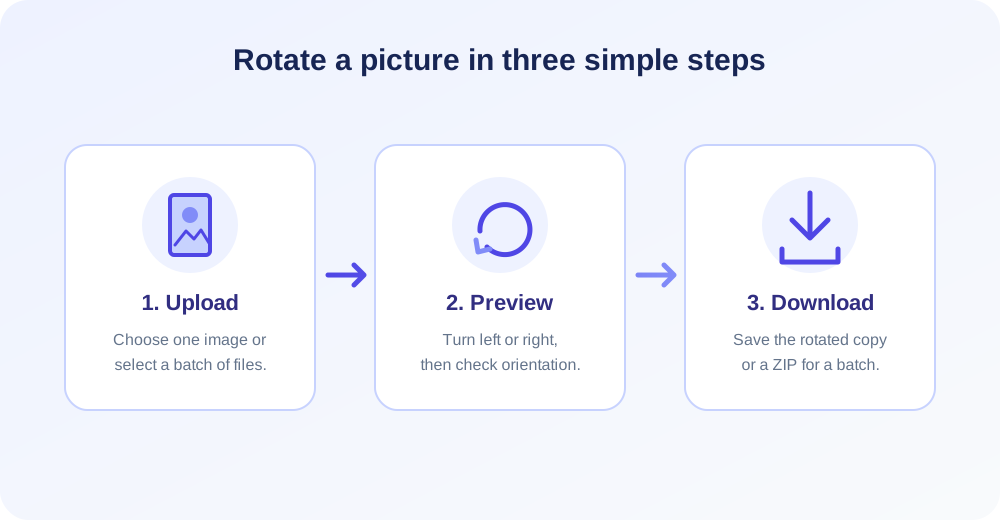
- Upload an image. Click the upload area or drop a supported file into it. Select multiple images if they should be processed in the same session.
- Choose a direction. Select Left or Right for a 90-degree turn. Use Reset if the preview should return to zero degrees.
- Adjust individual previews if needed. The small rotate icon on an image card changes that image independently. Shared direction buttons set the same turn across selected previews.
- Review each result preview. Check the subject, text direction, and crop boundaries. Remove an image if it should not be part of the batch.
- Select Rotate Image. Wait while the files are processed. A single image receives an individual download link; a batch is provided as a ZIP archive.
- Open the downloaded copy. Verify orientation in the application where you intend to use it, particularly if the source depends on camera orientation metadata.
The preview is a useful way to catch direction mistakes before submitting. For instance, a document photograph rotated left may still be upside down, in which case a second quarter-turn is needed.
For several unrelated pictures, use the per-image control to avoid applying one direction to every file by accident.
Understanding Left, Right, and Reset
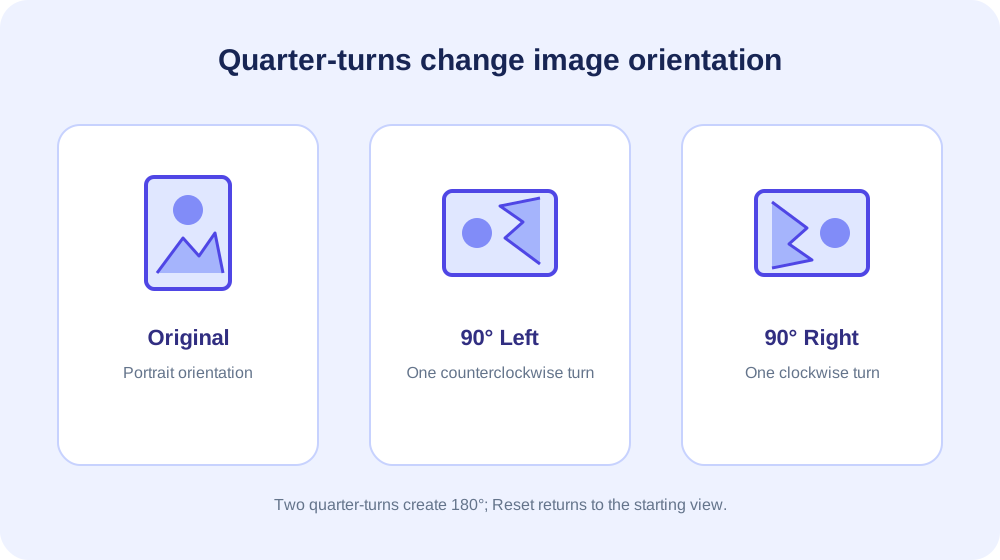
Left and Right describe the direction of the quarter-turn from the current image orientation. The left control turns by 90 degrees counterclockwise; the right control turns by 90 degrees clockwise.
A reset returns the image preview to its original zero-degree position, so you can reconsider the direction without re-uploading.
Two quarter-turns in the same direction make a half-turn. Three quarter-turns make a 270-degree turn, which is equivalent to one 90-degree turn in the opposite direction.
The tool offers simple preset values rather than a numerical angle field, keeping the choices clear for common rotation tasks.
For a square icon, a quarter-turn may not change the overall bounding-box dimensions, but it can still change the way a symbol or text appears. For a rectangular image, the width and height swap after a 90- or 270-degree turn.
A 180-degree turn keeps the same width and height.
| Action | Rotation | Typical result | Dimensions |
|---|---|---|---|
| Left once | 90° counterclockwise | Portrait becomes landscape, or vice versa | Width and height swap |
| Right once | 90° clockwise | Turns the image in the opposite direction | Width and height swap |
| Same direction twice | 180° | Turns the image upside down | Original width and height remain |
| Three turns one way | 270° | Equivalent to one turn in the other direction | Width and height swap |
| Reset | 0° | Returns the preview to its starting orientation | Original width and height |
When People Rotate Images
Phone photos are a familiar reason to rotate a picture. A device may be held vertically, while another app reads its image data or orientation marker differently. The resulting photo can appear sideways in a website, email attachment, or older desktop program.
A saved rotation can provide a more consistent visual copy for those destinations.
Scanned paperwork may arrive in landscape when it should be portrait, or a page may be captured at an angle that makes reading inconvenient. A right-angle rotation fixes a page that is turned on its side.
It does not straighten a crooked scan or remove dark edges; those jobs call for a deskew, crop, or scanner correction feature.
Product photos, diagrams, and social images can also need a simple orientation change before publishing. A product shown on its side may be confusing in a listing, and a horizontal graphic may need to stand upright in a specific layout.
Preview the final framing and check any labels or directional elements before sharing.
Image Rotation and Orientation Metadata
Some image files contain orientation metadata in addition to their pixel grid. A camera can write pixels in one orientation and add a flag telling compatible software how to display them upright.
One viewer may follow that flag, while another may ignore it or apply it at a different stage in its workflow.
This difference explains why a photo can look upright on a phone but sideways after it is uploaded somewhere else. A rotation tool creates a processed output, but the final appearance still depends on how the source decoder and destination viewer handle image orientation.
Verify the downloaded copy in the actual app or site where it will be used.
For a critical archive, retain the original photo and compare its appearance across a couple of viewers. If the output looks wrong only in one program, the issue may be that program's metadata handling.
The right solution may be to normalize orientation in a photo editor or export a standard copy with the intended pixel orientation.
Supported Images and File Size
The form accepts JPG/JPEG, PNG, GIF, WEBP, AVIF, BMP, HEIC, ICO, TIFF/TIF, and SVG file extensions. Each selected image may be up to 20 MB.
The actual ability to read a particular file depends on its encoding and the server's image support; extensions identify common types but do not guarantee every specialized variant can be opened.
Image processing uses memory for decoded pixels, not just the compressed file size. A large, high-resolution photo can therefore require more server resources than a small graphic, even when both files are under the upload limit.
Very large batches may be constrained by request, memory, or processing limits beyond the visible per-file size rule.
If an upload fails, check that the file opens in an image viewer, confirm the extension matches the true file type, and try one image at a time.
If the file uses an uncommon codec, export a compatible JPG or PNG copy from a trusted image editor and rotate that version instead.
Does Rotating Change Quality or Image Size?
A right-angle rotation is a geometric rearrangement; it does not need to stretch pixels. The output canvas changes shape for a quarter-turn, so portrait dimensions become landscape dimensions, or landscape becomes portrait.
A half-turn leaves the dimensions in the same order because the rectangle is reversed without changing its width-to-height proportions.
The tool must decode and save an output image, which can involve re-encoding. Lossless formats can preserve pixel values more directly, while lossy formats such as JPG may be encoded again and can introduce small differences.
Repeatedly saving the same JPG through multiple editing steps is best avoided when fine detail matters.
Rotation does not increase resolution, add missing detail, or guarantee a smaller file. If the output must be a particular number of pixels, use a resizer after checking the orientation. If upload size is the issue, a compressor is more appropriate than rotation alone.
How to Rotate Image in Word
Microsoft Word can rotate a picture that is already placed in a document. Select the image to reveal its picture formatting controls, then look for a Rotate command.
Many desktop versions offer preset turns and a flip menu; exact tab names and toolbar placement can vary between Windows, Mac, web, and mobile editions.
For a small adjustment in Word, use the rotation handle displayed above the selected image if your version shows it. Drag carefully and review how surrounding text wraps.
This changes the image's position in the document layout, which is useful for a report or presentation page but is not necessarily the same as exporting a standalone rotated file.
If you need a reusable image outside Word, create or save a separate image file after editing. Keep an untouched copy, especially when the source is a photograph or logo.
The Word method is convenient for page composition, while a dedicated image editor provides more control over export settings, transparency, and pixel dimensions.
How to Rotate Image on iPhone
On iPhone, open the picture in Photos and choose Edit. The crop and straighten workspace includes a rotate control for turning the image in quarter-turns.
The exact symbols or labels can change between iOS versions, so look for the rotate icon in the editing toolbar if your screen differs from a guide written for another release.
After applying a turn, review the image and tap Done to save the edit. Photos generally keeps edits reversible in its library, but behavior can vary when you export, share, or edit a copy in another application.
Duplicate the photo first if you need a completely separate original and edited version.
If an iPhone image appears sideways only after transfer, check whether the receiving app reads orientation metadata.
Rotating and exporting a copy may help normalize the file, but confirm the shared copy on the target device or platform before deleting the original or sending a large group.
How to Rotate the Image in Photoshop
Photoshop offers different rotation workflows depending on whether you want to turn the entire document or only a layer. For a whole canvas, look under the Image menu for image rotation options.
For a placed object or layer, select that layer and use Free Transform to rotate it while preserving the rest of the composition.
When using Free Transform, a numeric angle can be useful for precise placement. Confirm the transform and inspect empty corners or transparent regions that may appear after turning a rectangular layer.
If you rotate the whole canvas by 90 degrees, the canvas orientation changes; if you rotate only a layer, the canvas can remain fixed and the layer may extend beyond its bounds.
Menu labels, shortcuts, and tool behavior differ by Photoshop version and workspace. Save a duplicate or use a separate layer before destructive edits.
Photoshop is the better choice for free-angle corrections, masks, and compositing; this online rotator is simpler when the task is a clean quarter-turn of a whole image.
Choose the Right Tool for the Job
Use rotation when the picture needs a new direction, not when its subject needs a new crop. If you need to cut away borders, remove empty space, or reframe a person, use Image Cropper.
A crop changes the visible area; it does not simply turn the complete image around.
If the output must have a specific width or height, use Image Resizer. A resizer adjusts dimensions, while rotation changes orientation. For a rotated portrait intended for a profile, check both the final shape and the platform's pixel requirements.
To change a supported image into a different file type, visit Image Format Converter. If a file is too heavy to upload, Image Compressor is designed to reduce image size. For visual lookup rather than editing, use Reverse Image Search.
These operations can be combined in a broader workflow, but apply only what the image needs. For example, rotate a sideways source first, then resize a copy for a particular placement.
Keep the original to avoid losing options and compare the final file with the destination's format and dimension requirements.
Batch Rotation and Per-Image Choices
Batch processing is useful when a set of scans or photos share the same orientation problem. Add the group, choose a common direction, and review the cards before processing.
This helps avoid repeating the upload and download sequence for every file, especially when preparing a consistent set for an album or project.
Not every image in a group will necessarily need the same correction. A folder may include both portrait and landscape shots, or some files may already be upright. Use the individual quick-turn control on each card to make separate choices.
The result for a batch is packaged for download as a ZIP, making it easier to store the related files together.
After downloading, extract the archive and spot-check the contents. Confirm filenames, orientation, and visual quality. If the archive contains many files, open several representative outputs, including the first and last image.
This simple review can catch a mistaken global direction before the processed group is sent onward.
Privacy and File Handling Considerations
Images can include personal, business, or location-sensitive information. Before uploading, consider whether the picture contains faces, confidential documents, private surroundings, or embedded metadata.
Use an online service only when you are comfortable with its handling of the selected file and the data needed for the requested processing.
For sensitive work, an offline photo application may be a better option because it can keep the source on your own device. Whatever tool you choose, avoid uploading material you are not authorized to process.
Keep a source copy in a secure place and share only the output intended for the recipient.
Review the privacy and file-handling information provided by the service you use. A download link is a way to retrieve a generated file, not a reason to assume that a file has been archived permanently or deleted at a particular time.
Avoid relying on a temporary online output as your only copy.
Common Rotation Mistakes to Avoid
One common mistake is choosing a direction based on how the preview is positioned on a screen rather than the subject's intended orientation. Look at text, faces, horizons, and recognizable objects.
If they still appear sideways, use the opposite control or make another quarter-turn before downloading.
Another mistake is assuming that rotation also crops or straightens an image. A quarter-turn only changes the orientation.
If a photo was taken at a slight diagonal, a right-angle control will not level the horizon; use a straighten tool and crop the resulting corners in a more complete editor.
Do not replace the original before verifying the output. A viewer may interpret metadata differently, or an unusual file variant may produce a processing error.
Open the result in the intended destination, confirm it is upright, and keep the source until the corrected image has been accepted.
Troubleshooting an Image Rotator Online
If the file does not appear in the preview, confirm that its extension is supported and that it is smaller than 20 MB. An accepted extension can still contain an uncommon encoding.
Try opening the file locally and exporting a standard version if the source cannot be previewed.
If processing does not finish, retry with one image rather than a large batch. A complex file can use more memory than expected, and the server may have additional request limits. If the smaller test succeeds, process the remaining files in manageable groups.
If the output downloads but looks unchanged, make sure the selected angle was not Reset and that the image did not receive two turns that returned it to its original orientation.
Reopen the preview, set a single direction, and compare the saved copy against the source.
Conclusion: Rotate a Copy and Check the Result
A reliable rotation workflow starts with a supported image, applies a clear quarter-turn, and checks the downloaded result in its destination. This online image rotator offers Left, Right, and Reset controls, per-image adjustments, multi-file selection, and copies for download.
It is suited to right-angle orientation corrections, not free-angle straightening, cropping, or resizing.
Keep the source file, especially when metadata, transparency, animation, or high image quality matters. Use Word, iPhone Photos, or Photoshop when the edit belongs inside those apps, and choose a dedicated crop, resize, format, or compression tool when the task is different.
A quick preview and final check help ensure the image is ready to share.


