Octal To Binary: Convert Base-8 Values With Confidence
Octal and binary are two ways to write whole numbers using different digit systems. Octal is base 8 and uses digits from 0 to 7; binary is base 2 and uses only 0 and 1. Converting between them is especially straightforward because every octal digit corresponds to exactly three binary digits. SnapZain’s octal to binary converter applies that relationship to one value or a space-separated list of values.
Enter up to 500 characters in the Octal input box, choose Convert, and read the result in the Binary field. Separate multiple octal values with spaces to keep each conversion distinct. The calculator rejects characters outside the octal digit range. It also provides Copy to clipboard, Clear, and Ctrl+Enter as a keyboard shortcut for Convert.
How The Conversion From Octal To Binary Works
In a positional number system, each digit’s value depends on its position. In base 8, the positions represent powers of 8: ones, eights, sixty-fours, and so on. In base 2, positions represent powers of 2. Since 8 = 2³, a single octal position has the same range as a group of three binary positions. This makes digit substitution a reliable conversion method for octal integers.
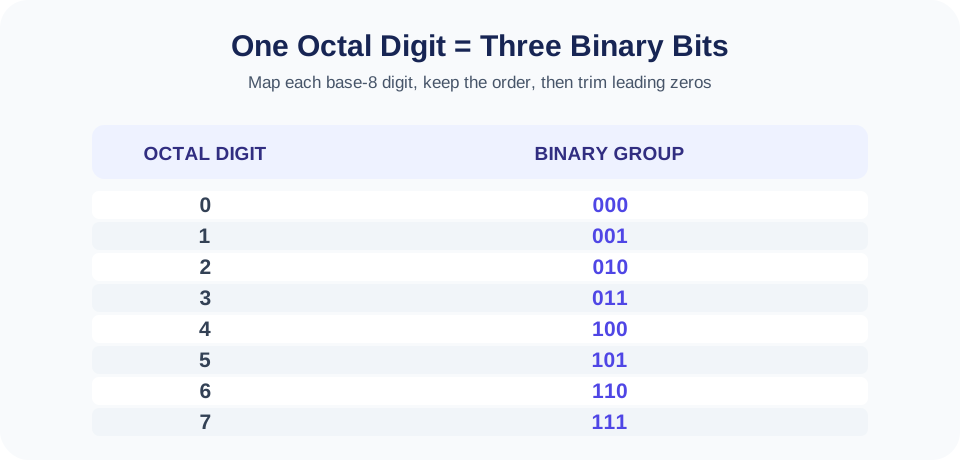
For each digit, look up its three-bit equivalent. Then join the groups in the same order as the octal digits. If the first group begins with zero, remove only those leading zeros from the beginning of the whole result. Do not remove zeros from the middle or end; they carry place-value information.
| Octal Digit | Three-Bit Binary Group | Decimal Value |
|---|---|---|
| 0 | 000 | 0 |
| 1 | 001 | 1 |
| 2 | 010 | 2 |
| 3 | 011 | 3 |
| 4 | 100 | 4 |
| 5 | 101 | 5 |
| 6 | 110 | 6 |
| 7 | 111 | 7 |
The chart is the central reference for an octal to binary conversion. You do not need to convert through decimal for ordinary whole-number inputs. Direct mapping also makes it easier to check that each octal digit was processed and stayed in its original position.
How To Convert Octal To Binary By Hand
Use this repeatable method whenever you want to confirm the calculator’s result or understand the octal to binary conversion manually:
- Write the octal number clearly. Confirm that every character is a digit from 0 through 7.
- Replace each digit. Use the chart to substitute its three-bit binary group.
- Keep the digit order. Concatenate the groups from left to right without rearranging them.
- Remove leading zeros if needed. Trim zeros only from the far left of the completed binary number.
- Check the result. Convert the binary value back to octal by grouping bits in threes from the right, padding the leftmost group with zeros if needed.
For example, convert octal 57. The digit 5 maps to 101, and 7 maps to 111. Joining them gives 101111. The output has six binary digits because the original octal value has two digits and neither three-bit group starts with an unnecessary leading zero.
For octal 20, map 2 to 010 and 0 to 000. Joining produces 010000; remove the first zero to get 10000. The internal zeros remain, because they distinguish the value from other bit patterns.
Octal To Binary Examples: 100, 12, And 123
These examples are common checks for a calculator octal to binary result. Each one shows both the digit-by-digit substitution and the final binary integer without unnecessary leading zeros.
Convert 100 Octal To Binary
Map each digit in 100: 1 becomes 001, the first 0 becomes 000, and the last 0 becomes 000. The grouped result is 001000000. Removing the two zeros at the far left leaves 1000000. As a cross-check, octal 100 is 1 × 64 = decimal 64, and decimal 64 is binary 1000000.
Convert 12 Octal To Binary
For 12, substitute 1 with 001 and 2 with 010. The groups form 001010. Removing the first two leading zeros gives 1010. In decimal, the octal value is 1 × 8 + 2 = 10, and decimal 10 is binary 1010.
Convert 123 Octal To Binary
For 123, the groups are 1 → 001, 2 → 010, and 3 → 011. Their joined form is 001010011. Remove the first two zeros and the answer is 1010011. A decimal check gives 1 × 64 + 2 × 8 + 3 = 83; 83 in binary is 1010011.
Important: Remove zeros only from the beginning of the complete binary result. A zero between nonzero bits is significant and must stay.
Avoid Common Octal To Binary Conversion Mistakes
The digit mapping is short, but a few slips can change the answer. Keep the three-bit group for every octal digit until all groups have been joined. If you drop a zero from the middle of a group, the bits shift position and the represented number changes. Likewise, preserve the left-to-right order: the first octal digit remains the most significant group in the binary result.
Do not treat an octal string as though it were decimal. Octal 12 means one group of eight plus two, which is decimal 10—not decimal 12. Its binary form is therefore 1010, not the binary representation of decimal twelve. When an answer seems surprising, use the base-8 place values as an independent check: multiply each digit by its matching power of 8, add the values, then confirm the binary result has the same decimal value.
Also distinguish separate inputs from one number. Typing 12 3 requests two conversions; typing 123 requests one three-digit octal conversion. A space changes how the calculator splits its work. Before copying a long result, check that the input was grouped the way you intended.
Use The Octal To Binary Calculator
The online calculator follows the same base conversion process for you. Type an octal value into the Octal field, then press Convert. The Binary field displays the converted value. To process a list, place spaces between the octal numbers—for example, input 12 77 255 returns one result for each token in the same sequence.
The input area accepts a maximum of 500 characters. If you type beyond the limit, the tool reports an input-limit error when conversion is attempted. Enter only whole-number octal notation: the accepted digits are 0, 1, 2, 3, 4, 5, 6, and 7. The tool does not accept prefixes such as 0o, commas, decimal points, signs, or letters.
After a successful conversion, choose Copy to clipboard to copy the result. Use Clear to remove both the input and output, or press Ctrl+Enter while in the input box to run the conversion. When the input changes, the old output is cleared so it is not mistaken for the result of the new value.
Read Multiple Values And Validate Input
Space-separated values are handled as separate conversions, not as digits in a single longer number. For input 12 77, the calculator converts 12 and 77 independently and puts a space between their binary answers. Keep the separators clear so you can match each output to its original octal value. If you need a single larger octal integer, type its digits together without internal spaces.
Every token must contain at least one octal digit. Valid examples include 0, 7, 12, and 507. Invalid examples include 8, 19, 7A, -12, and 12.4. Those invalid forms contain digits, signs, or symbols outside the converter’s whole-number octal input rules.
Leading zeros are permitted in the input but do not change a whole number’s value. For example, octal 007 represents the same value as octal 7, so the output is the same canonical binary value. The calculator is intended for non-negative integer conversion; it is not a calculator for octal fractions or signed representations.
For very large values, compare the result with a trusted arbitrary-precision method. The current browser conversion uses JavaScript number parsing, which cannot represent every integer above its safe-integer range exactly. This is a precision limitation of the implementation, not of the mathematical octal-to-binary mapping. Ordinary-sized values and the examples on this page are within the exact range.
Important: This converter accepts octal digits only and is intended for whole numbers. It does not process fractions, negative values, or prefixed notation.
Why Octal And Binary Are Used Together
Binary is a natural way to represent information in digital systems, but long binary strings can be cumbersome to read. Octal offers a compact shorthand because each octal digit summarizes a group of three bits. This relationship is useful in learning number systems and interpreting bit patterns where groups of three are convenient.
For instance, binary 111 101 001 can be grouped into three-bit units and written as octal 751. In the reverse direction, octal 751 maps directly back to 111101001. This does not mean every system uses octal notation; it is simply a practical representation when the bit grouping aligns with three-bit units.
When reading technical material, be attentive to context. The same digits can represent different values depending on their base. The string 10 is ten in decimal, eight in octal, and two in binary. A base label or clear notation prevents ambiguity. The Octal field on this page treats the entered digits as base 8, while the Binary result is base 2.
Related Converters For Number And Text Work
Use the converter that matches the direction and data type of your task. Text to Binary represents characters as binary values. Text to HEX converts text characters into hexadecimal notation. Octal to Decimal changes a base-8 number into a base-10 value, and Text to ASCII displays character codes. These are separate conversions; they do not change the octal-to-binary rules explained here.
Conclusion: Convert Octal Digits In Three-Bit Groups
Octal-to-binary conversion is straightforward because each base-8 digit maps to one three-bit group. Check that the input uses digits 0 through 7, preserve their order, and remove only leading zeros from the completed result. The SnapZain calculator accepts a value or space-separated values up to 500 characters and provides copy and clear controls. Use the examples and chart to verify ordinary results, and double-check very large integers where JavaScript number precision can become a limitation.


