Text To Hex: Convert Characters Into Hexadecimal Codes
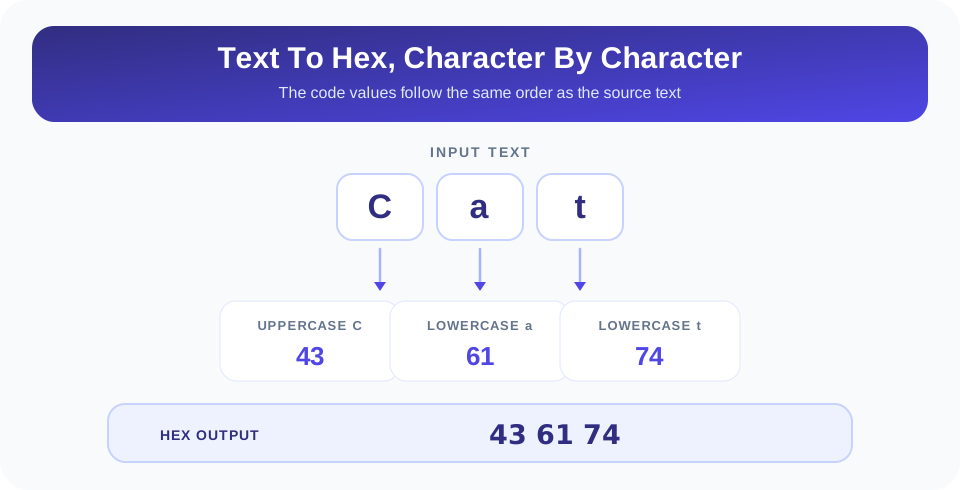
Hexadecimal is a compact way to write numeric values using sixteen symbols: 0–9 and A–F. A text-to-hex conversion represents each character with a hexadecimal code. SnapZain’s Text to HEX converter accepts up to 500 characters and returns uppercase hexadecimal values separated by spaces. For basic ASCII text, each character is shown as two hex digits: the word Cat becomes 43 61 74.
Enter or paste text into the input box, select Convert, and read the result in the Hexadecimal field. The page also lets you copy the output, clear the fields, or press Ctrl+Enter while in the input box. This tool displays a hex string; it does not create a downloadable hex file or encrypt your text.
What The Text To Hex Converter Produces
The converter processes the entered string one character at a time. For each character, it reads a JavaScript character-code value, converts that value to base 16, pads values to at least two hexadecimal digits, and joins the results with spaces. The letters in the output are uppercase. For familiar ASCII characters, this produces the expected two-digit byte-style codes.
For example, uppercase A has hexadecimal value 41, while lowercase a is 61. The output is case-sensitive because the source characters are different. A space is itself a character and is represented by 20; the spaces between output codes are added as separators so the individual values are readable.
Important: This converter returns character-code values as hexadecimal text. Hex is a representation, not encryption, and anyone who knows the encoding can convert the values back.
People searching for “ASCII text to hex” or an “ASCII text to hex code converter” often need this kind of character-by-character output. For standard ASCII input, the values correspond to ASCII codes. With characters outside the ASCII range, the details depend on the tool’s character handling; see the Unicode section below before using those results in another system.
How To Convert Text To Hex Online
The calculator is designed for a short, direct workflow:
- Enter the text. Type or paste up to 500 characters into the Text field.
- Review the input. Check uppercase and lowercase letters, spaces, punctuation, and line breaks.
- Start the conversion. Select Convert, or press Ctrl+Enter while the text box is active.
- Read the output. The Hexadecimal box displays uppercase values separated by spaces.
- Copy or clear. Use Copy to clipboard to reuse the result or Clear to reset both fields.
When the source text changes, the previous result is cleared so it cannot be confused with the conversion of the new input. If the input is empty or contains only whitespace, the converter returns an empty result. A space within a phrase, however, is encoded as a character and receives its own code.
Read A Text To Hex Conversion Example
Consider the word Cat. The first character is uppercase C, the second is lowercase a, and the third is lowercase t. Their standard ASCII hexadecimal codes are 43, 61, and 74. In the same order, the full result is 43 61 74.
To understand why the output uses these values, hex uses place values based on powers of 16. The code 43 means 4 × 16 + 3 = decimal 67, which is the ASCII decimal value for uppercase C. Likewise, 61 is 6 × 16 + 1 = 97, and 74 is 7 × 16 + 4 = 116. Each hexadecimal pair can therefore be checked by converting it to decimal and comparing it with a character-code reference.
| Input Character | Decimal ASCII Value | Hexadecimal Code |
|---|---|---|
| Space | 32 | 20 |
| 0 | 48 | 30 |
| A | 65 | 41 |
| Z | 90 | 5A |
| a | 97 | 61 |
| z | 122 | 7A |
| ! | 33 | 21 |
A phrase includes spaces and punctuation in its output too. For example, the space between two words adds another hexadecimal code between their character values. If you are comparing a converted phrase with a reference, count those separators as code boundaries, not as extra characters in the original text.
Hexadecimal And ASCII: How They Relate
ASCII assigns numeric values to a limited set of characters. Hexadecimal is one way to write those numbers. For example, uppercase A is decimal 65 and hexadecimal 41; those are two notations for the same numeric value. Hex does not define the character by itself—it gives a compact representation of a code whose meaning depends on the character encoding being used.
Standard ASCII contains 128 values, from 0 through 127. A text-to-hex converter can represent those values using hexadecimal, but the exact output format may differ among tools. Some display two digits per value, some omit leading zeroes, and others group bytes differently. SnapZain’s output is uppercase and space-separated, and it pads each converted character’s hex value to at least two digits.
The phrase “convert text to ASCII hex” commonly means converting ASCII character values into hexadecimal notation. That is appropriate for basic ASCII input. It should not be confused with converting a complete Unicode string into UTF-8 bytes, UTF-16 code units, or another explicit byte encoding. Those workflows can produce different sequences for non-ASCII symbols.
Important Unicode And Encoding Limitations
The current converter uses JavaScript’s charCodeAt method for each value produced by Array.from. For ordinary ASCII characters, the result is clear and matches the usual code. For many non-ASCII characters in the Basic Multilingual Plane, the returned value is a UTF-16 code unit. For supplementary Unicode symbols, such as many emoji, JavaScript stores the symbol using a surrogate pair; this implementation records only the first code unit for the iterated symbol rather than encoding the full Unicode code point or its UTF-8 bytes.
This means the output is useful for simple ASCII text, but it is not a complete Unicode-to-hex encoder. If you need to send multilingual text or emoji to a protocol, device, programming interface, or file, confirm which encoding it expects. UTF-8 byte output is common, but it is not the same as writing JavaScript character-code values as hex.
Important: For non-ASCII text, do not assume this result is UTF-8. The converter’s current character-code behavior can differ from byte-level encodings required by other software.
For interoperable data, use a converter that explicitly names the output encoding, such as UTF-8 bytes or UTF-16 units, and test with the target system. When accuracy matters, convert a short known sample first and compare its bytes with the expected reference.
Convert Text To Hex Code With Spaces And Punctuation
Every entered character contributes a value. Capitalization changes the code: A and a do not share the same representation. Digits typed as text are also processed one character at a time. The text 204 becomes the code for the character 2, followed by character 0, followed by character 4; it is not treated as a single numeric quantity.
Spaces, tabs, line breaks, and punctuation may all influence the result. A standard space has the ASCII hex value 20, while an exclamation mark is 21. A newline is typically represented by a control value, but copied line endings can differ by platform: some use line feed alone, while others use a carriage return followed by a line feed. This can create additional codes between lines.
If the output appears to contain an unexpected value, inspect the original text for invisible whitespace, different quotation marks, or punctuation copied from formatted documents. Curly quotation marks are not the same characters as straight quotation marks. A tab is not the same as several spaces, even if the two appear similar on screen.
Can You Convert Excel Text To Hex?
This SnapZain page converts text typed or pasted into its browser input. It does not upload Excel files, read spreadsheet cells, or process a whole workbook. Searches such as “Excel convert text to hex” and “Excel text to hex” refer to spreadsheet-specific ways of applying character-code and base-conversion operations to cell contents. Those workflows require a formula, script, or spreadsheet add-in appropriate to the Excel version and the expected encoding.
If you copy a short cell value into this tool, it can convert that text under the same 500-character limit and character-code behavior described above. Copying a large column or a workbook will not preserve spreadsheet structure, formulas, or cell formatting here. For batch processing, use a purpose-built spreadsheet workflow and verify whether it outputs ASCII codes, Unicode values, or encoded bytes.
Likewise, “convert text to hex file” can mean creating a file containing a hex string or transforming bytes into a binary file. This calculator only displays text in the result area; it does not create a file download. Copy the result if you need to paste it into another program, and make sure the receiving program expects this exact format.
Hex Is A Representation, Not A Security Method
Hexadecimal can make values easier to inspect, but changing text into hex does not hide or protect the information. A person can convert the sequence back if they know how characters were encoded. Do not use a hex string as a password protection mechanism, a digital signature, or proof that a message has not been changed.
If you are preparing data for software, treat the output as a representation that must match the target’s requirements. Confirm uppercase or lowercase expectations, separators, byte order, and character encoding. Some systems expect a continuous string without spaces; others expect each byte to be separated. The SnapZain converter includes spaces between character values, so remove or preserve them only if the receiving format specifies what to do.
Related Text And Number Converters
Use another converter when the desired output or source format differs. Octal to Decimal converts base-8 numbers into base 10. Text to ASCII displays decimal character-code values. Octal to Binary changes octal values into binary, and Text to Binary represents text characters in binary notation. Each tool has its own input expectations; choose according to whether you have text, octal digits, or another numeric representation.
Conclusion: Convert Text Into Readable Hex Values
SnapZain’s text-to-hex converter turns entered characters into uppercase, space-separated hexadecimal character-code values, with an input limit of 500 characters. It is straightforward for basic ASCII text, where familiar characters produce standard two-digit codes. For Unicode, Excel data, byte-level files, or security-sensitive use, check the encoding and output requirements carefully: this page does not process complete workbooks, create downloadable hex files, or encrypt text.


