Octal To Decimal: Convert Base-8 Numbers Into Base 10
Octal and decimal describe the same quantities using different digit systems. Decimal is base 10 and uses digits 0 through 9; octal is base 8 and uses only digits 0 through 7. When you convert octal to decimal, you calculate the value represented by each digit’s position and add those values together. The SnapZain octal to decimal converter handles a single octal number or multiple space-separated values in the browser.
Enter up to 500 characters into the Octal box, select Convert, and view the base-10 answer in the Decimal field. The calculator also includes Copy to clipboard and Clear controls, plus Ctrl+Enter as a keyboard shortcut. This page is for non-negative whole numbers written with octal digits; it does not accept fractions or signed values.
Understand Octal Place Values
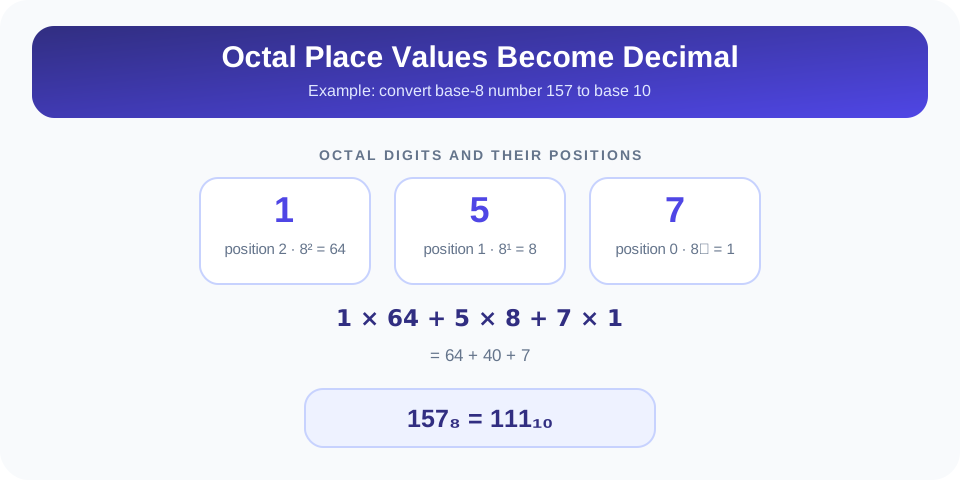
In any positional number system, a digit’s location determines how much it contributes to the total. In decimal, the places from right to left are 1, 10, 100, and 1,000. In octal, the places are powers of 8: 1, 8, 64, 512, and so forth. The rightmost digit occupies the 8⁰ place, the digit to its left occupies 8¹, and the next digit occupies 8².
To convert an octal number manually, multiply every digit by the power of 8 matching its position, then add all products. Start counting positions at zero from the right. A zero digit contributes zero, but it still marks an important position; removing it from the middle can change the value.
| Position From Right | Power Of 8 | Place Value In Decimal |
|---|---|---|
| 0 | 8⁰ | 1 |
| 1 | 8¹ | 8 |
| 2 | 8² | 64 |
| 3 | 8³ | 512 |
| 4 | 8⁴ | 4,096 |
For octal 157, the rightmost digit 7 is in position 0, digit 5 is in position 1, and digit 1 is in position 2. Therefore, calculate 1 × 64 + 5 × 8 + 7 × 1. The products are 64, 40, and 7; their sum is 111. Thus, 157 in base 8 is 111 in base 10.
How To Convert Octal To Decimal By Hand
Use this process to check any whole-number octal conversion, including values entered into the calculator:
- Verify the digits. Make sure every symbol is from 0 through 7.
- Label the positions. Starting on the right, write powers 8⁰, 8¹, 8², and continue to the left.
- Multiply each digit. Multiply the digit by the place value directly beneath it.
- Add the products. The total is the equivalent decimal number.
- Check the result. Convert the decimal total back to octal or compare it with a trusted calculator.
For example, with octal 243, the expansion is 2 × 8² + 4 × 8¹ + 3 × 8⁰. This becomes 2 × 64 + 4 × 8 + 3 × 1, or 128 + 32 + 3. The decimal result is 163. The same method works no matter how many valid octal digits the input contains.
Zeros can make the expansion easier to misread, so keep the original positions visible while calculating. In octal 205, the middle zero contributes 0 × 8, while the other digits contribute 2 × 64 and 5 × 1. The answer is 133. The zero does not add to the sum, but it cannot be dropped because it determines the place occupied by the 2.
Octal To Decimal Examples: 012, 015, And 100
These three examples illustrate leading zeros, a zero in the highest place, and a power-of-eight boundary. They are useful sample checks when learning the conversion of octal to decimal.
012 Octal To Decimal
For 012, assign positions from right to left: 2 is in the ones place, 1 is in the eights place, and 0 is in the sixty-fours place. The calculation is 0 × 64 + 1 × 8 + 2 × 1, which equals 10. The leading zero does not alter the value, so octal 012 and octal 12 both represent decimal 10.
015 Octal To Decimal
For 015, calculate 0 × 64 + 1 × 8 + 5 × 1. The products are 0, 8, and 5; adding them gives 13. This example also shows why the rightmost digit is not multiplied by 8: its position is 8⁰, which equals 1.
100 Octal To Decimal
For 100, the 1 occupies the 8² position, while both zeros contribute nothing. The calculation is 1 × 64 + 0 × 8 + 0 × 1, so the decimal answer is 64. One followed by two zeros in octal therefore marks one group of sixty-four, just as one followed by two zeros in decimal marks one hundred.
Important: Octal 100 is decimal 64—not decimal 100. A number’s value depends on its base, even when its digits look familiar.
Use The Octal To Decimal Calculator
The online calculator applies positional conversion automatically. Type a whole-number octal value into the Octal field and choose Convert. The result appears in the Decimal field as base-10 digits. You can then copy the output or clear the fields to begin another calculation.
To convert several values in one pass, separate them with spaces. For example, input 012 015 100 is read as three independent octal values and returns their decimal equivalents in the same sequence: 10 13 64. If you want a single longer octal number, enter its digits together without spaces. Spaces are separators between values in a multi-value entry.
The calculator accepts a maximum of 500 input characters. Its counter shows how much of that capacity you have used. If the value is longer, the tool reports an input-limit message. After changing the input, the previous output is cleared, helping prevent an old answer from being mistaken for the current result. Pressing Ctrl+Enter while the input field is active also runs the conversion.
Recognize Valid Octal Input And Common Errors
Octal is base 8, so its digit set ends at 7. Values such as 0, 7, 10, 127, and 755 are valid octal strings. Digits 8 and 9 cannot appear in an octal number. The calculator also expects plain whole-number digits, so a prefix like 0o, a minus sign, a decimal point, or punctuation will produce an invalid-input error.
Leading zeros are accepted and do not change the numeric value. For example, 00015 has the same value as 15 in octal. The output is a decimal number without unnecessary leading zeros. If multiple values are entered, put spaces between complete values rather than using commas or other separators.
This page does not calculate octal fractions such as 12.4, and it does not interpret negative notation such as -17. Those require additional rules for fractional positional values or signed numbers. Use this calculator for non-negative integers only. If an error appears, remove unsupported symbols and check every digit before trying again.
Another important limit concerns very large integers. The browser implementation uses JavaScript’s standard number parsing, which can lose integer precision above JavaScript’s safe-integer range. Most everyday examples are not affected, but a long octal string may produce a rounded decimal result. For applications involving very large values, verify with a tool that supports arbitrary-precision integer arithmetic.
Check A Decimal Answer By Converting Back
A useful verification method is to convert the decimal result back to octal. Repeatedly divide the decimal number by 8 and record each remainder. Continue dividing the quotient by 8 until it reaches zero. Read the remainders from bottom to top to get the octal digits. For decimal 64, division by 8 gives quotient 8 remainder 0; then 8 divided by 8 gives quotient 1 remainder 0; finally 1 divided by 8 gives quotient 0 remainder 1. Reading upward produces octal 100.
This reverse check is especially helpful when a value has several digits or zeros in internal positions. If the converted octal result does not match your starting value (ignoring optional leading zeros), revisit the place-value expansion or use a calculator to check the arithmetic. A consistent round trip is a practical way to confirm that both representations refer to the same integer.
Do not confuse converting a value with changing how it is displayed. Octal 17 and decimal 15 are two written representations of the same quantity. The number itself has not changed; only the base used to express it has changed.
Where Octal And Decimal Notation Are Useful
Decimal is familiar for everyday counting, measurements, and reports. Octal is useful when a compact base-8 representation is needed, such as in number-system lessons and some computing contexts. Converting to decimal can make a value easier to interpret alongside ordinary quantities or compare with a decimal-based calculation.
When reading technical values, confirm which base is intended before interpreting the digits. The string 100 can mean one hundred in decimal, sixty-four in octal, or four in binary. Clear labels, subscripts, or prefixes may be used by different systems to identify a base, but this calculator’s Octal input always treats plain digits as base 8. It does not guess the base from the digits.
Octal-to-decimal conversion is also a useful way to practice positional notation. Once you understand powers of 8 and digit weights, the same principle applies to other bases: multiply each digit by its positional power and sum the results. What changes between systems is the base and the allowed digit set.
Related Text And Number Converters
Choose a related converter when you need another representation. Text to ASCII shows decimal character-code values for text. Octal to Binary changes base-8 numbers into base-2 values. Text to Binary converts characters into binary form, while Text to HEX returns hexadecimal character values. These tools solve different conversions; use the one whose input and output match your task.
Conclusion: Convert Octal Values By Their Powers Of Eight
Converting octal to decimal means multiplying each digit by its power-of-eight place value and adding the results. The examples 012, 015, and 100 equal decimal 10, 13, and 64. SnapZain’s calculator accepts valid digits 0–7, can process space-separated whole numbers up to 500 characters, and provides copy and clear controls. Check the base, preserve zero positions, and verify very large integers with an arbitrary-precision method when exactness is essential.


