Meta Tag Generator: Create Useful Page Metadata
A meta tag generator helps you prepare HTML metadata for a webpage. Enter a title, description, canonical or Open Graph URL, optional preview image, and optional keywords in the form above. Select Generate Meta Tags to create a snippet that you can review and add to your own page’s <head> section.
This tool generates basic title, description, canonical, and Open Graph markup in your browser. It does not publish changes to your website, inspect your page, test whether the entered URLs work, or guarantee search rankings. You remain responsible for checking that the output describes the actual page, adding it through your CMS or code, and verifying the live HTML after publication.
Searchers may look for a meta tags font generator, but meta tags are HTML metadata, not font files or typography settings. If you meant a generator for choosing or styling fonts, that is a different kind of tool. This page focuses on tags that describe a webpage to browsers and services that process metadata.
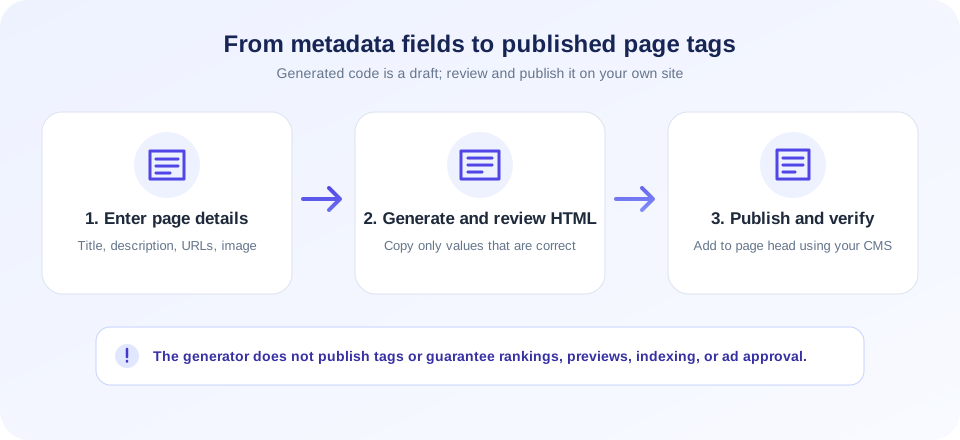
Generated tags are a starting point. The page they describe should deliver the same useful and accurate information to visitors.
How To Generate Meta Tags
Use the form to prepare markup for one page at a time:
- Write a page-specific title. Describe the actual page clearly and avoid claims the page cannot support.
- Add a concise description. Summarize what visitors will find; do not treat it as a guaranteed search snippet.
- Enter the canonical or Open Graph URL. Use the final, preferred public address for that page, not a temporary preview or unrelated homepage.
- Add an Open Graph image URL if appropriate. Select an image you own or are licensed to use and host it at a publicly accessible address.
- Use the optional keywords field cautiously. It creates a meta keywords tag, but major search engines do not use that tag as a ranking signal.
- Choose Generate Meta Tags. Review the generated code in the output area and copy only the markup you intend to use.
- Add the snippet to your site. Use your CMS, theme, or source template to place it in the page head, then publish and test the live URL.
The generator creates tags only for fields that contain values. If title and description are both blank, it displays a reminder rather than producing a meaningful snippet. It does not validate the relationship between fields, so you should check that the canonical URL, Open Graph URL, and image all match the same page.
Which Tags This SEO Meta Tags Generator Produces
This SEO meta tags generator is deliberately limited to the fields exposed in the form. Depending on what you fill in, the output can include a title element, a name="title" meta tag, a description tag, an optional keywords tag, a canonical link, and Open Graph properties for title, description, URL, and image.
Although the tool includes a name="title" meta tag, the standard HTML title element is the primary document title. Review generated markup for compatibility with your CMS and remove anything that duplicates a tag your theme or SEO plugin already outputs.
Meta Tags SEO Generator: Write For The Actual Page
A meta tags SEO generator can make it quicker to create a consistent starting point, but it cannot know whether a description is truthful or whether a title fits your page. Write the text after the page itself is ready. Use a clear subject and natural language, and avoid stuffing repeated search phrases into a title or description.
Each indexable page should have metadata that helps distinguish it from other pages on the same site. A service page, a help guide, and a contact page have different purposes; copying the homepage text to all three does not help people understand the result they may visit. Keep words aligned with visible headings and main content, and update metadata if the page’s subject changes.
There is no universal character-count formula that guarantees a search display. Titles and snippets may be truncated or rewritten depending on device, query, and search system. Write concise, useful text, then review the actual presentation with the appropriate search or social preview tools.
A search for an SEO meta tag generator often means a quick way to draft these fields, but the final wording should still reflect the page and its audience.
Meta Tag Title Generator: Choosing A Useful Title
The title element identifies the document. It can appear in browser tabs, bookmarks, and search results, though search engines may choose different wording. A practical meta tag title generator workflow starts with a human-written title that states what the page offers, uses the site or brand name only where helpful, and avoids repeating the same phrase unnaturally.
- Make the title specific to the page, not a generic label reused site-wide.
- Put the key subject in clear language and avoid misleading promises.
- Keep wording readable on mobile; do not pad it with unrelated variations.
- Check that the page heading and visible content support the title’s claim.
- Review templates for duplicate title output from themes or plugins.
After adding the generated title, view the published source and verify there is a single intentional title element. The generator also outputs a title meta tag and Open Graph title when the field is filled; evaluate whether your platform needs all of those values or already manages them.
Meta Description And Search Presentation
The description field is for a concise page summary. Make it clear what someone will learn, compare, or do after opening the page. Avoid writing an advertisement that promises features absent from the page. If the page changes, update its summary so it does not become outdated.
A description tag can be useful information for search systems, but it does not compel a search engine to display the same words. Search engines may select a passage from the page that better matches a query. As a result, a meta tags generator can produce correct HTML while the search-result snippet differs. This is normal and not, by itself, a reason to repeatedly rewrite the page.
For ad-supported sites, make sure titles and descriptions are consistent with the actual content and do not make deceptive claims. Metadata is not a substitute for original, substantial, helpful material or a clear user experience.
Meta Tag Keyword Generator: The Keywords Field
The optional keywords field outputs <meta name="keywords">. Historically, some publishers used this tag to list terms related to a page. Major search engines, including Google, do not use the meta keywords tag as a ranking signal. Adding a long list of phrases is therefore not a reliable SEO strategy and may make the markup harder to maintain.
If you keep the field for a system that specifically needs it, use a short, relevant list and follow that system’s documentation. Otherwise, leave it blank. Put effort into covering the topic naturally in page content, organizing navigation, and ensuring people can find the information they need.
People may search for a meta tag keyword generator or meta tag keywords generator, but no keyword list can guarantee traffic. Search performance depends on many technical and content signals, competition, user needs, and search engine systems that this generator does not evaluate.
A meta tags SEO generator or meta tags for SEO generator can prepare markup, but meaningful page content and accurate information remain essential. Generate meta tags as a small implementation task, not as a substitute for planning the page around a real reader’s needs.
Open Graph Meta Tags Generator For Social Previews
The generated Open Graph fields can describe a page when it is shared on services that support these properties. The title, description, URL, and image should represent the same destination. Use an image that is publicly fetchable and that you own, created, or have permission to publish. Do not use a private or temporary image URL that will expire.
This is a basic Open Graph meta tags generator. It does not create Twitter Card-specific tags, test the image, check image dimensions, or contact any social platform. Some services cache link previews, so a change may not appear immediately. Use the relevant platform’s official sharing debugger or preview tool where available.
Check the image at its direct URL and verify the final page’s source after deployment. A correct og:image value will not guarantee a preview if the image is blocked, unsupported, or inaccessible to the platform crawler.
A social preview should represent the page honestly. Use an image and description that you have permission to publish and that match the destination.
Canonical URL: Identify The Preferred Page Address
The canonical link element can indicate the preferred URL among pages with duplicate or substantially similar content. The tool uses the Canonical / OG URL field for both rel="canonical" and og:url. That pairing is convenient when both values should be the same, but you must decide the correct canonical address for your site.
Do not automatically point every page to the homepage. A canonical should normally represent the preferred version of the specific content. Consider HTTPS, host variant, path, trailing slash conventions, locale, and query parameters. Canonical signals are hints that search systems interpret; adding one does not guarantee indexing or ranking outcomes.
If your CMS or plugin already manages canonical tags, do not add a second competing link. Review the live page source and test important canonical behavior using tools designed for crawling and indexing.
Free Meta Tag Generator: Browser Workflow And Privacy
This free meta tag generator runs its generation logic in the browser. The form values are used by local JavaScript to assemble the output text; the generator does not submit those values to a generation endpoint. The code is displayed in a read-only text area for you to copy.
Still, treat URLs and metadata carefully. Do not put secrets, passwords, private customer details, or access tokens in metadata. The generated output becomes part of your public page if you publish it, and page source is ordinarily viewable by visitors. For internal pages, consider whether public metadata is appropriate and configure access controls independently.
The generator escapes ampersands, angle brackets, and double quotes in generated values to help preserve valid markup. This does not replace review: confirm encoding, URL correctness, duplicate tags, and the behavior of your CMS before deployment.
Is This An Advanced Meta Tag Generator?
This tool is an easy meta tag generator for common page and social metadata. It is not an advanced meta tag generator with every possible SEO directive. The form does not generate robots directives, hreflang, Twitter Cards, structured data, viewport tags, author tags, or platform-specific verification tokens.
Some projects need those additional fields, but they should be added only when appropriate and understood. For example, robots instructions affect crawling or indexing intent; hreflang requires carefully paired language-region URLs; structured data must reflect visible page content and follow the relevant vocabulary rules. Use platform documentation and specialized testing tools rather than inserting generic snippets without review.
A simple tool may be the best meta tag generator for a one-off basic snippet, while a CMS plugin or development workflow may be better for site-wide templates. Choose based on the actual publishing setup and quality-control needs, not on claims that a generator can guarantee a ranking outcome.
Blogger And CMS Implementation Notes
A Blogger meta tag generator search usually means someone needs HTML compatible with Blogger’s template system. This tool creates generic HTML; it does not log into Blogger, edit a theme, or ensure the snippet is placed correctly in every template. Platform templates and plugins can already output titles, descriptions, canonical links, or social properties.
Some users search specifically for a Blogger meta tag generator snippet to add in a template. Check Blogger’s current help and theme behavior before changing template markup, and avoid adding duplicate metadata that the platform already creates.
The same caution applies to WordPress and other content systems. Before pasting generated code, check the platform’s current documentation and inspect what the site already publishes. Duplicate metadata can create conflicting values. Back up a theme or template before making code changes, and use a staging environment where possible.
After publishing, load the actual public page and inspect its source. Confirm the title, description, canonical URL, and image address are correct. Test representative mobile and desktop pages, especially if shared templates control many URLs.
SEO Tools Meta Tag Generator: What It Cannot Promise
Searching for SEO tools meta tag generator or meta tags for SEO generator can make it sound as if generated markup alone is an SEO solution. It is not. A generator cannot create useful page content, fix broken navigation, improve site speed, resolve duplicate-page architecture, or determine whether a page is eligible for search display.
The phrase meta tag generator SEO Moz may describe someone comparing this utility with third-party SEO resources. SnapZain’s generator is independent and has no Moz integration or endorsement; compare each product’s current features directly.
Likewise, a valid snippet does not guarantee rankings, traffic, indexing, social engagement, or approval from an advertising program. Search engines and advertising providers make decisions using many signals and policies. Review current platform requirements directly and focus on the full site: original content, clear ownership and contact information, privacy disclosures, safe browsing, and a layout that does not confuse users.
Use metadata to describe the page accurately, not to promise results the page does not provide. A meta tag tool can draft markup, but it cannot create useful page content, fix technical issues, or guarantee how search engines display a result.
Common Meta Tag Mistakes To Avoid
- Duplicate tags: A theme and plugin may both output descriptions or canonical links.
- Wrong canonical: A URL can point at a different page or an obsolete HTTP version.
- Generic copy: Reusing a homepage description for every article makes previews less informative.
- Keyword stuffing: Repeating phrases in the keywords tag does not create a ranking shortcut.
- Broken social image: The image may be private, moved, or inaccessible to platform crawlers.
- Markup in the wrong place: Meta tags belong in the document head, not in an ordinary visible paragraph.
- Unverified output: A copied snippet may be altered or duplicated by the CMS after publishing.
- Misleading claims: Metadata should match the content and not promise unsupported results.
Troubleshooting Generated HTML
If the output area says to fill at least a title or description, provide one of those fields and select Generate again. If tags are missing, that is expected when their corresponding inputs are blank. Check each value before copying, especially the URL and image fields.
If the live page does not show your changes, inspect the page source rather than relying only on a browser tab label. Clear or refresh relevant caches, check the correct page template, and look for duplicate outputs from plugins. Some hosted platforms restrict editing of the document head; follow their supported settings instead of forcing code into an unrelated area.
If social previews remain old, the platform may have cached a previous version. Use its official debugging or refresh feature and confirm its crawler can access your page and image. The generator itself cannot invalidate third-party caches.
Related SnapZain SEO Tools
Use the SEO Audit for a separate review of visible website checks, the Redirect Checker to inspect redirect behavior, the Cloaking Checker to compare page responses, or the Google Cache Checker to check a separate cache-related question. These utilities do not replace editing and validating the final page source.
Meta Tag Generator Checklist
- Write accurate, page-specific title and description text.
- Use the preferred public URL for canonical and Open Graph URL fields.
- Choose an authorized, accessible social image.
- Leave the keywords field empty unless a specific platform requires it.
- Copy the output into the correct page head using your CMS or source workflow.
- Check for duplicate tags and verify the public source after publishing.
- Review current search, social, and advertising policies directly; no generator guarantees ranking or approval.
Conclusion
This meta tag generator SEO workflow provides a quick way to draft basic metadata without publishing anything automatically. Use the snippet as a starting point, make sure every value truthfully represents the page, and verify your CMS’s final output. Helpful content, accessibility, and user trust matter beyond the tags in the document head.


