Meta Tag Analyzer: Inspect Page Titles And Metadata
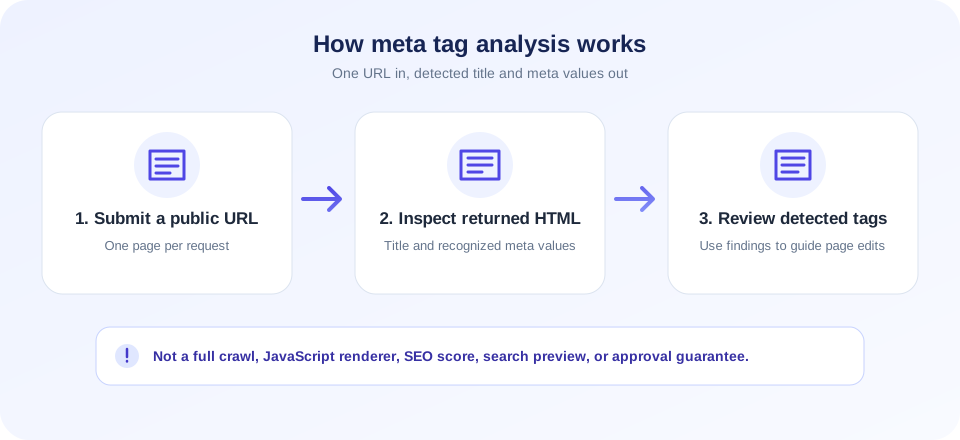
A meta tag analyzer helps you inspect the metadata returned for a web page. Enter one public URL in the tool above and select Analyze Meta Tags. SnapZain fetches that page from its server and displays the title plus detected meta elements in a name/property and content table. Use the result to review what the fetched HTML contains—not as a ranking score or a promise of how a search engine will display the page.
This meta tags analyzer tool is useful for a quick check of pages you own or are authorized to review. You can look for a description, robots directive, social preview properties, and other values visible in the returned source. It does not edit the page, crawl an entire domain, render JavaScript, compare competitors, or guarantee that the page is indexed. If you change metadata, update your website itself and check the live response again.
This meta tag analyzer tool reports detected source values only, making it easier to compare what the server returned with the metadata you intended to publish.
Whether you searched for a free meta tag analyzer, a meta tag analyzer free, a meta tag analyzer online, or SEO tools meta tag analyzer, the purpose here is the same: inspect a single page’s returned metadata. People may also search for a best meta tag analyzer or SEO meta tag analyzer; choose a tool by checking what it actually fetches and reports rather than assuming every analyzer offers audits, scoring, or crawling.
Metadata is only one part of a useful page. This analyzer can inspect a technical detail in the returned HTML, but it does not assess the page’s full content, user experience, or eligibility for services that may use it.
Metadata describes a page; it does not replace the useful, original content that visitors came to read.
How To Analyze Meta Tags Online
Use the analyzer for one web page at a time:
- Choose a public page. Enter a URL that you own or are permitted to inspect. Do not submit private or tokenized links.
- Enter its address. Include the domain and, if needed, the complete path and query string. The server adds
https://if the address does not start with HTTP or HTTPS. - Select Analyze Meta Tags. The page sends the URL to the SnapZain endpoint, which makes a server-side request to the destination.
- Review the returned rows. The table shows a tag’s name or property and its content value. A title element is listed as
title. - Compare with your intended values. Check spelling, page relevance, social properties, and indexing directives in the context of that specific page.
- Make changes at the source. Edit the relevant CMS settings, template, or code, publish the page, and analyze the live URL again.
The result reflects the response fetched at that moment. If a page is behind a login, blocks server requests, returns an error, or takes too long, the analyzer may not show data. A successful result also does not verify that a search crawler will receive the same version.
What This Analyzer Reads
The current tool requests the submitted page using an HTTP client and examines the returned HTML. It extracts a title when it finds a simple <title>...</title> element. It also scans meta elements for a name or property attribute alongside a content attribute. Matching pairs are presented as rows.
That means results may include common metadata such as description, robots, og:title, og:description, or social-card properties when the page includes them in the fetched source. It does not calculate character counts, quality grades, keyword density, schema validity, or a complete list of every SEO element on the page.
Understand The Limits Of A Meta Tags Analyzer
A website meta tag analyzer is a diagnostic aid, not a browser or full crawler. SnapZain’s implementation does not launch a headless browser to execute JavaScript. If a site inserts its tags after the initial response, the analyzer can miss them. It also uses a simple pattern-based parser, so unusual formatting, malformed markup, or attribute arrangements it does not recognize may produce incomplete results.
The phrase meta tag analyzer Google can refer to looking for Google-specific guidance or checking how a page may appear in Google. This SnapZain utility is not a Google product and does not access Google’s index or predict its result. For Google-specific indexing and rendering questions, use the official Search Console tools for a verified property.
The tool checks one URL and does not follow your site’s internal links to compare pages. It does not discover broken links, check mobile layout, inspect page speed, validate structured data, or tell whether a site has been indexed. For those jobs, use a tool designed for the specific test and interpret the evidence separately.
Server-side requests can also differ from your browser’s view. Sites may return different HTML based on location, cookies, authentication, device hints, cache, or bot protection. A page can work normally for you and still block a remote fetch. Conversely, a successful fetch does not prove that all visitors or crawlers receive identical content.
Title Tags: Clear Labels For Pages
The HTML title gives browsers and many search or sharing systems a concise label for a page. A useful title describes the actual page, distinguishes it from nearby pages, and avoids misleading promises. The analyzer reports text it extracts from the title element; it does not determine whether that wording is accurate or compelling for your audience.
Review important pages individually. A homepage title should identify the site or organization and its main purpose. An article title should reflect the article’s subject. A product or service page should name what visitors can actually find there. Avoid repeating the same generic title across many URLs or stuffing a list of unrelated keywords into it.
Search systems may rewrite title links based on page content and other signals. A title that appears in this tool is evidence of the source markup, not a guarantee of the exact headline that will appear in results or social feeds.
Meta Descriptions: Helpful Summaries, Not Ranking Promises
A description meta tag can offer a concise summary of a page. Write it for people: explain the page’s topic and what a visitor can expect, using accurate language. A description should not claim a feature or result that the page does not deliver. The analyzer can display the declared value, but it does not assess its editorial quality or guarantee a search snippet.
Search engines may choose a snippet from the page text instead of the description, depending on the query and their systems. Social platforms can use Open Graph or other metadata for link previews, and those previews can have their own caching behavior. Check actual previews using the relevant platform’s tools where available, and keep important descriptions consistent with the visible page.
A good description sets an honest expectation. The page itself must deliver on that expectation after the visitor clicks.
Robots Directives And Indexing Checks
If the analyzer finds a name="robots" tag, review its content carefully. A directive such as noindex may affect whether compliant search crawlers include a page, while nofollow relates to link-following instructions. The exact interpretation depends on the directive, crawler, response headers, and other page signals.
This tool only reports a matching meta tag from the fetched HTML. It does not inspect the HTTP X-Robots-Tag response header, robots.txt rules, canonical links, redirects, authentication barriers, or a search engine’s indexing record. Therefore, absence of a robots meta row is not proof that a URL is indexable, and presence of a directive should be checked against the page’s intended behavior before you change it.
Use your site’s search-console account and a crawler-specific inspection tool to investigate indexing. Do not remove directives blindly: some pages are intentionally excluded, such as private account flows, duplicate results, or internal utility pages. Confirm that each change matches your site’s purpose and privacy requirements.
Open Graph And Social Preview Metadata
Open Graph properties can provide a title, description, image, and canonical page URL for link previews on platforms that support them. Social networks may also read other card metadata. The analyzer lists matching property/content pairs present in the source, which can help identify a missing or outdated value before you test a real preview.
Keep preview text descriptive and make sure the referenced image belongs to you or is licensed for the intended use. Image URL, dimensions, accessibility, cache refresh, platform rules, and page redirects can all affect the final card. This analyzer does not fetch preview images, check image rights, validate their dimensions, or guarantee a specific social preview.
For a changed image or title, a social platform may keep a cached preview. Use its official sharing debugger or cache-refresh process if available. Repeatedly changing tags without checking the underlying page can make it harder to determine which version a platform has stored.
A Practical Metadata Review Checklist
Use the analyzer as one step in a broader, human-led review. For each important public page, check the following against the page’s actual purpose:
- Accurate title: Does the title describe this specific page without exaggerating?
- Useful summary: Does the description help a reader understand what they will find?
- Page-specific values: Are titles and descriptions distinct where pages cover different topics?
- Robots intent: Does any indexing directive match the page’s intended public or private status?
- Social preview: Do the Open Graph values represent the page and use an authorized image?
- Visible content: Does the page deliver the information promised in its metadata?
- Accessibility: Are images, headings, and links understandable to people using assistive technology?
- Mobile usability: Can visitors read and use the page on a small screen?
- Policy compliance: Is the site original, navigable, transparent, and compliant with the current advertising and privacy rules that apply?
Metadata should support a good page rather than substitute for one. Make the underlying content useful, factually accurate, and easy to navigate. Ad approval decisions are made by the advertising provider and can involve many site-wide factors beyond tags; no analyzer can guarantee approval.
Content Quality And Advertising Policy Considerations
If you are preparing a website for an advertising program, focus on the complete visitor experience. Publish original material that adds value, explain who operates the site where appropriate, provide clear navigation, and make essential privacy or contact information easy to find. Avoid copied or thin pages, deceptive claims, misleading buttons, confusing redirects, and layouts that make it difficult to distinguish content from ads.
Advertising policies change and vary by provider, so read the current policy documents and review your own pages before applying. A correct title and description do not compensate for content that is copied, unclear, unsafe, or not useful. Likewise, a technically complete set of metadata is not proof of compliance or eligibility. This Meta Tag Analyzer is an inspection utility only; it neither places ads nor evaluates an application.
Never click your own ads or ask others to generate artificial clicks. Keep ad placements clearly separated from navigation and content, and avoid encouraging accidental clicks. For privacy, disclose relevant data practices and obtain consent where required. These general practices are not a substitute for the specific rules that apply to your account and location.
Meta Tags Analyzer Versus A Meta Tag Generator
An analyzer reads the currently fetched page; a generator helps draft markup. If you discover missing or outdated values, a Meta Tag Generator can help prepare sample tags. You still need to decide whether each value is appropriate, add it to your site’s head section using your CMS or code, publish the page, and verify the live response.
Do not paste generated markup into a page without understanding where it belongs. Duplicate title or description tags can create ambiguity, and a tag copied into the visible page body may not behave as intended. Make changes through the system that controls your website templates, then test a representative page on mobile and desktop.
The analyzer’s output is not a downloadable report or a complete source-code audit. Keep your own change notes for important templates, especially if you maintain multiple language versions or pages with different indexing requirements.
How It Differs From Other SEO Checks
A metadata check answers a narrow question: what title and recognized meta tags appeared in the returned HTML for this one URL? It should not be confused with tests for redirects, cache availability, or content variation. Use a dedicated diagnostic and compare results when you are investigating those behaviors.
The Redirect Checker focuses on redirect responses and destination paths. The Cloaking Checker compares responses for potential differences, which require careful interpretation and authorization. The Google Cache Checker checks a separate cache-related question and cannot guarantee what a crawler currently indexes. None of these tools replaces your own review of the rendered page, server configuration, or search-console evidence.
Troubleshooting Missing Or Unexpected Tags
If results do not match what you see in a browser, compare the page source with the tool’s limitations. Check the exact submitted URL, including redirects from HTTP to HTTPS, trailing slashes, language paths, and query parameters. The remote server may receive a different version due to caching, bot protection, or location.
- No tags found: The page may lack recognized meta elements or use markup the simple extractor does not parse.
- Title is absent: Confirm the returned HTML includes a basic title element before the closing head tag.
- Tags differ from browser view: Check whether scripts add them after load or whether the server returns different content to automated requests.
- Could not fetch: Confirm the page is public, the URL is correct, and the server responds successfully without authentication.
- Wrong language or page: Inspect redirects and the final URL shown by the result.
- Old social card: Check the platform’s own preview cache and ensure its crawler can fetch the current page and image.
When results are important, compare the fetched page source, browser-rendered DOM, response headers, and the relevant platform’s official inspection tool. Each view answers a different question; a mismatch is a prompt to investigate, not by itself proof of a penalty or technical fault.
Privacy And Responsible Use
The browser sends your submitted URL to the SnapZain endpoint, and the server makes a request to that address. Submit only public pages you own or have permission to inspect. Do not submit private dashboards, internal company addresses, password reset links, session identifiers, invitation tokens, or query strings that grant access to sensitive information.
The target site may log requests, and the tool’s operator may process request data as described by the applicable privacy policy. Avoid sending personal data when a public page URL is enough. If you are testing a work site, follow your organization’s authorization and data-handling rules.
Use a careful review process: test a small number of pages, verify your own site changes, and avoid automated high-volume requests. The analyzer is intended for metadata inspection, not broad scanning or bypassing a site’s access controls.
Meta Tags Analyzer Checklist
- Analyze one public URL at a time and confirm the returned page is the intended one.
- Review title, description, robots, and social properties in context, not as isolated scores.
- Remember that client-rendered tags, response headers, canonical links, and full-site crawling are outside this tool’s current scope.
- Make corrections in your website CMS or source and recheck the published page.
- Use official search and social inspection tools for their own platform-specific questions.
- Keep page metadata accurate, useful, and consistent with the visible content.
- Never treat a result as a guarantee of rankings, indexing, or social display.
Conclusion
This meta tag analyzer online helps you inspect title text and detected meta values for an individual page. It provides a source-level snapshot, not an SEO verdict. Combine it with thoughtful page editing, accessible design, original content, and platform-specific checks.


