Redirect Checker: Follow A URL From Start To Finish
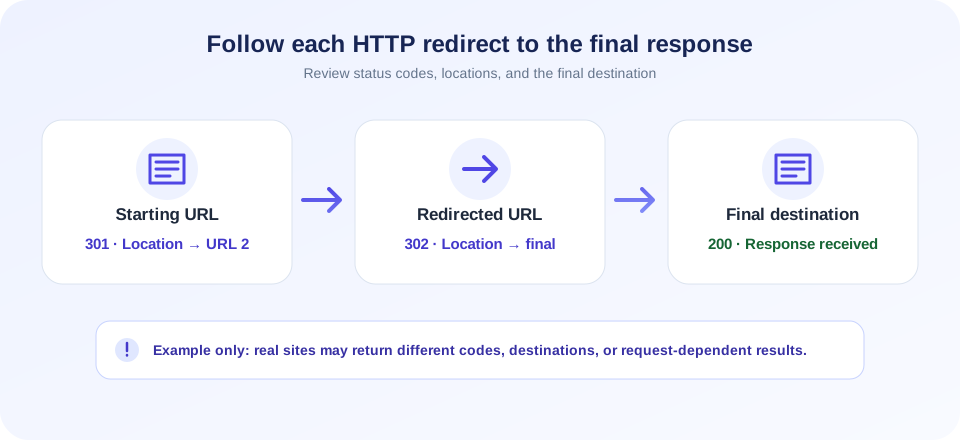
A redirect checker shows how a web address responds before a browser reaches its destination. Enter one URL in the tool above and select Check Redirects. SnapZain requests each address in sequence, records the HTTP status and URL, follows a redirect’s Location header, and displays the final URL it reached or attempted.
This URL redirect checker is useful when you have changed a page address, moved a site to HTTPS, or want to understand where a shared link leads. It follows server-side HTTP redirects for up to 15 requests. It does not crawl your site, accept a list of URLs, execute JavaScript, or guarantee that every visitor or search crawler receives the same path.
Use the results as a snapshot of a server-side GET request. Check that each status code makes sense, that the chain ends at the intended page, and that there are no loops or unnecessary hops. A redirect is not automatically a problem: it is often the correct way to route users from an old address to a new one.
How To Check Redirects With This Tool
- Enter one public URL. Include the page address you want to test. If the scheme is omitted, the server adds HTTPS.
- Select Check Redirects. The server sends a GET request and disables automatic redirect following so it can inspect each step.
- Read the chain in order. Each row displays the response status and the URL requested at that hop.
- Check the final URL. Compare it with the address where you intended visitors to land.
- Investigate unexpected responses. Review the page configuration, redirect rules, status codes, and target availability.
- Test the final destination directly. Confirm it loads as expected in your own browser and context.
The checker can follow absolute and relative Location values, including protocol-relative, root-relative, and path-relative addresses. It stops when it encounters a non-redirect response, a redirect without a Location header, a request failure, or the 15-request limit.
Reading HTTP Redirect Status Codes
HTTP status codes tell a client what happened to a request. For redirects, the status and the Location response header work together to point the client to another address. The tool records the status for each request, but it does not decide whether your chosen status is strategically correct for your migration. Match the code to the real behavior and duration of the change.
| Status family / code | Common meaning | What to review |
|---|---|---|
| 301 | Permanent redirect in common HTTP usage. | Confirm the move is intended to be permanent and the destination is the equivalent page. |
| 302 | Temporary redirect in common HTTP usage. | Use when the routing change is temporary; verify it is not masking a permanent move. |
| 303 | Redirect to another resource, often with a GET follow-up. | Check the application flow and expected method behavior. |
| 307 | Temporary redirect that preserves the request method. | Confirm method preservation is appropriate for the endpoint. |
| 308 | Permanent redirect that preserves the request method. | Use only when permanent routing and method preservation are intended. |
| Non-3xx response | The request ended at a regular response or an error page. | Review the returned status and whether the URL is the expected final page. |
| Status 0 / request failed | The checker could not obtain an HTTP response. | This is a tool-side request failure indicator, not a status sent by the server. |
Status-code semantics can depend on request methods and client behavior. This tool uses GET requests, so evaluate the result in that context. If you are changing form submissions, APIs, or other non-GET endpoints, test those flows with an approved method-specific tool as well.
Check 301 Redirect And Permanent URL Changes
A 301 redirect checker can help confirm that an old URL points to its intended replacement. This is useful after reorganizing content, changing a domain, consolidating HTTP and HTTPS, or selecting a preferred hostname. Check the old page and verify the destination is the closest relevant new page rather than an unrelated homepage.
To check 301 redirect behavior or check for 301 redirect responses, inspect the actual status in the chain, not only the final URL. If you need to check redirect 301 handling for a migration, verify the old path, status, and replacement address together. A browser may arrive at the right page even when several unnecessary intermediary URLs are involved. Keep mappings direct where practical, update internal links and sitemaps to use final destinations, and avoid creating loops or chains that are difficult to maintain.
For temporary campaigns or short-lived routing, a permanent code may not reflect the intended lifecycle. Choose redirect behavior based on the real move and platform requirements; do not select a status just because an SEO article says one code is always best.
Redirect Chains, Loops, And Final Destinations
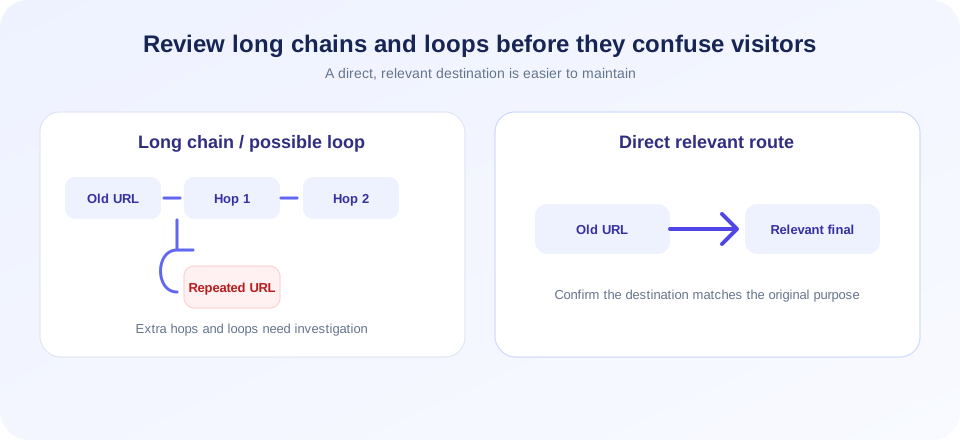
A redirect chain occurs when one URL points to another, which then redirects again before reaching the final response. Chains can result from layered rules: for example, an old path may move to a new domain, then switch to HTTPS, then normalize a trailing slash. A redirect chain checker makes those steps visible so you can decide whether they are intentional and whether they can be simplified.
A loop occurs when routing sends a request back to a URL it has already visited, or otherwise cycles without reaching a stable destination. The server-side tool limits checks to 15 requests, so an unusually long chain may end at the limit rather than reveal the ultimate URL. Inspect repeated addresses and review rewrite rules, proxy settings, CDN rules, and application-level redirects.
| Pattern | Possible issue | Review step |
|---|---|---|
| One redirect to the intended page | Usually straightforward routing. | Confirm status intent and content relevance. |
| Several redirects in sequence | Extra latency and harder-to-maintain rules. | Consider updating old mappings to the final destination. |
| Repeated URL in the chain | Potential redirect loop or conflicting rules. | Inspect host, scheme, path, slash, and application rules. |
| Chain ends at a different topic | Destination may not satisfy the original link’s purpose. | Map to the closest useful replacement or an appropriate not-found page. |
| Stops after the hop cap | The final destination may not have been reached. | Check each hop and investigate a long or cyclic configuration. |
Check Website Redirection During A Migration
When a site moves, test representative old URLs—not just the homepage. Include top landing pages, articles, product pages, localized paths, and URLs with query parameters if those matter to your audience. A redirect from a retired page should lead to a genuinely useful replacement; sending every deleted URL to the homepage can confuse visitors and may not preserve the original intent.
A useful migration review includes the previous URL, expected destination, observed status, and final URL. Test both the old and new versions, check HTTP-to-HTTPS and host normalization, then review internal links and XML sitemaps so they point directly to current destinations. Keep a record of redirect rules and their owners so later changes do not silently break older links.
This page is not a bulk redirect checker and cannot import spreadsheets. For a large migration, use a controlled crawling workflow on URLs you own and validate samples before deploying rules. Do not send high-volume requests to sites you do not control.
HTTP Redirect Checker: What Is Tested
This HTTP redirect checker makes server-side GET requests using a generic SEO-tool user agent. It turns off the HTTP client’s automatic redirect handling so each response can be recorded. It follows 3xx responses when a Location header is present and resolves relative locations against the current URL.
The response can differ from what a browser sees. The target may vary by cookies, location, device, authentication, bot protections, request headers, or HTTP method. The tool does not run JavaScript redirects, meta refresh tags, service workers, or browser-only navigation. It also does not inspect a complete site or guarantee that the target page is safe.
Because redirects can point to external domains, treat unfamiliar final destinations cautiously. A link’s redirect path does not prove that the final site is trustworthy. Verify the domain before entering credentials, downloading files, or providing personal information.
Link Redirect Checker And Redirect Link Checker Use Cases
A link redirect checker, redirect link checker, or website redirect checker can help you understand where a shared address leads. You might check a campaign URL, a link in documentation, a QR destination, or an old bookmark. Use it on links you are permitted to inspect and pay attention to every hostname transition, not only the final path.
If a shortened URL is involved, the shortener may be one hop and the destination may add more. The final output is useful for troubleshooting, but it does not check whether the destination is malicious, whether its content is appropriate, or whether a user will encounter a browser warning.
For important links, provide context to recipients and use clear, trusted domains. Short links can conceal the destination text, so test them before sharing and do not use redirects to mislead people.
Why Redirect Results Can Differ
A check redirects result is based on one server-side route at one point in time. Another checker may use a different location, user agent, timeout, DNS resolver, TLS stack, or redirect limit. Browser cookies and JavaScript can also change what happens after the initial response. Small differences do not automatically indicate a broken setup.
- Request failure: A timeout, TLS issue, DNS error, or remote block can stop the chain.
- Missing Location header: The response is 3xx but does not tell the checker where to go next.
- Authentication: The remote system may return a login page instead of the expected route.
- Bot filtering: A server or security layer may treat automated checks differently.
- Redirect cap: The checker stops after at most 15 requests to avoid unbounded loops.
- Client-side behavior: A browser may navigate after JavaScript runs, which this HTTP-only check does not follow.
If a result is unexpected, test the final address in a normal browser, inspect server logs if you control the system, and compare the exact response headers and status codes. Avoid repeatedly probing a service that is timing out or blocking automated traffic.
How To Check Site For Redirects Without Overlooking Context
To check site for redirects methodically, begin with a small list of important pages and record the expected end state. For each address, note the response code, Location destination, hop count, and final page. Include variants such as HTTP and HTTPS only when they are relevant to your configuration.
When you check site redirects, consider the experience for real visitors as well as the server response. Make sure redirects preserve meaningful paths and query parameters where required, avoid routing users to unrelated content, and do not create loops between CDN, web server, and application rules. Confirm that language or regional routing is accessible and not dependent on a crawler being treated specially.
For a site-wide inventory, this single-URL form is only a spot checker. Use an authorized crawler or log analysis workflow designed for your own site and respect the relevant rate limits. Validate a sample manually before applying a large configuration change.
Redirect Check And SEO: Practical Guidance
A redirect check supports technical troubleshooting, but it cannot predict rankings. Search systems consider many signals and process redirects according to their own systems. A 301 does not guarantee a ranking boost, immediate indexing, or transfer of every signal. The best practice is to make routing clear, relevant, and consistent with the content move.
After a permanent site change, update internal links, canonical references, and sitemaps to the destination URL where appropriate. Retain redirects that help people with old links, and monitor server logs and search reporting for errors. Avoid chaining multiple legacy rules when a direct mapping is practical.
Use status codes that match the true permanence of the move. Do not rely on the checker alone for a migration plan; review current search platform documentation, test representative URLs, and keep rollback instructions for changes affecting important traffic.
How This Differs From Other SEO Tools
A redirect chain is one specific part of a website’s behavior. The Cloaking Checker compares response sizes for browser-style and Googlebot-style requests; it does not replace redirect inspection. The Google Cache Checker attempts a legacy cache endpoint and cannot confirm indexing. The Meta Tag Generator drafts metadata, while Meta Tags Analyzer reads detected tags from a fetched page. URL Shortener creates short links but does not establish destination safety. Each tool has separate scope and limitations.
Someone comparing an Ahrefs redirect chain check with this page should note that different providers may use different locations, request headers, timeouts, and hop limits. This checker reports its own server-side GET chain of up to 15 requests; do not assume results or features are identical across services.
Redirect Checker Checklist
- Test one public URL you own or are authorized to inspect.
- Read every status code and Location hop, not just the final URL.
- Confirm permanent and temporary status codes match the real change.
- Look for loops, irrelevant destinations, missing Location headers, and long chains.
- Remember the checker follows HTTP GET redirects only, with a maximum of 15 requests.
- Verify important results in the browser and with your own server or CDN logs.
- Use a separate authorized crawl workflow for bulk or site-wide checks.
Conclusion
This redirection checker offers a convenient way to inspect one HTTP redirect path at a time. It records statuses, follows server-provided Location headers, and shows the final address reached within its hop limit. Treat it as a troubleshooting snapshot: validate the destination, check the page in a browser, and use a larger authorized audit when you need to review many URLs.


