Google Cache Checker: What This Tool Can Tell You
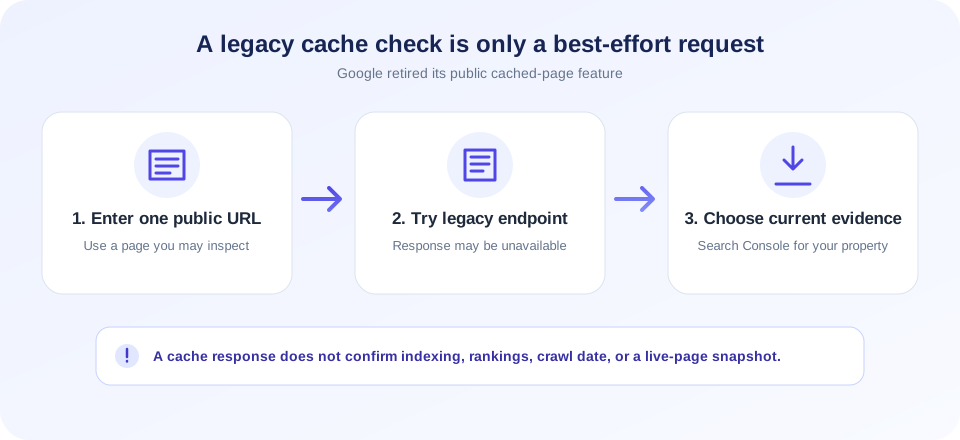
A Google Cache Checker is commonly used to try to open a saved copy of a webpage associated with Google Search. The SnapZain tool accepts one URL, builds a legacy Google cache link, and attempts to check whether that endpoint returns a successful response with content. Google has retired its public cached-page feature, however, so the old endpoint may fail or behave inconsistently. Treat this tool as a best-effort attempt—not as a reliable Google indexing or freshness report.
To use it, enter a public page URL and select Check Google Cache. If the server returns a response that meets its simple availability check, the page may say a cached version appears available. Otherwise, it may still offer a link to try or state that a cache may not be available. None of those outcomes proves whether Google currently indexes, crawls, or stores your page.
This distinction matters for site owners: a cache check is not a ranking score, crawl report, live-site check, or archival recovery method. If you need Google-specific information about a site you manage, use Search Console’s current reporting and URL Inspection features. If you need to inspect what visitors see now, open the live URL directly.
What The Cache Check Actually Does
After you submit a URL, SnapZain normalizes it to use HTTP or HTTPS and constructs a request to Google’s historical web-cache URL pattern. The server makes a short-timeout request to that endpoint. It treats a successful response with a body larger than a threshold as a possible cached result. If the endpoint cannot be reached, the status can be unknown; if the response does not meet the heuristic, the page says the cache may not be available.
That response is a rough endpoint check, not a deep analysis of content or Google’s systems. It does not examine your site’s server cache, a CDN, your browser cache, or a search crawler’s internal state. It also does not test multiple URLs, extract a reliable snapshot date, compare old and current content, or crawl a domain.
| Tool outcome | What it means here | What it does not mean |
|---|---|---|
| Appears available | The legacy endpoint responded successfully and passed a basic body-size check. | Google currently indexes the URL or has a fresh, complete copy. |
| May not be available | The endpoint did not satisfy the checker’s availability heuristic. | The page is definitely not indexed or has an SEO penalty. |
| Unknown / request error | The request timed out or could not be interpreted reliably. | The URL is absent from Google or unavailable to all visitors. |
| Open cache link | The page opens a generated legacy Google cache URL. | The retired public cache service is guaranteed to work. |
Google Retired Its Public Cached-Page Feature
For many years, Google Search offered a cached copy link that could help users view a prior copy when a page was slow or temporarily unreachable. Google later removed that public feature from Search. Older instructions that recommend using a cache operator or a webcache.googleusercontent.com link may no longer work. A legacy endpoint can still respond in some circumstances, but a response should not be treated as a supported, dependable service.
That is why a tool labeled “Google Cache Checker” can be useful only with clear limitations. The interface may attempt the historical check, but it cannot recreate a discontinued product or access private Google infrastructure. If you arrive from a search for now Google Cache Checker, the practical update is that no third-party checker can guarantee access to Google’s former public cached-page copies.
When the old link fails, avoid repeatedly trying variations as though a cache must exist. Instead, use the right source for the question: Search Console for information about your verified property, the live page for current output, and your own backups or archival systems for historical content.
An unavailable legacy cache is not proof that a page is unindexed. It may simply mean the old public cache endpoint is no longer serving it.
How To Use This Google Cache Checker
- Choose a public URL. Use a page you own or are authorized to inspect. Do not include password-reset links, private tokens, or account-only addresses.
- Enter one address. Include the full page URL. If you omit the scheme, the service adds HTTPS before building the check.
- Select Check Google Cache. The tool sends the URL to its server, which attempts the legacy endpoint request.
- Read the status cautiously. It describes the endpoint response, not your Google ranking, indexing status, or last crawl date.
- Open the offered link only if useful. The target is a historical cache URL and may no longer be supported or accessible.
- Use a current diagnostic for next steps. For pages you manage, inspect Search Console and the live page separately.
A URL can work in your browser but fail from SnapZain’s server because of bot protection, region restrictions, network timeouts, redirects, or changes to Google’s endpoint. Conversely, a successful response does not prove that every visitor sees the same content.
Cache Checker Does Not Mean Browser, CDN, Or Hosting Cache
The word cache is used for several different systems. A browser cache stores resources on a visitor’s device. A CDN cache stores copies at edge servers to speed up delivery. A web host or application may cache generated pages. Google’s former public cached-page feature was separate from those systems.
This cache checker does not inspect the cache-control headers returned by your website, purge a CDN, clear a browser’s stored files, or read your application cache. It only attempts a request to the legacy Google cache endpoint for the submitted page. For other cache questions, use your browser’s developer tools, hosting dashboard, CDN controls, or server logs.
If your goal is to check caching on your own site, first identify which layer you mean: browser, application, host, or CDN. Each has different headers, controls, and logs; a Google cache link cannot confirm whether those systems are serving an older response.
| Cache type | Typical purpose | Where to investigate |
|---|---|---|
| Browser cache | Reuse downloaded resources on a user’s device. | Browser settings and developer tools. |
| CDN cache | Serve content from an edge network near visitors. | Your CDN dashboard, headers, and purge tools. |
| Application or host cache | Reuse generated pages or query results. | Your CMS, framework, hosting controls, or logs. |
| Former public Google cache | Previously exposed a Google-associated page copy in Search. | Public feature retired; legacy links are not dependable. |
A Cached Page Is Not The Same As An Indexed Page
Indexing means a search system has processed and may show a URL in its results. A cached copy was a separate way to view stored page content. The existence or absence of a cache endpoint response does not reliably establish whether a page is indexed. Do not use this checker to diagnose a sudden ranking drop, submit a reconsideration request, or estimate organic traffic.
For a site you own, use Google Search Console’s URL Inspection feature and its coverage or indexing reports where available. Check the canonical URL, robots directives, HTTP response, sitemap, internal links, and whether the page offers useful original content. Search Console reports can also take time to reflect changes and should be interpreted in context.
If you want to verify public visibility, search for the exact URL or a distinctive page title as a supplemental check, not as a complete technical report. Search results vary and are not a substitute for authenticated tools for your property.
Check Cached Pages After Updating Content
Older tutorials may tell you to check cached pages after publishing an update to see whether Google has refreshed its copy. Since the public cache feature was retired, this approach is no longer dependable. The result may fail regardless of whether your live update is correct, and it does not show a trustworthy timestamp for the last crawl.
After editing your own page, confirm the change in the live browser and inspect the published HTML. If you need Google to recrawl a URL, follow Search Console’s current guidance for URL Inspection and indexing requests. A request is not a guarantee of immediate crawling or indexing. Make sure the page is accessible, internally linked where appropriate, and not unintentionally blocked.
For deployment history or rollback, retain your source-control changes, CMS revisions, backups, or approved archival copies. A discontinued cache endpoint should not be your only backup strategy.
Troubleshooting “Cache May Not Be Available”
A “may not be available” message is deliberately cautious. The tool uses a basic response check; it cannot distinguish all possible reasons for an unsuccessful result. The endpoint could be retired, unavailable from the server’s network, slow, or return a small error page that does not satisfy the checker’s heuristic.
- Verify the URL. Make sure it is the intended public page and not an internal preview or a private link.
- Check the live page. Open it directly and confirm its current HTTP and browser behavior.
- Consider endpoint retirement. Google’s former public cache feature is no longer a reliable destination.
- Do not infer indexing status. Use Search Console for Google’s reported information about a verified property.
- Check other caches separately. CDN and host cache tools answer different questions.
- Try later only for transient errors. Repeated requests cannot restore a discontinued feature.
If you need a historical copy of your own site, check your backups, version history, content management system revisions, or a reputable web archive where appropriate. Availability of third-party archives is also not guaranteed.
Cache Check And SEO: Use Evidence That Fits The Question
A cache check is often confused with crawl monitoring, ranking checks, page indexing, and page speed. These are distinct tasks. The old Google cache link cannot tell you whether title tags are correct, whether redirects are configured properly, or whether Googlebot can render the page today.
Use an appropriate diagnostic for each issue. Inspect redirects separately; compare page responses only when you have authorization and a clear reason; analyze metadata from the page source; and use Search Console for Google-specific property reports. A single endpoint test should not be used to label a website as penalized, unsafe, or excluded.
Also remember that search optimization is not only technical. Publish useful, original content that answers a visitor’s question, keep navigation understandable, maintain accessible page structure, and avoid deceptive claims. No cache checker can guarantee search visibility or advertising approval.
Responsible Use And Privacy
When you submit a URL, the browser sends it to SnapZain’s server, which constructs and requests a related Google cache URL. Submit only pages you have permission to check. Avoid private dashboards, internal network locations, account invitation links, and URLs containing credentials or personal data. The target URL may also be present in service logs according to the applicable privacy policy.
The tool makes a single best-effort request, not a site crawl. Do not automate repeated checks or use it to generate unnecessary traffic. For systems belonging to your employer or clients, follow written authorization and organizational policies. If a page is protected, do not attempt to bypass its authentication or access controls.
This utility is independent of Google. Its name describes the historical task users search for; it does not imply endorsement or a current official Google feature.
Related SnapZain Tools
For separate diagnostics, try Redirect Checker to review redirect behavior, Cloaking Checker to compare responses cautiously, Meta Tag Generator to draft basic metadata, or Meta Tags Analyzer to inspect detected metadata in a fetched page. These tools answer different questions and do not restore Google’s retired cached-page service.
Quick Decision Guide
| Your question | Better next step | Why |
|---|---|---|
| Is my page indexed by Google? | Search Console URL Inspection for a verified property. | It reports Google-specific crawl and indexing information. |
| What does my page show right now? | Open the live URL and inspect its page source. | This checks the current visitor-facing response. |
| Is the CDN serving old content? | Check CDN headers, dashboard, and purge status. | This tool does not inspect CDN cache state. |
| Can I recover a previous draft? | Use site backups, CMS revisions, or source control. | A legacy Google cache link is not a dependable archive. |
Google Cache Checker Checklist
- Enter one public URL you are authorized to inspect.
- Understand that the tool tests a legacy public cache endpoint, not Google indexing.
- Treat available, unavailable, and unknown results as limited endpoint signals.
- Use Search Console for Google’s current reports on a site you manage.
- Use browser, CDN, or hosting controls for those respective cache layers.
- Use backups and revision history to preserve your own historical content.
- Do not submit confidential URLs or infer rankings, penalties, or crawl dates.
Conclusion
This Google Cache Checker tool offers a convenient way to try the historical cache URL for one page, but Google’s public cached-page feature has been retired. Use it with that limitation in mind. For current indexing questions, consult Search Console; for live page checks, open the URL directly; and for recovery, rely on backups and version history. A cache endpoint response alone cannot answer all of those questions.


