URL Encode: Safely Represent Data Inside A URL
URL encoding represents characters in a form that can be safely carried within a Uniform Resource Identifier component. Spaces, non-ASCII text, and characters with reserved meaning may need percent-encoding when they are part of a query value or another URL component. This URL encoder uses JavaScript's encodeURIComponent() function on the entire input string and displays the result for copying.
That detail matters: the tool encodes the whole input as one component. If you enter a complete address such as https://example.com/search?q=hello world, the output encodes the slashes, question mark, equals sign, and other delimiters too. That is useful when a full URL itself must be placed inside another parameter, but it is not the right way to prepare every ordinary clickable URL.
Use the encoder for a value you need to place inside a URL, such as a search term or a nested return address. When you are building a complete URL, preserve its structural separators and encode only the components that contain data. This guide explains the difference, common JavaScript approaches, Python equivalents, and mistakes such as double encoding.
How To Encode A URL Component Online
For a quick conversion with this online URL encode tool, first decide which characters to encode for URL use:
- Choose the exact text or value. Decide which part of a URL you are encoding, rather than automatically selecting the full address.
- Paste it into the input. The tool accepts a string and processes the complete textarea value as one component.
- Select Encode URL. JavaScript
encodeURIComponent()creates the percent-encoded output in your browser. - Review the result. Confirm that reserved separators were encoded only where intended and that the output fits your target context.
- Copy it. Use Copy to clipboard, then place the result in the appropriate URL component.
The tool does not parse a full address into its scheme, host, path, query, and fragment before encoding. It does not automatically preserve URL punctuation. If your goal is to keep a full address readable and functional, encode individual values or use a URL-building API in application code.
What Percent Encoding Means
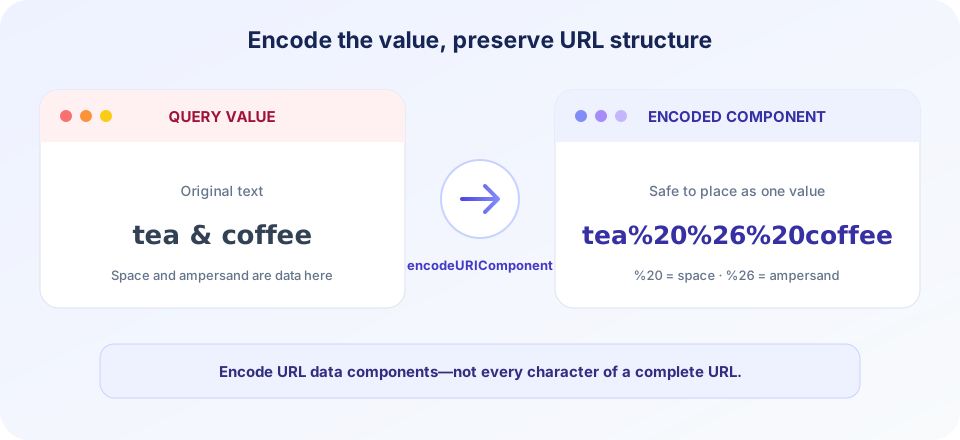
Percent encoding represents a byte using a percent sign followed by two hexadecimal digits. For example, a space commonly appears as %20 in a component. Characters outside the ASCII range are encoded from their UTF-8 bytes, so a single visible Unicode character can produce several percent escapes.
Some characters are reserved because they separate parts of a URL. A slash can separate path segments; a question mark begins the query; an ampersand separates query parameters; and an equals sign separates a parameter name from its value. If such a character is data inside one component, encode it so it is not mistakenly interpreted as structure.
Percent encoding is not encryption. It does not conceal data from a server, browser history, network monitoring, or anyone who can read the URL. Never place passwords, secret keys, or private data in a URL on the assumption that an encoded value is hidden.
Understanding encoding in URL components helps avoid broken links: the same character can be structural in one position and ordinary data in another. A URL encoded value may look unfamiliar because reserved characters are shown as percent escapes, but it still represents the original text and can be decoded by the receiving application.
Encode A Value, Not Automatically The Entire URL
A URL has distinct components: scheme, host, path, query, and optional fragment. Encoding a value and encoding the entire URL are different operations. This tool's use of encodeURIComponent treats every character in the input as component data, including characters that would ordinarily divide a full URL into parts.
| Task | Typical approach | Reason |
|---|---|---|
| Encode a query parameter value | encodeURIComponent(value) or URLSearchParams | Data delimiters such as & are escaped inside the value. |
| Encode a whole URI while retaining its structure | encodeURI(uri), when appropriate | Leaves more URI delimiters unescaped than component encoding. |
| Place a full URL inside another query value | Encode the nested URL as one component | Its own ?, &, and = must not split the outer query. |
| Build query parameters in JavaScript | URLSearchParams | Encodes names and values while handling query separators. |
| Encode application/x-www-form-urlencoded data | Use form/query APIs for that format | Spaces may be serialized as + rather than %20. |
URL Encoding In JavaScript
JavaScript provides two familiar global functions: encodeURI() and encodeURIComponent(). The former is intended for a complete URI and preserves more characters that have structural meaning. The latter is designed for an individual component, such as a query parameter value, so it also encodes delimiters that could otherwise change the URL's structure.
For example, if a search term contains an ampersand, encoding that term prevents it from being interpreted as the start of another query parameter. A modern JavaScript application can use URLSearchParams to assemble a query string:
const params = new URLSearchParams();
params.set("q", "tea & coffee");

const url = `https://example.com/search?${params.toString()}`;
This approach keeps the job of building a URL separate from the job of encoding its values. The browser's URL APIs also help parse and manipulate components without manually concatenating every delimiter. Avoid encoding a finished query string a second time; doing so can turn existing percent signs into %25.
When discussing encoding URL in JavaScript, JavaScript URL encode, URL encode JavaScript, URL encode JS, or JS URL encoding, the key decision is always the target context. Use component encoding for data values; use a URI-aware API when constructing a complete URL.
When To Encode The URL And When To Encode A Value
The instruction to “encode the URL” can mean two different things: encode a value that will be placed in a URL, or encode a complete URL so it can be transported as data inside another URL. The first is common when a search term contains spaces or punctuation. The second occurs with redirect or callback parameters, where the nested address must not break the outer query string. In either case, be precise about the component boundary.
For example, imagine a destination address that already contains its own query. If you place that address in a separate outer parameter, encode the nested address as a value; otherwise its question mark and ampersands can be mistaken for the outer URL's separators. But if you are simply building a normal search address, keep the scheme, host, path separators, and query punctuation intact, and encode only the individual search text. This is why the page's URL encode online action is intentionally a component operation, not a smart full-address parser.
Encoded URLs are still readable in part: percent escapes describe bytes, and the rest of the string can reveal its structure and meaning. Treat encoded values as ordinary data, not as secret or trusted content. Validate the value after decoding, and use allowlists or application-specific checks before using it to navigate or access resources.
If you search for “URL encoder encode” or “URL encode decode,” remember that encoding and decoding are paired operations with context-specific rules. Encode exactly once before inserting a value and decode once at the receiving boundary. If an encoded value is already present, do not automatically run it through the encoder again just to make it look more encoded.
Spaces, Plus Signs, And Form Encoding
Spaces often cause confusion because different URL-related formats represent them differently. encodeURIComponent("a b") produces a%20b. In form-style query serialization, a space may appear as +. These representations are not interchangeable in every context, so match the encoding to the server or protocol expectation.
A literal plus sign can also be meaningful. In some form-encoded data, plus is interpreted as a space; a real plus value must then be encoded appropriately. Do not replace all spaces with plus signs by hand unless you are deliberately producing the relevant form encoding. For typical JavaScript query construction, let URLSearchParams handle serialization.
Similarly, do not assume that every URL containing a percent sign is broken. A sequence such as %2F can represent a slash as data within a component. But an incomplete escape, such as a percent sign not followed by two hexadecimal digits, may be invalid or interpreted inconsistently. Keep encoded data intact and decode only once when the corresponding application expects it.
Encoding Unicode And Non-English Text
URLs are transmitted using defined character encodings rather than arbitrary visual glyphs. JavaScript's URI encoding functions convert text to UTF-8 bytes, then percent-encode bytes that are not allowed or are reserved in the component. As a result, a non-English word or emoji can expand into several percent escapes while still representing the same original text.
Do not encode a string by replacing each Unicode character with its numeric code point. Percent escapes represent bytes, and UTF-8 characters may span multiple bytes. Use a standard library such as the browser's built-in functions, URLSearchParams, or a language's URL utilities so the output follows the expected encoding rules.
When receiving encoded text, the application must decode it using the matching component rules and character encoding. Keep the data flow consistent from creation through parsing. A mismatch between UTF-8 and legacy character encodings can produce garbled text even when the percent syntax appears valid. Use URL encoding for a URL component; use HTML escaping for markup and a separate validation policy for application input.
Encode URL In Python
Python's urllib.parse module includes helpers for URLs and query strings. quote() is commonly used to encode a component, while quote_plus() uses plus signs for spaces in form-style values. For assembling parameters, urlencode() can serialize a mapping or sequence of pairs.
from urllib.parse import urlencode

query = urlencode({"q": "tea & coffee"})
url = "https://example.com/search?" + query
Choose a Python function based on the exact context and expected server behavior. Do not apply component encoding to a whole URL if the scheme, slashes, and query delimiters need to remain functional. For complex URL manipulation, parse the address into parts and rebuild it using the standard library rather than performing broad string replacements. If you are searching for “encode URL Python” examples, look for guidance that distinguishes a component from a full address.
In short, to encode URL in Python, first decide whether the input is a component or a complete address. Use quote for a component value, use urlencode to build query parameters, and use parsing and reconstruction helpers when changing a full URL. The same planning applies in JavaScript and other languages: choose the correct helper for the format rather than trying to encode every character indiscriminately.
Encoding And Decoding Safely
Encoding and decoding should happen at well-defined boundaries. Encode data when placing it into a URL component. Decode it once when reading that component on the receiving side. Avoid repeated transformations, and never rely on encoding as input validation: after decoding, validate the value according to the application's own rules.
Double encoding occurs when a value that already contains percent escapes is encoded again. For instance, the percent sign in %20 can become %25, producing %2520. A later decoder may convert one layer at a time, making the result difficult to reason about and potentially unsafe if different systems decode at different stages.
Decoding arbitrary input can fail when percent escapes are malformed or when bytes do not form valid UTF-8. Do not catch such errors and silently treat the original value as decoded output. Handle invalid data explicitly and decide whether to reject it, report an error, or apply a documented recovery policy.
Common URL Encoding Mistakes
A search phrase such as “URL encoder spellmistake” may simply be a typo while looking for a URL encoder. The important point is to select the right encoding operation, not the exact spelling of the search query.
- Encoding the whole URL as a query value: This converts the scheme and separators too. Encode only the value unless the entire URL is nested as data.
- Encoding a value with encodeURI: Reserved delimiters may remain active. Use component encoding for individual values.
- Encoding twice: Existing percent signs get escaped and values may be changed on later decoding.
- Confusing plus and space:
%20and+have context-dependent meanings. - Using URL encoding for HTML: HTML output needs HTML-context escaping, not URL percent escapes.
- Assuming encoded means secret: Encoded data can be decoded and remains visible in the URL.
- Manually replacing punctuation: Different URL components treat different characters specially; use standard APIs.
- Ignoring the receiver: The server and application must decode and validate according to the same format.
Is The URL Encoder Private?
The shown tool calls encodeURIComponent() in your browser and does not submit the entered text to a SnapZain encoding endpoint. The output is displayed in the page so you can copy it. Still, avoid entering credentials, secrets, or sensitive personal information into a URL: encoding does not protect it, and URLs can be recorded in browser history, server logs, analytics, or referrer data.
When you paste a completed URL into a browser or send it to a website, that destination receives an ordinary request. Think about the data included in query strings, and prefer secure application mechanisms for sensitive values. A percent-encoded API token is still an exposed token.
Related SnapZain Tools
For other text and number transformations, visit MD5 Generator to calculate a hash, Text to Binary to represent text using binary values, Text to HEX to convert text characters to hexadecimal, or Octal to Decimal to convert numbers between bases. These tools do not perform URL component encoding.
URL Encoding Checklist
- Identify whether you have a full URL or a single component value.
- Use component encoding for query values and data embedded inside a URL.
- Use URL-building APIs to preserve delimiters when assembling a complete address.
- Choose the correct format for spaces, especially when working with form submissions.
- Encode once and decode once at clearly defined boundaries.
- Never treat percent encoding as encryption or a way to hide secrets.
- Test the final URL with the server or application that will receive it.
Conclusion
In short, this online URL encode tool applies JavaScript's encodeURIComponent() to the entire input as component data. It is useful for preparing a value, but it intentionally encodes URL delimiters as well. For a complete address, assemble the URL with suitable APIs and encode only the components that require it. Review the result before using it so that data stays data and URL structure stays structure.


