TikTok To MP4: Save A Video You Have Permission To Use
A TikTok to MP4 tool can take a video link and attempt to provide a downloadable video file. On this page, paste one TikTok video URL, select Get MP4, and use the download action if a compatible media source is available. Availability depends on the video, the platform response, and the server’s current download support.
Use this service only for videos you created, own, or have permission to save. Downloading a video does not transfer its copyright or grant permission to repost, edit, distribute, or monetize it. Respect the creator’s attribution, TikTok’s terms, privacy settings, and any applicable rights. When TikTok offers an official download or export option, that is the preferred route.
This tool does not provide a quality selector or a dependable video transcoding workflow. It retrieves or proxies a source that is available to the server; the actual container, resolution, audio, and watermark depend on that source. A filename ending in .mp4 is not a guarantee that the underlying codec or media profile has been converted.
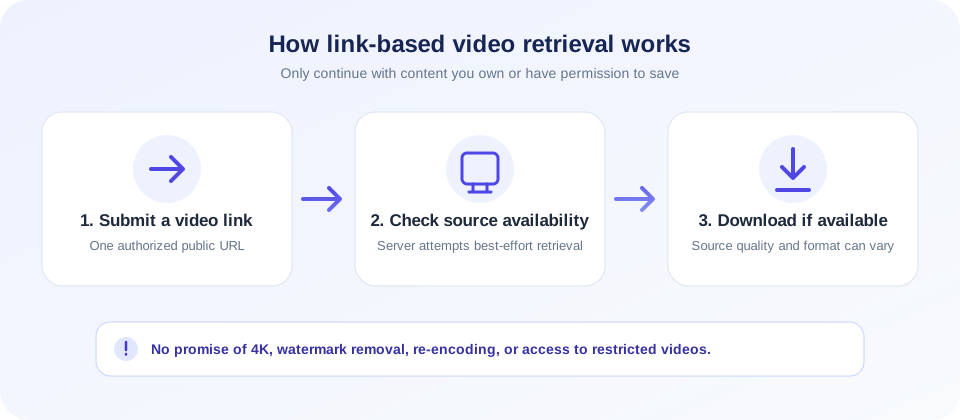
A successful download gives you a copy of a video—not permission to repost, edit, or redistribute it. Save only content you own or are authorized to use.
How To Convert A TikTok Link To MP4
To try a single video link with the current tool:
- Confirm your rights. Make sure you created the video or have permission to save it, and that downloading complies with the platform’s current rules.
- Copy the TikTok video link. Use a public video link you are authorized to process. Do not submit a private URL or one containing account credentials.
- Paste the link into the input. The form expects one TikTok URL at a time.
- Select Get MP4. The page sends the link to the server, which attempts to retrieve an available video source.
- Use Download MP4 if offered. If the source is supported, the page provides a download action. Save the file and check it in a media player.
- Keep the original attribution. Do not remove creator marks or reuse the video beyond your permission.
The tool may not work for videos that are private, deleted, region-restricted, age-restricted, or otherwise inaccessible to its server. It also may stop working when TikTok changes its page structure or media delivery. A failed request does not mean the video is free to obtain through another method; respect access controls and choose an official option.
What This TikTok To MP4 Converter Actually Does
The form submits the video link to a server endpoint. The backend attempts to resolve a media URL using available server-side support or extracts a media link from the publicly fetched page. If it succeeds, it returns a same-site download address. The browser then retrieves that file and saves it locally. This is a link-based workflow; it does not let you upload a video file for conversion.
Although people often call this a TikTok to MP4 converter, the current implementation does not let you choose codecs, frame rates, dimensions, bitrates, or audio settings. It does not contain a user-facing transcode step. The available media format is determined by what the server can retrieve. The interface uses an MP4-style filename, but the output is not a guarantee of a particular encoding profile.
Searches phrased as convert TikTok to MP4, TikTok URL to MP4, convert TikTok video to MP4, or download TikTok video to MP4 generally describe this link-based retrieval task. Wording such as “TikTok convert to MP4,” “converter TikTok to MP4,” “TikTok converter to MP4,” “from TikTok to MP4,” and “TikTok to download MP4” does not mean the file is re-encoded; the tool still depends on an available source and does not promise a particular media format.
| Question | What to expect | What is not guaranteed |
|---|---|---|
| Can I submit a TikTok link? | Yes, one link per request. | Every link will be accessible. |
| Does it deliver a video file? | It attempts a server-side retrieval when a source is available. | Success for private, removed, or restricted videos. |
| Is it always MP4? | The download is presented with an MP4-style filename. | Container, codec, or device compatibility. |
| Can I pick 4K or HD? | No resolution control is shown. | 4K, HD, original quality, or a specific bitrate. |
| Can I remove a watermark? | No watermark option is offered. | A watermark-free copy or removal of creator attribution. |
| Can I convert audio to MP3? | No, this page is for video retrieval. | Audio extraction or MP3 conversion. |
TikTok To MP4 Download: Quality And Compatibility
Searches such as TikTok to MP4 HD or TikTok to MP4 4K express a desire for a sharper file, but the source link and this tool do not expose a quality choice. A platform may provide different playback streams, and the backend’s selected source can vary. The returned result may be lower resolution than the original upload, or it may not be available at all.
MP4 is a container format; it can hold different video and audio codecs. Compatibility depends on both the container and the codecs, not just the .mp4 filename. If a file does not play, check the actual media information using a trusted local player or media utility. Re-encoding can change quality and should only be done when you have the right to process the content.
Do not promise an original-quality copy based on the URL alone. The source may be compressed, and a server-side downloader may choose a format based on availability. For your own uploads, keep the original file or use the platform’s official export/download workflow when possible to preserve the highest-quality source.
TikTok To MP4 No Watermark: Important Limits
Some searches ask for TikTok to MP4 no watermark or a TikTok to MP4 downloader that removes branding. This tool does not include a watermark-removal setting and does not guarantee a watermark-free result. The downloaded media may include the watermark or attribution present in the available source.
Watermarks can identify a creator or source. Removing them may mislead viewers about authorship or violate a creator’s rights or platform rules. Preserve attribution and obtain permission before sharing someone else’s work. If you need an unmarked version of your own video, use your original editing project or an official source file rather than stripping attribution from a published copy.
A search phrase such as “TikTok to.mp4” does not change these limitations. The tool processes an eligible video link; it does not offer a separate watermark-removal service or a guarantee that every downloaded file will be free of branding.
TikTok To MP4 Versus MP4 To TikTok Format
Converting a TikTok post to a downloadable video file is different from preparing an MP4 for upload to TikTok. This page attempts to retrieve media from a TikTok URL. It does not reformat a locally stored video into TikTok’s recommended upload dimensions, bit rate, aspect ratio, or audio settings.
The phrase MP4 to TikTok format usually refers to preparing a video for publishing, while TikTok video to MP4 describes retrieving a file from a published link. These are opposite workflows. For an upload, use a video editor and follow TikTok’s current publishing guidance. For a copy of your own existing content, use an official download/export feature when available.
Similarly, TikTok MP4 to MP3 means extracting audio, which this tool does not do. It only exposes a video download action when the backend can find an available source. Choosing the right task upfront avoids expecting a format conversion that the page does not provide.
Copyright, Permission, And Creator Attribution
Video content can be protected by copyright even when it is publicly visible. Public access does not automatically grant permission to download, copy, repost, remix, or use a clip in advertising. A creator may also have contractual, privacy, or publicity rights in content. The rules can vary by jurisdiction and by the intended use.
Before you download TikTok to MP4, consider these checks:
- Ownership: Did you make the video, or do you hold the necessary rights?
- Permission: If someone else created it, have they clearly authorized the specific use?
- Platform rules: Does saving or reusing the video comply with TikTok’s current terms and available settings?
- Attribution: Will the creator and source remain clearly credited wherever the clip is used?
- Privacy: Does the video include people or information that should not be copied or redistributed?
- Purpose: Is the planned use limited to personal, archival, educational, or another permitted purpose under applicable rules?
If any answer is uncertain, ask the rights holder or use the platform’s official sharing features instead. A download utility cannot grant rights, determine fair use, or make a reuse lawful. Keep proof of permission for business or public distribution.
Private, Deleted, And Restricted Videos
The server must be able to access a video page and a supported media source. A private video, follower-only post, deleted post, restricted content, or location-limited page may not be accessible. This tool does not sign into your TikTok account and should not be used to bypass a creator’s privacy choices or platform access controls.
If you own the content but the link is no longer available, check your local camera roll, editing project, cloud backup, or TikTok’s official account data options. If another person owns it, ask them to provide a copy or enable a platform-supported way to share it.
Short links can also behave differently from canonical video URLs because the server must follow redirects and resolve the video page. When permitted, use the full public video link copied from TikTok. A link that works in your logged-in browser may still be unavailable to a server-side request.
Why A TikTok MP4 Download May Fail
Video platforms change how pages and media are delivered. A source URL can expire, require headers, or be served through a format the backend does not support. Network timeouts, server configuration, or temporary service limits can also cause errors. The tool depends on upstream availability and does not promise that every video will work.
- Invalid link: Re-copy the URL and check that it points to a TikTok video.
- Video unavailable: The post may be private, removed, age-restricted, or region-limited.
- Platform changes: TikTok may update page markup or media delivery, requiring server-side support to change.
- Network delay: The retrieval may time out or the source host may not respond.
- Browser download behavior: Check your Downloads folder and browser settings if a file was returned.
- Unsupported media: The source may not provide a compatible downloadable video stream.
Try again later for temporary errors. Do not use repeated requests to overload a service, and do not try to evade privacy or technical restrictions. For content you own, prefer your local original or official account export when the online fetch does not work.
Privacy And File Handling
When you submit a video URL, the page sends it to SnapZain’s server, which then requests the TikTok page and may contact a media host or configured provider to retrieve the file. This is not an entirely local conversion. Avoid submitting private URLs, account tokens, or links that expose personal information. Review SnapZain’s privacy policy for request processing and retention details.
The browser saves the returned response to your device. A download may use temporary server-side media handling, but this page does not promise permanent storage or a particular retention period. Keep your own original copy and delete files you no longer need, especially on shared devices.
Downloaded videos can contain personal information, faces, voices, or location details. Store and share them responsibly. Do not use this tool to collect or redistribute material in ways that violate consent, privacy, copyright, or platform rules.
Related SnapZain Tools
For other web and content tasks, visit Mobile Friendly Test to preview a site in mobile- and desktop-sized frames, Javascript Obfuscator for basic JavaScript string transformation, XML Sitemap Generator to create a sitemap from URLs, URL Parser to inspect URL components, or TSV to JSON to convert tabular text into JSON. These tools do not download or convert TikTok videos.
TikTok Video Download Checklist
- Use only a video you own or are expressly authorized to save.
- Prefer TikTok’s official download or account export options when available.
- Submit one public TikTok video URL and do not try to bypass privacy settings.
- Expect availability and media quality to vary; there is no 4K or HD selector.
- Do not expect watermark removal or a specific codec from the MP4 filename.
- Keep creator attribution and obtain permission before reposting or editing.
- Check local rules, platform terms, and privacy considerations before use.
Conclusion
This TikTok to MP4 downloader is a best-effort link-based utility for authorized content. It attempts to retrieve an available video source and offer a download, but it does not guarantee that a video is accessible, watermark-free, HD, 4K, or re-encoded to a particular MP4 profile. Use official platform options where possible, respect creators’ rights, and treat a successful download as a file copy—not as permission to reuse the content.


