XML To JSON Converter: Transform XML Data Into Readable JSON
XML and JSON both represent structured information, but they organize it differently. XML uses named elements, attributes, namespaces, and text nodes. JSON uses objects, arrays, and primitive values. When an application expects JSON but your data arrives as XML, an XML to JSON converter can map the document into a JSON structure that is easier to use in many web and API workflows.
Use the online XML to JSON converter above to paste XML or upload an XML file, then select Convert to JSON. The tool parses the document in your browser, presents indented JSON, and lets you copy or download the output. Whether you want to transform XML to JSON for an integration, change XML to JSON for a quick data exchange, or convert from XML to JSON for inspection, the mapping conventions matter. This is a convenient XML to JSON converter online for common structures—not a universal, lossless translation for every XML vocabulary.
Searches such as “convert an XML to JSON” usually mean converting an XML document into JSON. If you need an XML to JSON formatter or an XML to JSON converter online, review how that tool handles root tags, attributes, repeated elements, namespaces, and mixed text before using its output.
That distinction is important. XML and JSON do not have identical data models, so every XML to JSON conversion must choose conventions for attributes, repeated elements, namespaces, mixed text, and root elements. This page explains what this converter does, how to interpret its output, and when you may need a schema-aware or application-specific transformation instead.
How To Convert XML To JSON Online
For a quick conversion, prepare a well-formed XML document and follow these steps:
- Paste XML or upload a file. Enter your document in the input field, or choose Upload XML to read a local .xml file into the browser.
- Check the document structure. XML needs correctly nested tags, quoted attribute values, and one document root. Fix parser errors before continuing.
- Select Convert to JSON. The browser parses the XML and applies the converter's mapping rules to its root element and descendants.
- Review the JSON output. Check arrays, strings, attributes, namespaces, and any mixed content against the structure expected by your application.
- Copy or download the result. Use Copy for the clipboard or Download JSON to save the result as
data.json.
The page does not need an account or a server-side conversion request for this process. Uploading a file fills the input; you still need to run the conversion. If the input is invalid, the browser parser reports an error and the output is hidden so that an old result is not mistaken for the current conversion.
What The XML To JSON Conversion Produces
The converter starts from the document's root element, converts that element's contents, and serializes the result with JSON.stringify using indentation. It does not add another wrapper property named after the root. For example, <person><name>Mina</name></person> becomes a JSON object containing a name property, rather than an object with a person property around it.
Child elements become properties. If a parent has multiple child elements with the same name, their values are collected into a JSON array. When a name appears just once, the converter returns that value directly, not as a one-item array. This means that the same property can have different JSON types across documents if one document has one matching element and another has several.
For an element that has child elements, its attributes are collected inside a property named _attributes. However, text-only and empty elements take a simpler path and return a string, so any attributes on those elements are not included. Leaf-element text and retained attribute values remain strings, even when they look like numbers or boolean literals. Empty elements become empty strings. The table below summarizes these conventions.
| XML pattern | Converter behavior | Example JSON shape |
|---|---|---|
| One child element | Creates a property with its converted value | {"name":"Mina"} |
| Repeated child elements | Creates an array under the shared child name | {"item":["A","B"]} |
| Attributes on an element with child elements | Groups them under _attributes; values are strings | {"_attributes":{"id":"7"}} |
| Attributes on text-only or empty elements | Not included in the output | The element becomes its text string or "" |
| Text-only element | Trims its text and returns a string | {"count":"25"} |
| Empty element | Returns an empty string | {"note":""} |
| Element namespace prefix | Removes the prefix from the child property name | {"entry":"x"} |
| Mixed text and child elements | Converts children, but omits the parent's interleaved text | Text order is not fully preserved |
XML And JSON Have Different Data Models
There is no single universal rule for mapping every XML document to JSON. XML can represent attributes separately from child elements, attach namespace identifiers, include comments and processing instructions, and interleave text with child nodes. JSON has objects and arrays but no built-in equivalent for all of those XML features. A converter must either encode the distinctions using agreed conventions or omit information. For example, a generic XML to JSON formatter may preserve attributes differently from this page, or may keep the root element as a named property.
As a result, two tools can transform the same XML into different—but valid—JSON. One might prefix attributes with an at-sign, another might use an _attributes object, and a third might flatten them into ordinary keys. Repeated elements may always become arrays in one tool, while another returns a single value for just one occurrence. None of these choices is universally correct; the right mapping depends on the receiving API or application.
This tool uses a straightforward shape intended to be readable: nested child elements form objects, repeated names form arrays, and attributes are grouped under _attributes. It is useful for inspecting or adapting common XML, but JSON validity alone does not mean that the result matches an external schema. Always compare the output with the contract expected by the system that will consume it.
A Simple XML To JSON Example
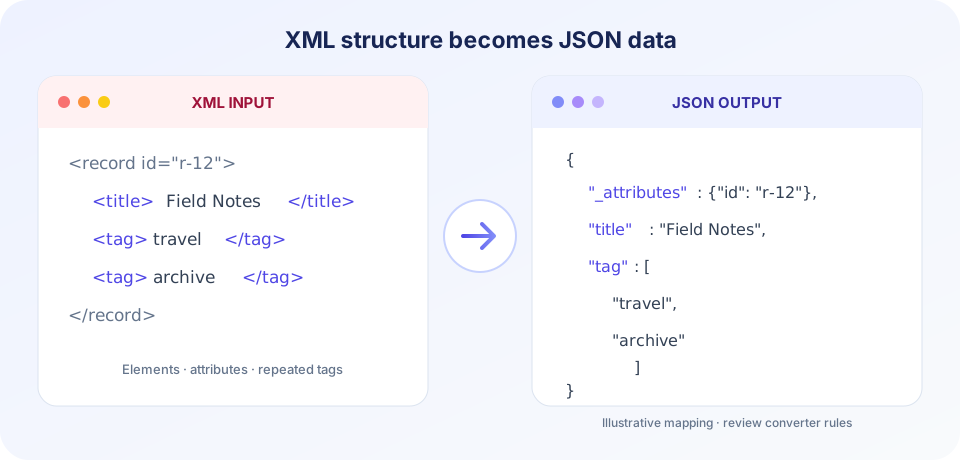
Consider a small document containing an item with an identifier, a title, and two tags:
<record id="r-12">
  <title>Field Notes</title>
  <tag>travel</tag>
  <tag>archive</tag>
</record>
The converter drops the outer record wrapper, stores the id attribute in _attributes, and groups the repeated tag elements into an array. Its result is equivalent to:
{
  "_attributes": {
    "id": "r-12"
  },
  "title": "Field Notes",
  "tag": [
    "travel",
    "archive"
  ]
}
Notice that the values are strings. The tool does not infer that some text should become a number, boolean, date, or null. This predictable string behavior prevents accidental type guesses, but applications that require typed values need an additional validation or transformation step.
Attributes, Namespaces, And Repeated Tags
Attributes are often used for identifiers, codes, and metadata. When an element has child elements, the converter places its attributes together in an _attributes object. A child element and an attribute can have the same name without overwriting each other because they occupy separate places in the output. Attribute values remain strings, and the attribute names are kept as parsed. One limitation is important: attributes on text-only or empty elements are discarded because those nodes return their text value before the attribute handling runs.
Repeated tags require special attention when building an integration. The converter produces an array only when it encounters multiple children with the same property name. A consumer that expects every value to be an array may need a normalization step for documents with a single occurrence. Conversely, code that expects a single object can fail when the source later contains repeated elements.
Namespace handling is intentionally simplified. For child elements, the converter removes the portion before a colon from the tag name. Thus, elements named catalog:item and warehouse:item both become item properties. If both appear under the same parent, their values can be grouped together as repeated names even though the original namespaces might mean different things. Namespace URIs are not preserved as a separate field. Do not rely on this converter for XML where namespace identity is essential.
Text, Empty Elements, And Mixed Content
For an element with no child elements, the converter trims the text and returns it as a string. Leading and trailing whitespace is therefore removed from leaf values. Empty elements produce an empty string. This mapping does not distinguish an empty tag from a tag that contained whitespace only after trimming, nor does it produce JSON null.
Mixed content is a common XML edge case. A document such as <p>Read <em>carefully</em> before continuing.</p> has text both before and after a child element. This implementation returns the converted child element but does not retain the parent text fragments or their order. It therefore cannot reproduce the original paragraph faithfully from its JSON result.
Comments, processing instructions, and other non-element nodes are not emitted as properties. The converter only collects ordinary text nodes in its element traversal; CDATA sections are not handled as ordinary text nodes and may be omitted from the result. For applications depending on exact text-node types or ordering, test representative input carefully. The JSON output should be treated as structured data, not as a reversible copy of the source document.
XML Well-Formedness And Common Errors
XML parsers are strict. An opening tag must have a corresponding closing tag, elements must be properly nested, attribute values must be quoted, and the document must have one root element. A missing closing tag, duplicate top-level elements, an unescaped ampersand, or malformed attribute syntax can cause parsing to fail before conversion begins.
- Check matching names. XML tag names are case-sensitive, so
<Name>and<name>are different. - Close elements in order. Close the most recently opened element first; sibling tags cannot overlap.
- Escape reserved characters. Use entities such as
&for an ampersand in text, unless it begins a valid entity reference. - Quote attribute values. Both single and double quotes are valid delimiters, but the value must be properly closed.
- Keep one document root. Multiple unrelated top-level elements need a common wrapper to form one XML document.
- Check encoding. If a file has an encoding declaration, make sure its actual bytes and declared encoding agree.
The browser's DOMParser reports malformed XML using a parser-error node, which this tool displays as an error instead of producing JSON. Error text can vary by browser. Fix the XML source and run the conversion again rather than copying output from a previous attempt.
Convert XML To JSON In JavaScript
In JavaScript, the browser's DOMParser can read XML text into a document. A transformation then walks the nodes and builds objects and arrays according to the rules your project needs. Finally, JSON.stringify(value, null, 2) creates readable, indented JSON. This online XML to JSON JavaScript tool follows that client-side pattern and uses the built-in browser parser rather than sending the source to a conversion API.
When implementing your own XML to JSON JS conversion, explicitly decide how to handle attributes, namespace URIs, repeated elements, empty values, numbers, comments, and mixed content. Check for parser errors before using documentElement, and avoid assuming that each XML element maps cleanly to a single JSON property. For untrusted documents or server-side processing, choose a maintained parser and review its security behavior, size limits, and entity-expansion safeguards.
For a production data pipeline, a schema-aware mapping is usually more reliable than a generic converter. It can validate required fields, normalize a single item and an array into the same shape, convert known numeric fields deliberately, and preserve identifiers that would otherwise be lost by prefix stripping or root omission.
Convert XML To JSON In Python
Python can parse XML with libraries such as ElementTree, then construct dictionaries and lists and serialize them with the standard json module. The parser does not automatically decide the JSON representation for every document. Your code still needs a mapping policy for XML attributes, repeated children, namespaces, text, and root elements.
For example, one application may represent an attribute as "_attributes": {"id": "r-12"}, while another expects the attribute to be a sibling key. Before writing a Python converter, inspect the target JSON schema and build tests using typical documents and edge cases. Use a parser that fits your trust boundary and keep dependency versions current.
If your task is to convert XML to JSON Python for a one-off data migration, validate the JSON output and compare record counts and key values against the source. For recurring imports, write explicit transformation code and error handling rather than assuming a general-purpose library will preserve every XML feature by default.
Privacy, File Handling, And Large Documents
This tool reads pasted text in the page and uses FileReader to load a selected XML file into the browser's input. The conversion then happens with the browser's XML parser and JavaScript. The shown implementation does not post the XML to a SnapZain conversion endpoint. As with any website, follow your organization’s data-handling rules and avoid processing confidential records on a shared or untrusted device.
Client-side conversion is convenient, but it uses the browser tab's available memory. The browser builds a parsed document and a separate JSON result, so a very large XML file can consume substantially more memory than the file's size on disk. It may slow down the tab or fail on a constrained device. For large exports, use a local program with streaming support or divide the input into manageable, valid documents.
After conversion, use the provided download or copy controls only after reviewing the output. A downloaded file is named data.json; save it in the appropriate project location and apply the file naming and access controls required by your workflow.
When A Generic Converter Is Not Enough
A simple online converter is useful when you want to inspect XML, create a JSON sample, or move straightforward nested data into another tool. Consider a custom transformation if your XML depends on namespace identity, mixed content, document order across text and elements, typed data, schema validation, or round-trip reconstruction.
Use test fixtures that cover at least one element, repeated elements, attributes, empty values, Unicode text, namespace-qualified tags, malformed input, and the largest expected document. Validate that the output matches the exact keys and data types expected by the consuming service. If the output will be used operationally, add automated tests so that changes in source XML do not silently change the JSON structure.
XML to JSON is a mapping, not a perfect format swap. Review the converter's rules before relying on the output for production data.
Related SnapZain Tools
After converting data, you may need to inspect or prepare related formats. Use the URL Parser to examine parts of a URL, TSV to JSON to turn tab-separated rows into JSON objects, or the QR Code Generator to create a QR code from suitable text or a link. For network information, visit What Is My IP. Each tool has a different purpose; none changes the XML-to-JSON mapping described on this page.
XML To JSON Conversion Checklist
- Confirm the source is well-formed XML with one root element.
- Decide whether dropping the root tag name is appropriate for your target structure.
- Check how repeated child names, attributes, and namespace prefixes appear in the output.
- Remember that numbers, booleans, and attribute values remain strings.
- Inspect mixed-content elements because their interleaved parent text is not preserved.
- Validate the generated JSON against the receiving application's expected schema.
- Use a parser or transformation designed for your requirements when fidelity or large-file processing matters.
Conclusion
Use this online XML to JSON converter for a quick, browser-based transformation of common XML structures. Paste or upload a document, convert it, and review the output rather than assuming every XML feature maps identically. When the conventions match your needs, the formatted JSON is ready to copy or download; when the XML carries information that the mapping omits, use an explicit, tested transformation tailored to that data.


