Password Generator: Create A Random Password
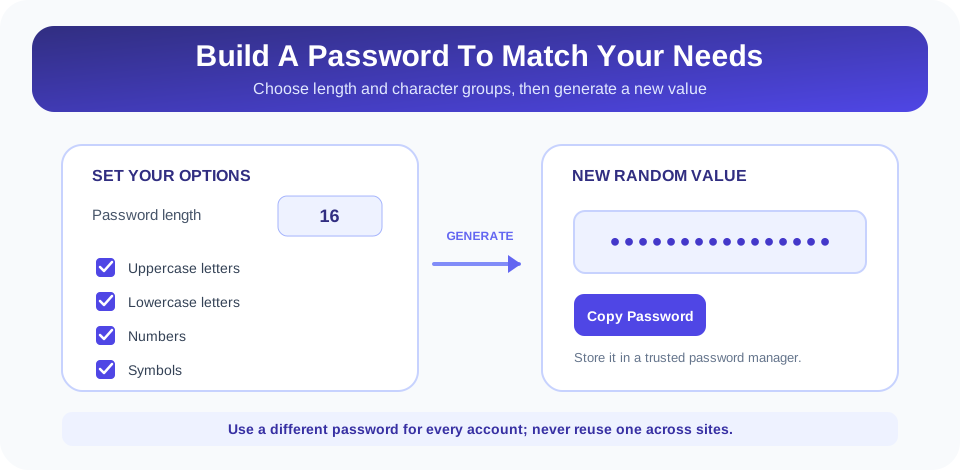
A password generator creates a string that can be used as a new account password. SnapZain’s password generator lets you choose a length from 8 to 128 characters and select uppercase letters, lowercase letters, numbers, and symbols. The default is 16 characters with all four groups enabled. Set your preferences, select Generate Password, and use Copy to move the result to a password manager.
This online password generator creates a character string; it does not create a word-based passphrase or rate the strength of a password you enter. The generator uses the browser’s crypto.getRandomValues when available, but its current code falls back to Math.random in environments without that API. Because of this fallback, do not treat the page as a high-assurance source for critical credentials without verifying the deployed behavior and your security requirements.
How To Use The Password Generator Online
Follow these steps to generate a password that meets a website’s rules:
- Choose a length. Enter a number from 8 to 128 in the Password length field. The default value is 16.
- Select character groups. Keep or change the uppercase, lowercase, number, and symbol options. All are selected initially.
- Generate a new value. Click Generate Password. If you typed a value below 8 or above 128, the tool adjusts it to the nearest allowed boundary.
- Copy and save it safely. Click Copy, then place the password in a trusted password manager rather than an unprotected note.
- Use it for one account. Generate a different password for every website and service.
If you turn off every character group, the tool displays a prompt to choose at least one type. The Copy button also creates a password if no result has been generated yet. The generated value is displayed in the browser; the tool does not include a built-in password history, account vault, or synchronization feature.
Choose A Password Length That Fits The Account
Password length is one important factor in resistance to guessing. A longer password can offer more possible combinations, especially when its characters are selected unpredictably. However, length alone is not a complete security guarantee: reuse, phishing, malware, account recovery weaknesses, and insecure storage can still put an account at risk.
The tool accepts passwords from 8 to 128 characters. Eight is the minimum; for a 12-character password, set the length to 12, and choose 15 or 16 characters when that better fits the account. These settings cover common requests such as an 8-character password generator, a 12-character password generator, a 15 character password generator, and a 16-character password generator without requiring a fixed preset. For services that allow it, longer unique passwords are generally easier to manage when stored in a password manager.
There is no universal length that overrides the website’s requirements. Some services impose a maximum, reject particular symbols, or have legacy limitations. Match the length to what the account accepts, and do not shorten every password to the same minimum just for convenience. If the service supports longer values, consider using that capacity along with uniqueness and multi-factor authentication.
Understand The Character Options And Table
This strong password generator combines the selected character groups into a pool and chooses characters from that pool. The available groups are uppercase A–Z, lowercase a–z, digits 0–9, and a set of common symbols. The table summarizes what each option does and when it may be useful.
| Option | Characters Included | Practical Note |
|---|---|---|
| Uppercase | A–Z | Can expand the choice of characters when accepted by the service. |
| Lowercase | a–z | Provides standard lowercase letters. |
| Numbers | 0–9 | Adds digits to the available character pool. |
| Symbols | Common punctuation and symbols | Some websites restrict which symbols they accept. |
All groups are enabled by default, but the generator does not enforce that at least one character from every selected group appears in the result. It samples characters from the combined pool. If a service requires one or more symbols or digits, inspect the result or generate another one until it meets that rule. Avoid manually editing a password into a predictable pattern just to satisfy a requirement if you can instead create a new random value with suitable options.
Use the length field to make the output fit the account’s policy. The table below summarizes the available range and several common examples; every value shown is supported by the same length control.
| Length Setting | Example Use | Tool Behavior |
|---|---|---|
| 8 characters | Minimum accepted length | The field cannot generate fewer than 8 characters. |
| 12 characters | Medium-length account password | Enter 12 before generating. |
| 15 or 16 characters | Longer unique password | Both lengths are supported; 16 is the default. |
| 17–128 characters | Accounts that allow longer values | Choose a length within the service’s stated limit. |
These examples are length choices, not separate generator modes. A free password generator or a strong password generator should still be judged by how it creates randomness, handles the result, and lets you make a unique credential for each account.
What Makes A Strong Random Password
A strong random password generator should create a value that is difficult to predict, and the result should be unique to one account. A longer password selected unpredictably from a broad character pool is generally harder to guess than a short, reused, or personally meaningful one. Do not rely on substitutions such as replacing “a” with “@” in a familiar word: attackers know common patterns and test them.
SnapZain’s generator uses crypto.getRandomValues when the browser provides it. That browser API is intended for generating random values, but the implementation maps random bytes into the character pool using a remainder operation, which can introduce slight distribution bias. The code also contains a Math.random fallback when the cryptographic API is unavailable. Therefore, while this page can generate convenient random-looking passwords for ordinary use, it should not be described as a guaranteed secure password generator for high-risk accounts or regulated environments.
Important: A password is strongest in practice when it is long, unique, generated unpredictably, stored safely, and protected with multi-factor authentication where available.
If you manage sensitive business, financial, or administrator accounts, follow your organization’s approved credential process. Use a reputable password manager with a suitable built-in generator, verify its security documentation, and enable multi-factor authentication. Do not reuse a generated value or send it to someone in plain text.
Password Generator With Words Or Passphrases
Some people prefer a password generator with words because a phrase made from several random words can be easier to remember and type. This page does not offer that mode: it chooses individual characters from the selected letter, number, and symbol groups. If you need a passphrase, use a trusted tool that explicitly selects words randomly and lets you control the number of words and separators.
A memorable phrase is not automatically secure. Familiar quotations, song lyrics, names, dates, and common word combinations are easier to guess than a genuinely random phrase. A password manager can remove the need to memorize every account password, allowing you to use long unique strings while remembering only the manager’s master credential.
Free Password Generator And Browser Privacy
This is a free password generator page that calculates a value in the browser. In the current form code, the generated string is not submitted to an application endpoint; it remains in the displayed page unless you copy it or interact with other browser features. Still, never assume that any website is appropriate for secrets without checking its privacy practices, page security, and the behavior of the deployed code.
When using a password generator online, generate only the password you need, copy it directly into a trusted password manager, and avoid sharing it in screenshots, chats, or documents. If clipboard access is unavailable, the tool uses a browser copy fallback. Clear or close the page after use if you do not want the generated value left visible on screen. Do not use shared or untrusted devices for sensitive account setup.
Compare Password Generators And Choose Carefully
When choosing the best password generator for your needs, compare the length range, character options, randomness method, privacy behavior, and whether it can store credentials safely. A free password generator can be convenient, but “free” or “online” does not by itself establish that a tool is secure. For important accounts, consider a trusted password manager that can generate and save unique credentials together.
You may also encounter separate tools from LastPass, Norton, Avast, or Google while comparing options. A search for a LastPass password generator or another provider’s generator does not mean this SnapZain page is affiliated with those services. Review each provider’s own documentation and choose the tool that meets your requirements.
For a secure password generator, the implementation matters more than the label. Check whether it uses a cryptographically secure random source, whether it avoids predictable bias, and whether generated values are transmitted or stored. This page uses the browser’s cryptographic random API when available but includes a weaker fallback, so use an approved password manager for high-assurance credentials.
Common Password Generator Problems
- The service rejects the password: It may disallow certain symbols or set a length limit. Adjust the options and length to match its rules.
- The result is shorter than expected: Values below 8 are raised to 8, and values over 128 are reduced to 128 when you generate.
- A selected symbol is missing: The generator samples from a combined pool and does not require one character from each selected group.
- Copy does not work: Browser clipboard permissions may be unavailable. Try the browser’s manual selection and copy controls, and verify the value before saving.
- No password appears: Make sure at least one character group is selected and press Generate Password.
After copying, confirm that the password manager saved the exact value and that the account’s sign-in works before closing your setup session. Never paste a password into a support request or public troubleshooting post.
Related SnapZain Tools
Explore other utilities for different tasks: URL Parser separates a web address into components, TSV to JSON converts tab-separated data, QR Code Generator creates a QR code, and What Is My IP displays IP address information. These tools do not manage passwords; use the password generator only for creating a candidate credential and store it securely in an appropriate manager.
Generate A Password And Protect Each Account
Conclusion
SnapZain’s password generator gives you control over length and character groups, with a default length of 16 and an allowed range of 8 to 128 characters. It creates a random string and offers a Copy button. Use a different password for every service, choose a length accepted by the account, and save the result in a trusted password manager.
Remember the implementation’s limits: it uses the browser cryptographic random API when available, falls back to Math.random otherwise, and does not force every selected character group into each result. It is not a word-based passphrase tool or a password vault. For high-assurance use, verify the deployed generator or use an approved password manager, and add multi-factor authentication wherever possible.


