What Is My IP? Find Your Public IP Address
If you are asking “what is my IP,” you usually want to know the public IP address that an online service can see when your connection reaches it. SnapZain’s What Is My IP page automatically looks up that public-facing address, shows it near the top, and can display additional network details such as approximate city, region, country, time zone, and internet organization. Use the copy control to copy the displayed IP address.
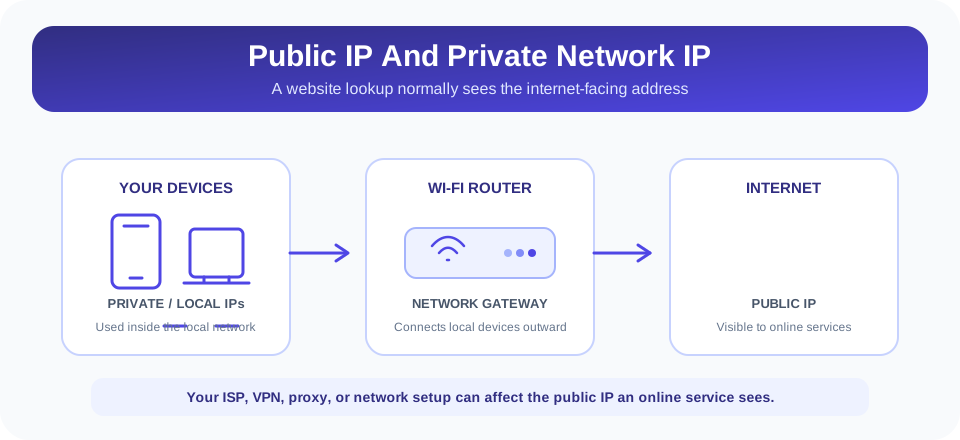
This page answers “what is my public IP” rather than scanning every network address on your computer. It does not reveal the private IP assigned by your Wi-Fi router to a phone or laptop. Public and private addresses serve different purposes, and a VPN, proxy, mobile carrier, or business network can affect which public address the lookup sees.
How To Check Your Current IP Address
The lookup runs when the page loads. Wait for the loading label to be replaced by an IP value. The page also displays an approximate location summary when the lookup service returns those fields. Select Show More Details to expand the information table, or use the copy button beside the public IP to copy that value.
- Open the page. No manual IP entry is needed for the basic “what is my current IP” lookup.
- Wait for the result. The page requests IP information and shows the public-facing address reported for the connection.
- View more details if needed. Expand the details table for fields that the provider returned, such as country, city, ISP or organization, and time zone.
- Copy only what you need. Copying places the IP value on your clipboard; be careful where you paste it.
The available location and network fields depend on the lookup response. Some may be missing or displayed as a dash. If the service is unavailable or the request is blocked, the page may show an error instead of a result. This is a lookup utility, not a network repair tool; it reports the address and details returned by its data source without changing your network configuration.
What Is An IP Address And What Does It Do?
An Internet Protocol (IP) address is a numeric network identifier used to route traffic between devices and services. When your browser requests a website, network equipment uses IP addressing to direct that request and the response. IP addresses may use IPv4 or IPv6, and the version visible to a website depends on your connection and how the destination is reached.
Your internet provider or network administrator assigns or routes the public-facing address used by your connection. At home, a router commonly allows multiple devices to share one public address while using separate private addresses inside the local network. A company, school, mobile carrier, VPN, or proxy may route traffic differently, so the address visible to an online service may not be the same as the one a device displays in its own network settings.
The lookup page reports an address observed by its service, along with geolocation information when available. It does not identify a person, reveal account passwords, or provide a precise street address. An IP address is one piece of technical network information, and it should not be treated as a complete identity profile.
Public IP Versus Private Or Local IP Address
A public IP address is used for communication across the public internet. A private IP address is used within a local network and is not normally routed across the internet as a globally reachable address. The router can assign local addresses to devices such as computers, televisions, printers, and phones while translating their traffic through the network’s internet-facing connection.
| Address Type | Where It Is Used | Can This Page Show It? |
|---|---|---|
| Public IP | Connection visible to websites and internet services | Yes, this is the main address the lookup reports. |
| Private or local IP | Inside a home, office, or other local network | No, this page does not scan device network interfaces. |
| VPN or proxy exit IP | Internet-facing endpoint used by a VPN or proxy route | It may be shown if that is the address reaching the lookup service. |
| Router or carrier-side address | Assigned within an ISP or upstream network | The result depends on the public route observed by the service. |
If you search “what is my private IP,” “what is my local IP address,” or “what is my IP address private,” this page is not the right place to retrieve that value. Check your operating system’s Wi-Fi or network settings, or your router’s device list. A local IP may differ between Wi-Fi and Ethernet, and it can change when the router assigns a new address.
People sometimes ask “what is my IP address WiFi” when they want either the public address used by the Wi-Fi network or the phone’s private Wi-Fi address. This page answers the first question: it reports the public-facing address for the connection. It does not show the individual device’s local Wi-Fi address.
Why IP Location Is An Approximation
IP geolocation databases estimate where an address or network is associated. Providers may use registration records, routing information, and other datasets, and their coverage and update timing differ. A result can point to a nearby city, regional hub, ISP office, mobile gateway, or VPN exit location rather than your actual current position.
For that reason, a search such as “what is my location IP” should be understood as an approximate network-location lookup—not GPS or live device tracking. The page may show a country, city, region, postal code, latitude and longitude, and time zone if the source returns them. Those values are not guaranteed to be precise, and missing details do not necessarily mean the IP lookup failed.
Important: An IP-based location is an estimate about a network connection. Do not use it as a precise home address or proof of someone’s physical location.
If the city seems unfamiliar, your ISP may route traffic through a central gateway or register address blocks to a different service area. A VPN or proxy may place the apparent location elsewhere still. Compare results from trusted sources only as a rough diagnostic, and avoid publishing someone else’s IP address or geolocation information without permission.
Why Your Public IP Can Change
Some internet providers assign dynamic public addresses, which can change after reconnecting, a lease renewal, router restart, or network reconfiguration. Other plans offer a static address that remains assigned for longer. Mobile networks and shared internet services may route many subscribers through carrier gateways, so an address can reflect the provider’s network rather than one individual device.
Using a virtual private network or proxy can change the IP address visible to a destination: the destination may see the VPN or proxy exit address rather than the one assigned directly to your home connection. Split tunneling, browser-specific proxy settings, or a VPN connection failure can affect which route is used. If you are checking whether a VPN is active, compare the result with the expected VPN location and verify the VPN application’s connection status.
Changing the displayed address is not the same as changing a device’s local IP, and a lookup cannot guarantee anonymity. Websites can use other information such as cookies, logged-in accounts, browser characteristics, or network behavior. Do not rely on IP changes alone as a complete privacy or security measure.
What The Details Table Can Show
After selecting Show More Details, the page can list network and geolocation fields returned by the lookup provider. The tool may show country and country code, city, region and region code, postal code, latitude, longitude, time zone, organization or ISP, and the IP address. The exact set depends on available provider data.
Organization and ISP names can describe the network operator or hosting company associated with an address block. They do not necessarily identify the person using the connection. Coordinates are approximate metadata, not a GPS fix. The details table includes copy controls for individual values, but copying does not verify that a value is current or exact.
The result is useful for basic diagnostics—for example, checking whether a VPN exit address appears or identifying the country associated with an internet connection. It is not a complete network scan, DNS diagnostic, port test, or security assessment. Use a dedicated diagnostic tool if you need those functions.
Privacy And How The Lookup Works
To display the address associated with your internet connection, the page sends a lookup request to the site’s IP information endpoint. The server obtains location and network metadata through external IP-geolocation services, with a browser-side provider fallback if the first request fails. IP addresses are network data and can be sensitive; review SnapZain’s current privacy policy for information about provider processing, logging, and retention.
The Copy IP control copies the displayed value to your clipboard. It does not itself post the address to a public page, but if you paste it into a message, form, or third-party website, that destination can receive it. Avoid sharing screenshots that include your IP or location details unless you intend to disclose them.
This page does not need your name, email, or account password to display the basic result. However, that does not mean all web traffic is anonymous or that third-party processing is impossible. For sensitive environments, follow your organization’s policy before using online network lookup services.
IPv4 And IPv6: Why IP Addresses Can Look Different
IPv4 and IPv6 are two versions of the Internet Protocol. An IPv4 address is commonly written as four numbers separated by periods, while an IPv6 address uses groups of hexadecimal characters separated by colons. The formats look different, but both identify network endpoints for routing. Which one a website sees depends on the network, the internet provider, and the route used to reach that site.
A connection may support both protocols, or it may prefer one depending on availability. A dual-stack router can use IPv4 for some destinations and IPv6 for others. As a result, checking the address on one website does not necessarily prove which protocol every other service sees. This page displays the address value returned by its lookup path; it is not a full interface inventory and does not test every destination or network route.
IPv6 can also appear in privacy-related discussions because devices may have more than one address or use temporary addresses for outgoing connections. Network operating systems and routers manage those settings, and the details depend on configuration. If you need to troubleshoot a protocol-specific issue, check your device’s network settings and consult your internet provider or administrator rather than relying only on a general IP lookup.
Common Questions About Your IP Address
People searching for an IP address usually want to know which address a website or online service can see. The answer may differ from the value shown in the settings of a phone or computer because those settings can display a private local address instead. For a public-facing check, this page reports the IP associated with the connection reaching the lookup service.
If you are trying to find a computer IP address for local file sharing, printer setup, or router configuration, look in the device’s network settings instead. If you are trying to understand why a website reports a different location, consider your VPN, proxy, mobile carrier, or ISP routing. These are distinct questions, and identifying which address you need makes it easier to use the correct tool.
Search wording varies, but accurate answers depend on the same context: public versus private address, the active network path, and whether location data is approximate. The lookup can help with the public connection address; it cannot confirm a device’s private network configuration or establish a person’s physical identity.
Related SnapZain Tools
Explore other utilities for different tasks: Hours Calculator calculates time intervals, Password Generator creates candidate passwords, MD5 Generator calculates a digest from text, and Text to Binary converts characters to binary values. These tools are separate from IP lookup and do not change your network address.
Check The Public IP Your Connection Uses
Conclusion
The What Is My IP page gives a quick view of the public IP address reported for the connection reaching its lookup service. It can also show approximate location and network-provider details when those values are available. Use the result for a basic connection check, but remember that IP geolocation is not exact and a VPN, proxy, mobile carrier, or shared network may affect what appears.
If you need your private Wi-Fi or computer address, find it in your device or router settings. If you need exact location, use an authorized location service rather than inferring it from an IP. And if the information is sensitive, consider the endpoint and external lookup providers involved before sharing it.


