PDF To PowerPoint: Turn Document Pages Into A Slide Deck
The SnapZain pdf to powerpoint tool is designed to convert an existing PDF file into a PowerPoint presentation in PPTX format. The upload form accepts one PDF at a time and limits the file to 10 MB. Select the PDF, choose Convert to PowerPoint, and use the download link if the conversion finishes successfully.
There is an important service requirement: the current server converter calls an iLovePDF-compatible PDF-to-PPTX API and requires the site administrator to configure its API key and endpoint. If that configuration is unavailable or the external service rejects the request, conversion will fail rather than produce a file. Do not assume a successful result solely because the upload was accepted.
Converting a PDF into slides is not the same as recovering the original PowerPoint file. A PDF preserves pages, not the original authoring structure. Text boxes, charts, grouped shapes, and editable objects may be reconstructed differently, and some pages may appear as flattened imagery. Treat the PPTX as a starting point that needs review and possibly manual editing.
How To Convert PDF To PowerPoint With This Tool
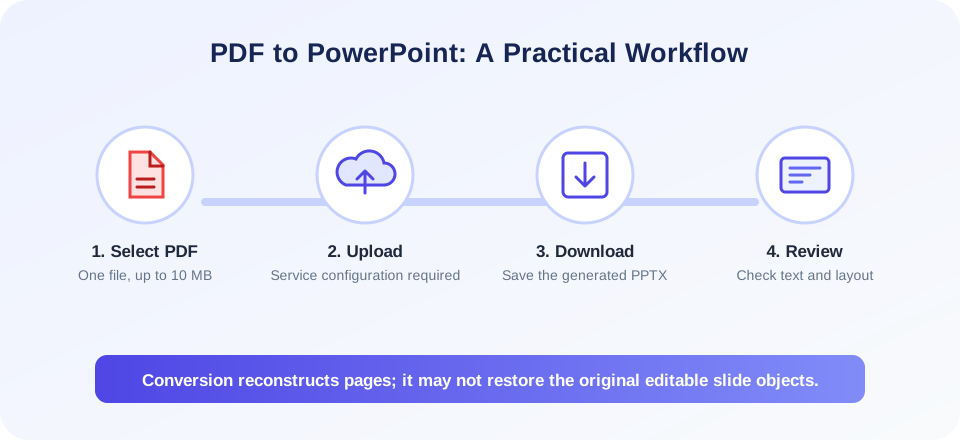
To convert pdf to powerpoint through the online form, use this workflow:
- Check the source PDF. Confirm it opens correctly and contains the pages you intend to convert.
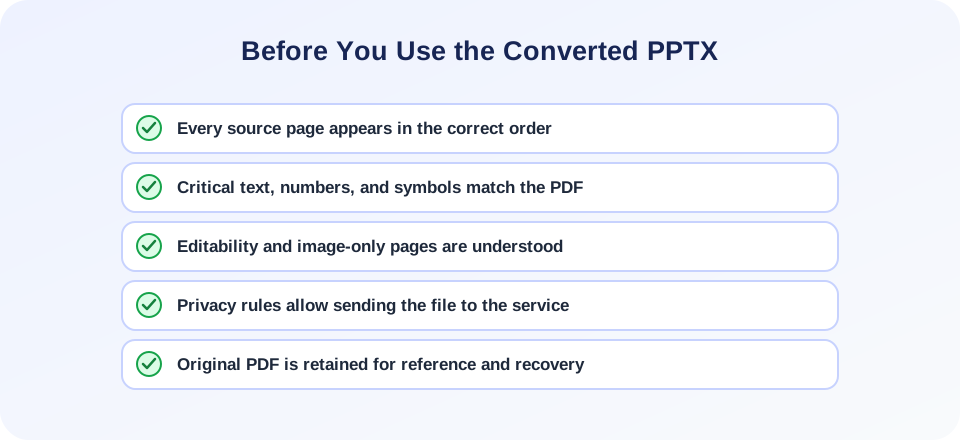
- Keep a source copy. Conversion creates a separate PPTX; retain the original PDF in case you need to compare, retry, or use another method.
- Select one PDF file. Use the upload panel or drag the file into the designated area. The visible form accepts PDFs up to 10 MB.
- Start conversion. Select Convert to PowerPoint. The file is sent to SnapZain’s conversion endpoint, which relies on the configured third-party API.
- Download if successful. Use the result link shown on the page to save the generated PPTX.
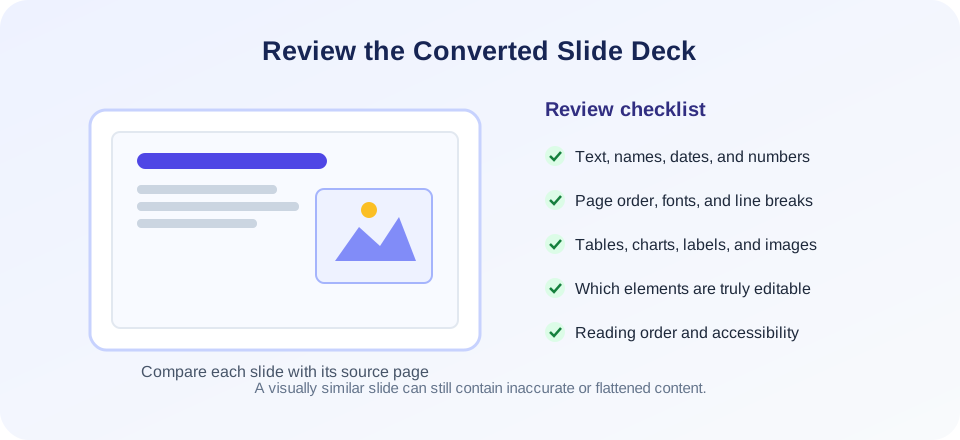
- Review and repair. Open the deck in a presentation application and check each slide’s text, order, images, spacing, and editability.
If the converter reports an error, verify the file is under 10 MB and is a valid, readable PDF. The server must also have the required API credentials and a reachable service endpoint. If conversion continues to fail, try an approved desktop PDF editor with export-to-PowerPoint support or contact the site administrator about service configuration.
What A PDF To PowerPoint Converter Can And Cannot Recover
A pdf to powerpoint converter attempts to map page content into one or more presentation slides. Depending on the PDF and conversion engine, text may become editable text, images may be placed as pictures, and page elements may be grouped or flattened. That behavior is determined by the source file and conversion service; the SnapZain form does not expose controls for choosing how individual objects are reconstructed.
PDFs often lack information about how a page was originally authored. A single page might contain paragraphs, vector drawings, a scanned image, or a mixture of these. Even when text can be selected in the PDF, it does not necessarily retain paragraph, column, or table structure in a form that matches PowerPoint objects. A conversion tool has to infer a slide layout from a fixed page.
For best results, compare the new deck with the source PDF and expect to adjust fonts, alignment, colors, text boxes, and chart details. If a page is converted as a single image, it may look faithful but be difficult to edit. If content is reconstructed into individual objects, it may be more editable but not match the original exactly. Choose based on the task you need to complete.
| PDF content | Possible PPTX result | What to inspect |
|---|---|---|
| Selectable text | May become text boxes or may be grouped with other content. | Reading order, line breaks, fonts, and whether text is editable. |
| Scanned page | May remain a page image unless OCR is applied by the service. | Legibility, text recognition, and whether manual transcription is needed. |
| Tables and charts | May be reconstructed as graphics or separated elements. | Values, labels, alignment, and whether data remains editable. |
| Vector drawings | May be converted to images or groups of shapes. | Line quality, grouping, color, and edit behavior. |
| Fonts and special symbols | May be substituted if the original font is unavailable. | Text wrapping, missing glyphs, and changes in emphasis. |
Convert PDF File To PowerPoint: Prepare The Source
When you convert pdf file to powerpoint, the PDF’s clarity and structure influence the result. A digitally generated PDF with selectable text and consistent page dimensions is often easier to process than a low-resolution scan, but no outcome is guaranteed. A scan may need optical character recognition before the content can be edited meaningfully.
Check whether the PDF pages are oriented correctly and whether they contain the material you need. Remove unrelated pages using an appropriate authorized workflow before converting, especially if the service or file size limit requires a smaller document. Do not upload content you are not permitted to share with an external service.
If you only need to present a few visual pages, inserting each PDF page as an image in a new slide deck may be enough. This preserves appearance but does not make the image’s text or objects individually editable. If you need editable text or elements, conversion may help, but plan for manual cleanup and verify the output closely.
PDF To PowerPoint Free: Service Availability And Privacy
Search phrases such as convert pdf to powerpoint free usually express a desire for an online conversion without a purchase. The current SnapZain interface does not show a paid plan, but the actual converter requires an iLovePDF API key configured by the site and sends the selected file to that external conversion service. Availability depends on server configuration, provider terms, and successful processing; it should not be represented as an unconditional guarantee.
Consider the document before uploading. A PDF may contain personal details, client records, internal financial information, legal material, or unpublished work. Only use this service when your privacy policy, contract, and organization rules allow the upload and external processing. For restricted or confidential files, prefer an approved desktop application or internal conversion service.
The uploader’s 10 MB limit is a front-end restriction, not a statement about the provider’s general capabilities. If your PDF exceeds the limit, do not split or remove pages in a way that loses essential context. Use a trusted local tool or prepare an authorized copy suited to your task.
Editability, Accuracy, And Accessibility After Conversion
A generated PowerPoint is not automatically an editable duplicate of the original source. If the PDF came from a presentation, it may be possible to extract text and layout, but original slide masters, animation timelines, notes, object relationships, and chart data may no longer exist in the PDF. If the PDF was created from a scan, the file may contain only page images.
Check critical numbers, labels, dates, and citations manually. A layout that looks plausible can still contain an OCR error or a misplaced character. For financial, medical, legal, engineering, or safety information, use a qualified reviewer and compare the deck against the source document before relying on it.
Also check accessibility in the resulting presentation: reading order, alternate text, text contrast, and whether content is selectable. A conversion does not automatically make a document accessible. If you distribute a deck widely or under a formal accessibility requirement, validate it with appropriate tools and expert review.
PDF To PowerPoint Versus PowerPoint To PDF
PDF to PowerPoint and PowerPoint to PDF are opposite conversion directions. This page starts with a PDF and requests a PPTX file. The reverse tool starts from a PPT or PPTX and creates static PDF pages. A powerpoint to pdf converter is the right choice when the source is a presentation and the desired output is a document; phrases such as convert powerpoint to pdf describe that reverse workflow. A powerpoint presentation convert to pdf task should therefore start with the original presentation, not this PDF upload form. For someone looking for convert pdf to powerpoint online or a pdf to powerpoint converter free, the actual conversion still depends on the server’s configured service. Searches for powerpoint to pdf free or converter powerpoint to pdf free describe the reverse direction, not the PDF upload on this page. Whether you are saving a deck to PDF, moving from PowerPoint to PDF, or looking for a PowerPoint to PDF converter free option, check the service’s limits and privacy terms. Choose the direction based on the file you have and the format you need; changing one format to another does not guarantee that the original authoring features can be recovered.
If your goal is to edit an existing slide deck, find the original PPTX whenever possible. Converting a PDF may provide a useful foundation, but it can require rebuilding layouts, restoring data, and correcting text. If your goal is only to distribute slides consistently, converting the original presentation to PDF may be a simpler route than first converting a PDF back to PowerPoint.
Use clear filenames for source and output files and retain the PDF used for conversion. That lets you compare versions and makes it easier to identify which content needs correction.
“A converted deck is a working copy to review, not proof that the original slide structure has been recovered.”
Choose The Right Conversion Method For Your Goal
Before you convert, decide whether you need a deck that looks like the PDF, a deck you can edit, or a presentation assembled from selected pages. These goals can call for different workflows. A page-by-page image deck can preserve the visual source reliably, while reconstructed text and shapes may provide more editing flexibility at the cost of visual changes. A conversion service may not expose a choice between these methods, so inspect its output before relying on it.
| Your goal | Practical starting point | Trade-off |
|---|---|---|
| Show the PDF pages in a presentation without changing their design | Insert page images into a presentation, or convert and inspect the resulting PPTX. | Page images preserve appearance but their words and shapes are not independently editable. |
| Edit text and rebuild the content | Try a PDF-to-PPTX converter, then correct each slide manually. | Text and layout reconstruction may be incomplete; review is essential. |
| Reuse only selected pages | Prepare an authorized PDF containing only the required pages, then convert it. | Check page numbering and context after removing pages. |
| Recover the original authoring objects and theme | Locate the original PPTX or ask its creator for the source file. | A PDF usually does not preserve slide masters, animations, notes, or original chart data. |
A PDF-to-PowerPoint workflow can be appropriate for a quick presentation draft or a one-time visual review. For a high-stakes deck, plan time for a content owner to proofread it. If you need a continuing editable source, rebuilding from the original content or recovering the source deck may be more reliable than repeatedly converting between fixed-page and slide formats.
Related Document Conversion Tools
If the PDF conversion is only one step in a larger workflow, consider these related options. Convert an editable document with Word to PDF. Create a PDF from PNG images using PNG to PDF. Render pages from a PDF as image files with PDF to PNG. To extract table-like data into a spreadsheet, see PDF to Excel.
These tools do not all create editable slides. Word to PDF and PNG to PDF produce PDF documents from other sources; PDF to PNG creates image outputs; PDF to Excel attempts a spreadsheet conversion. Choose the format that meets your purpose and verify that the converted content is complete and accurate.
| Task | Related tool | Check the result |
|---|---|---|
| Convert a word-processing file to PDF | Word to PDF | Page breaks, fonts, tables, and text rendering. |
| Create a PDF from PNG images | PNG to PDF | Image order, page size, and scaling. |
| Export PDF pages to PNG images | PDF to PNG | Image dimensions, resolution, and page sequence. |
| Extract PDF tables or content to a spreadsheet | PDF to Excel | Rows, columns, numbers, and reading order. |
Common PDF To PPTX Problems
If upload is rejected, check the file extension, confirm the PDF is readable, and make sure it is below 10 MB. A file can have a .pdf name but contain invalid or damaged data. Open it in a trusted reader and try a fresh authorized copy if necessary.
If processing returns an API or service error, the issue may be server configuration or provider availability. The current converter specifically requires the configured API key. Repeatedly uploading the same private file is not a good troubleshooting step; contact the site administrator or choose a local alternative for sensitive documents.
If the file downloads but the slides look wrong, inspect page dimensions, font support, scan quality, and layout complexity. Improve source quality where possible, then repair the generated deck manually. Some source PDFs cannot be converted into fully editable PowerPoint objects without substantial reconstruction.
PDF To PowerPoint Summary
The SnapZain tool accepts a single PDF file up to 10 MB and sends it to a server-side conversion flow that requires a configured iLovePDF-compatible API. When available, the service returns a PPTX download. Conversion can reconstruct page content into slides, but it does not guarantee that the PDF’s original objects, design structure, or editability will be restored. If the source file is a PowerPoint and you need a PDF, use the reverse-direction workflow instead of uploading the presentation here.
Conclusion
Keep your source PDF, upload only files your policies permit, and inspect the generated presentation for visual and factual accuracy. Use the result as a draft when editing is needed. If the online service is unavailable or the document is sensitive, choose a trusted local PDF application and follow its current export instructions.


