Text To ASCII: Turn Characters Into Decimal Codes
Text is made from characters; computers represent those characters with numeric values. The SnapZain Text to ASCII converter takes the text you enter and displays a sequence of decimal character codes, with one number for each character. For standard ASCII characters, the result corresponds to their familiar ASCII decimal values. For example, uppercase A becomes 65, and lowercase a becomes 97.
Enter text in the input field and choose Convert. The result appears in the output box labeled ASCII (decimal). You can copy it, clear both fields, or use Ctrl+Enter to run the conversion. The input is limited to 500 characters. This page converts characters to decimal values; it does not draw text as ASCII art or output hexadecimal or binary codes.
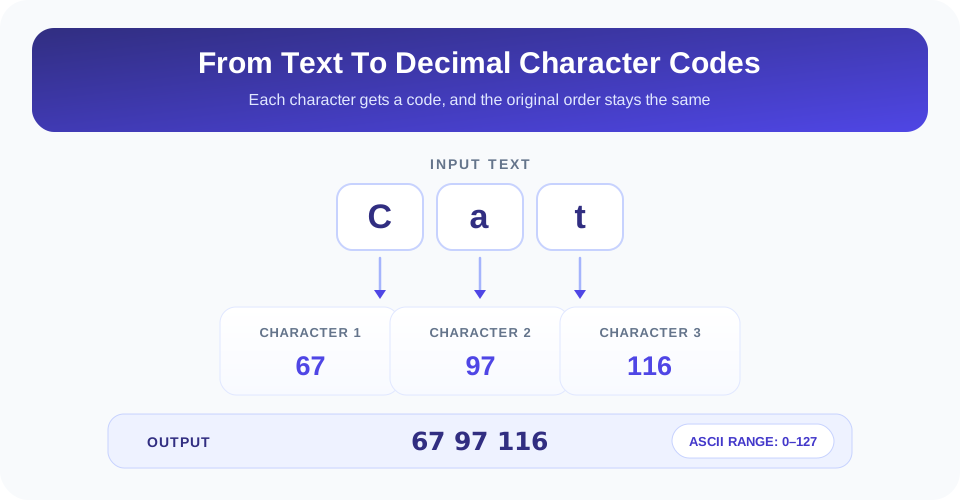
What The Text To ASCII Converter Returns
The tool reads the text as a series of characters and outputs their JavaScript character-code values separated by spaces. If you enter Cat, the output is 67 97 116: 67 represents uppercase C, 97 represents lowercase a, and 116 represents lowercase t. Character order is preserved, so the code sequence can be matched back to the original string.
ASCII is a specific character encoding with 128 values, numbered 0 through 127. It includes English letters, digits, common punctuation, space, and control codes. The converter’s field says “ASCII (decimal),” which is accurate for characters in that range. Some characters people commonly type today—such as accented letters, curly quotes, or emoji—are outside standard ASCII. This tool still returns a JavaScript code value for many such characters, but that value should not be described as a standard ASCII code.
Important: ASCII codes cover only values 0–127. A number above 127 is not a standard ASCII character, even if this converter displays a decimal value for it.
This distinction matters when sending data to older systems or comparing results with an ASCII-only specification. If your text contains only basic English letters, digits, spaces, and common punctuation, the displayed decimal values are in the standard ASCII range. For broader Unicode text, use a Unicode-aware method if you need complete and interoperable code points.
How To Convert Text To ASCII Online
Use the calculator when you need a readable list of decimal character values:
- Enter the source text. Type or paste up to 500 characters into the Text box.
- Check the content. Confirm capitalization, spaces, punctuation, and line breaks; each character affects the output.
- Run the conversion. Select Convert, or press Ctrl+Enter while the input field is active.
- Read the decimal output. The result field shows codes separated by spaces, following the character order.
- Copy or reset. Choose Copy to clipboard to reuse the codes, or Clear to begin again.
When you edit the input after conversion, the old result is cleared so it is not mistaken for the new text’s codes. If the input contains only whitespace, the converter treats it as empty and returns no code sequence. A space within other text, however, is a character and has the standard ASCII decimal value 32.
Common ASCII Character Codes
The following small chart helps you understand and verify typical output. ASCII codes are case-sensitive: uppercase and lowercase letters use different numbers. A blank space between words is also represented by a code, even though it may be easy to overlook in the original text.
| Character | Decimal ASCII Code | Example Input |
|---|---|---|
| Space | 32 | A B includes a space code between the letters. |
| 0 | 48 | Digit zero, not the letter O. |
| 9 | 57 | Digit nine. |
| A | 65 | Uppercase A. |
| Z | 90 | Uppercase Z. |
| a | 97 | Lowercase a. |
| z | 122 | Lowercase z. |
| ! | 33 | Exclamation mark. |
For instance, A B contains three characters: uppercase A, a space, and uppercase B. Its decimal output is 65 32 66. If the 32 is missing, check whether the original input actually included a space before conversion.
Text To ASCII Art Is A Different Kind Of Tool
Search phrases such as “text to ASCII art” and “text to ASCII art generator” describe a different task from character-code conversion. ASCII art uses ordinary text symbols—such as slashes, brackets, underscores, and letters—to create a visual design, banner, or picture. The SnapZain Text to ASCII page does not generate that kind of artwork. It produces decimal values for characters instead.
For a text-to-ASCII-art generator, the output would usually be a multi-line design made from symbols. For this text-to-ASCII converter, the output is a numeric sequence such as 72 105 for the letters in Hi. The distinction is useful when choosing a tool: one transforms the visual appearance of words, while the other represents each character as a number.
Likewise, a “text to ASCII code converter” typically means decimal character codes, which is what this page provides for ASCII-range text. Searches for “text to ASCII hex” or “convert text to ASCII binary” refer to alternate numeric bases. The same character can be represented in decimal, hexadecimal, or binary, but this calculator’s output field is explicitly decimal.
ASCII, Unicode, Hexadecimal, And Binary
ASCII is an older, limited character set. Unicode supports a much broader range of characters used in languages and symbol systems around the world. They are related concepts but not interchangeable labels: an ASCII character is also represented within Unicode using the same basic value, while many Unicode characters have no ASCII equivalent.
This page’s implementation uses JavaScript’s charCodeAt on each iterated character. For typical ASCII input, this gives the expected decimal code. For non-ASCII characters, it can display a value greater than 127; for supplementary Unicode symbols such as many emoji, it reports only the first UTF-16 code unit from the pair rather than the complete Unicode code point. Therefore, the tool should not be used to encode arbitrary Unicode text as if it were a complete Unicode converter.
Hexadecimal and binary are simply different ways to write numeric values. For example, decimal 65 can be written as hexadecimal 41 or binary 01000001 in an 8-bit representation. This converter does not produce those formats. Use a purpose-built text-to-hex or text-to-binary tool when that is the desired output, and check whether it handles Unicode or only a limited character range.
Important: This page returns decimal character values, not ASCII art, hex, or binary. For non-ASCII symbols, verify the encoding method you need before treating the result as a portable character code.
Spaces, Punctuation, And Line Breaks
Every character in the input can affect the code list. A space is not a visual gap to be ignored; it is represented by decimal 32. Punctuation also has its own values. Capitalization matters because A and a are different characters with different codes. Numbers typed as text are converted digit by digit: the text 204 becomes the code for character 2, then character 0, then character 4—not the single decimal number 204.
Line breaks are characters too. A line-feed is commonly represented by code 10. Depending on the platform or copied text, a line ending may consist of a carriage return and line-feed pair, creating two values. If a result has an extra code between lines, the line-ending format may explain it. Tabs and other control characters can also be included when they are present in the text input.
To check an unexpected result, count the source characters—including spaces and punctuation—and compare that count with the number of output values. This is most useful for short plain-text input. For long text, use a suitable encoding-aware tool if exact byte representation, normalization, or multilingual text handling matters.
How To Read And Reuse Decimal Codes
Each output number maps to one input character in order. To reconstruct basic ASCII text, convert each decimal number back to its character using an ASCII table or an ASCII-to-text converter. Verify that the values are within 0–127 if the target system expects strict ASCII. Values outside that range require a different encoding interpretation.
Because the codes are separated by spaces, preserve those separators when copying the sequence. Do not remove a code just because it represents a blank space in the source sentence. If you want to compare two strings, check the decimal sequences from left to right; a changed number often points to a difference in case, punctuation, or whitespace.
This format can help with basic encoding lessons, debugging simple text protocols, and checking the numeric representation of ASCII characters. It is not encryption: the codes are a reversible representation of characters, not a method for protecting private information. Avoid treating an ASCII sequence as secret merely because it is numeric.
Related Text And Number Converters
Choose a related converter when the required output format changes. Octal to Binary converts base-8 values to binary. Text to Binary represents text characters in binary form. Text to HEX returns hexadecimal character values, while Octal to Decimal converts octal numbers into base 10. These tools perform distinct conversions; selecting one should depend on the source and output format you actually need.
Conclusion: Convert Text Into Decimal Character Codes
The SnapZain Text to ASCII converter produces a space-separated decimal code for each character, with a 500-character input limit and simple copy, clear, and keyboard controls. For standard ASCII text, values fall within 0–127; ASCII art, hex, binary, and full Unicode conversion are different tasks. Check spaces, capitalization, punctuation, and non-ASCII characters before reusing the result, especially when another program expects a specific character encoding.


